Stupid Question Time!!!

Anonymous_354

Duct tape lovers UNITE!
Local time
Today, 12:31
Joined
Jun 6, 2007
Messages
74
Ok, I need to get a number off of a form to a form. How do I do that?

I'm sure it's a really simple fix, yet it's still beyond me. Please explain in simple terms, as I am new to this stuff.

ex. On your main form, you have a project number. I need the details form to have all the items from that project number.
 
How are you using the forms? Are you going to open the details form from the main form, or by some other means?
 
It goes Main form > Details form > Details query. You type in the number, click go, you get to the details screen . I need to know how to filter the 34814 results down to just the ones of that project number (about 214). After that, I have a query that will take the entry you selected and use a query to filter it down to the child parts.
 
If you have the project number available on the main form, you can just open the details form by using:

DoCmd.OpenForm "YourDetailsFormNameHere", acPreview, , "[ProjectNumber]=" & Me!YourProjectNumber

Remember to replace the words ProjectNumber with the actual field name.
 
In the click event for a command button is the first one I would normally use. But, you can do it on any event essentially. You just need to figure out how you want the user to open that details form.
 
It's complaining it can't find the macro DoCmd. I'm guessing I put it in wrong. And if you put it through the expresion builder, it says the syntax is wrong.
 
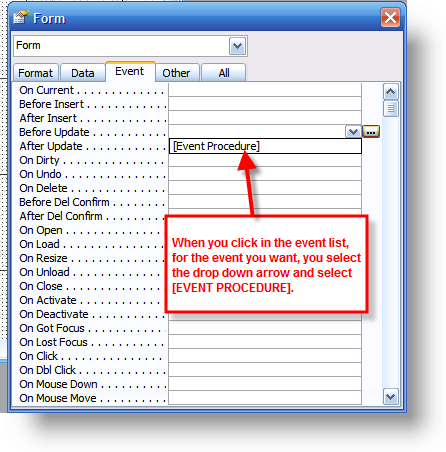
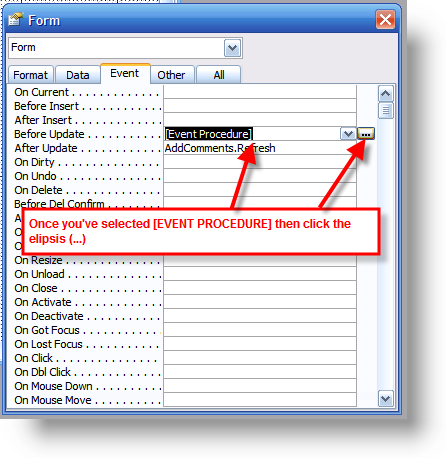
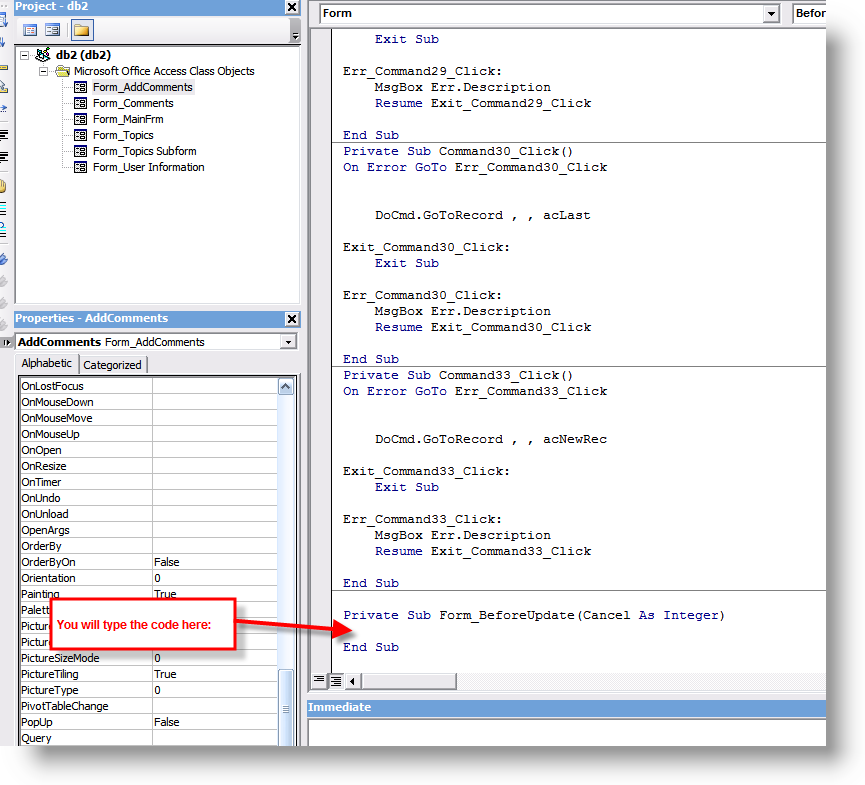
It doen't go in the expression builder. Here are some screenshots I created for someone else, which should give you the gist.

Ignore the part that shows the code going in the AfterUpdate event. You want the control's click event

ev02.png


ev03.png


ev04.png
 
"Error accessing file. Network connection may have been lost." Should I rebuild the form?
 
Didn't you experience this already, before? Did you create a new database and import in objects from the other corrupt database? If so, you may have unwittingly imported a corrupt form. And the answer is that you will need to get rid of the culprit form (could be more than one, but usually is just one).
 
Correct. The objects did not completely copy. After you restart the program, forms, reports, and macros disappear. I cannot edit the form that I made (from scratch) as it does not save. It gets to the point where I can click on the "close" button and prompts me to save (click yes and it does not close and does not save, click no and it closes with out saving). No error messages, no nothing. I'm thinking my install is bad, but it's a relatively new install (2 weeks) so I doubt it.
 
You can try uninstalling and reinstalling (and I would as soon as you can) so that you can either know that is it or it isn't. But, I'm guessing that your database is corrupt (based on my experience with your file on my machine and getting the same behaviour). You should be able to save your tables and queries, but you may (or may not) be able to save your forms and reports.

The thing to do is to create a blank database, import the tables and queries, then import that ONE form and see if it still does it. If so, you know that one form is bad. If it works, keep doing one at a time and trying things until it breaks again. At that point you have found your culprit. I've had to do that before. That's a good reason to keep backup copies fairly frequently so you don't lose a lot of work if something dies.
 
Thing is, the backups are corrupt too... I think. Same symptoms. I'll try your suggestion, but it might take a while.

10 Minutes later:

Well, I think there's more than one thing that's the problem. I imported the tables and queries, then I imported the table I was having trouble with. I put a button on there and tried saving. I closed it then Access crashed. And the form's gone. After I restart.

5 Minutes later:

What does it mean by "Name conflicts with existing module, project, or object library" when it has a name that looks like asdfuawierahsdif (random letters)?
 
Do you have a form that you are using code with it that you have typed in your own event instead of letting Access create it? In other words, you manually typed in something like

Private Sub Command12_Click()

End Sub

instead of SELECTING the click event for that button (or other control).
 
Well, that's pretty clear. After I got everything imported, I tried that table again. Wiped out the same stuff. Time to rebuild the form.
 
Do you have a form that you are using code with it that you have typed in your own event instead of letting Access create it? In other words, you manually typed in something like

Private Sub Command12_Click()

End Sub

I don't know. Probably. I can't see the code because "Error accessing file. Network connection may be disconnected." Why, oh why can't they build idiot-proof programs that won't die... ever!
 
Finally

Ok, it works, without too much code or trouble. I had to import stuff that wouldn't go away and remake all the ones that would leave. Now for the other half. I need to take the first two digits of the ITEM_NO and only display those in a table nearly exact to the one I just built, but only displaying items with the matching first two numbers in ITEM_NO with all project numbers. I had a query to do that, but I can't figure out how to use it. Any thoughts?
 

Users who are viewing this thread

Back
Top Bottom