

IanMilly
Registered User.
- Local time
- Today, 21:51
- Joined
- Jun 1, 2004
- Messages
- 46
hi
i have a db with several forms and subforms. I have creatd this db from an old db i was making (development version if you like)
I have a form with a subform inserted. On the subform are several check boxes. When Checkbox 1 is true i want Checkbox 2 to be false (and vice versa), I have built an event as such
Hd is Checkbox1, Ld is checkbox2 (this code is repeated twice , but switched, for the other option).
The code works fine for my normal form, but in a subform an error occurs. Is there something about the code when implimenting a subform that causes the error?
I also have a image swap item which shows a picture according to a combobox option (A,B or unknown) and the two checkboxes (LD and HD)(once the button "Swap_Image" is pressed). The image name is "swap". This code works fine in a form, but when it is used as a subform problems occur.
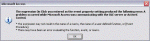
As I said the code works fine in my old db in a normal form, but when used in the new db in a subform an error occurs. Anyone have a solution to this problem? The error that appears is attached
Help is very much appreciated
i have a db with several forms and subforms. I have creatd this db from an old db i was making (development version if you like)
I have a form with a subform inserted. On the subform are several check boxes. When Checkbox 1 is true i want Checkbox 2 to be false (and vice versa), I have built an event as such
Code:
Private Sub HD_Click()
    If HD.Value = True Then
        LD.Value = False
    End If
End Sub
Hd is Checkbox1, Ld is checkbox2 (this code is repeated twice , but switched, for the other option).
The code works fine for my normal form, but in a subform an error occurs. Is there something about the code when implimenting a subform that causes the error?
I also have a image swap item which shows a picture according to a combobox option (A,B or unknown) and the two checkboxes (LD and HD)(once the button "Swap_Image" is pressed). The image name is "swap". This code works fine in a form, but when it is used as a subform problems occur.
Code:
Private Sub Swap_Image_Click()
If ((Config.Value = "A") And (LD = True)) Then
     Swap.Picture = "C:\Documents and Settings\user\My Documents\My Pictures\Configs\LD_ConfigA_Internal_Power.gif"
Else
    If ((Config.Value = "A") And (HD = True)) Then
         Swap.Picture = "C:\Documents and Settings\user\My Documents\My Pictures\Configs\HD_ConfigA_Internal_power.gif"
    Else
        If ((Config.Value = "B") And (LD = True)) Then
             Swap.Picture = "C:\Documents and Settings\user\My Documents\My Pictures\Configs\LD_ConfigB_External_power.gif"
        Else
            If ((Config.Value = "B") And (HD = True)) Then
                 Swap.Picture = "C:\Documents and Settings\user\My Documents\My Pictures\Configs\HD_ConfigB_External_power.gif"
            Else
               If Config.Value = "UNSELECTED" Then
                  Swap.Picture = "C:\Documents and Settings\user\My Documents\My Pictures\configs\jumpersettings.gif"
               End If
            End If
        End If
    End If
End If
End Sub
As I said the code works fine in my old db in a normal form, but when used in the new db in a subform an error occurs. Anyone have a solution to this problem?
The error that appears is attachedHelp is very much appreciated
Attachments
Last edited:
 )
)


