Hi,
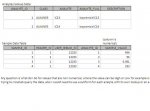
I am designing this database I have decided that using the row entry route for date is the way to go. However I have a couple of questions as it stands I have tables like so:
Analytes lookup table
ALKANES
iC13
isoprenoid C13
ALKANES
iC14
isoprenoid C14
Sample Data Table
(column is numerical)
My question is what do I do for values that are non numerical, where the value can be High or Low for example or a range of text values. My first though would be to use a lookup ID in the sample value field. How doable is this, would you then encounter issues when trying to crosstab query the data, also I would need to use a subform for each analyte with its own lookup or an actively modifying lookup piece of VBA.
My other questions is when there is a comments field for example – I think at the last count there are 5 comments categories which are free text is it going to be easier to have a table similar to the Sample Data Table but with Sample_Value being a text field?
Any experience would be greatly appreciated.
Cheers,
Oliver
I am designing this database I have decided that using the row entry route for date is the way to go. However I have a couple of questions as it stands I have tables like so:
Analytes lookup table
ANALYTE_ID
CLASS
ANALYTE
ANALYTE_FULL
DESCRIPTION
1
iC13
isoprenoid C13
2
iC14
isoprenoid C14
Sample Data Table
(column is numerical)
SAMPLE_ID
HEADER_ID
USER_BIBLIO_ID
ANALYTE_ID
SAMPLE_VALUE
1
1
12233
1
456
2
1
12233
2
56
3
1
12233
3
0.001
4
1
12233
4
233
My question is what do I do for values that are non numerical, where the value can be High or Low for example or a range of text values. My first though would be to use a lookup ID in the sample value field. How doable is this, would you then encounter issues when trying to crosstab query the data, also I would need to use a subform for each analyte with its own lookup or an actively modifying lookup piece of VBA.
My other questions is when there is a comments field for example – I think at the last count there are 5 comments categories which are free text is it going to be easier to have a table similar to the Sample Data Table but with Sample_Value being a text field?
Any experience would be greatly appreciated.
Cheers,
Oliver