
Table relationship problems

WILYWAYNE11

New member
Local time
Today, 13:00
Joined
Aug 27, 2022
Messages
20
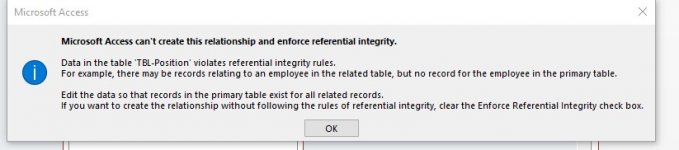
We have two tables joined in a one to many relationship however we cannot select any options without getting an error message. None of us are programs and are in need in plain remedies to correct the relationship problem with losing any data. I have attached screen shots of the tables and connections. Screenshot 2023-02-27 131044.jpg
 

Attachments

I don't think we can help you with what you provided, look at the error description and try to understand the cause; you probably have duplicates in a field used in the join when you shouldn't or you have missing key(s) in one of the tables. Without analyzing the actual data you won't be able to solve this. I suggest you make copies of the two tables in question to preserve the existing data, empty them and, once empty, set the desired reference. Now run two append queries to repopulate them from the copies; when running the inserts you should get some more messages identifying the cause of the problem (you should end up with partially populated tables that satisfy the integrity constrains, the missing records being the problem).

Cheers,
 
Hi Pat..
We tried to resolve the problem SEVERAL TIMES and we still cannot modify the relationship to a one to many profile. If you can take a look at what has been designed and help I would be grateful.
Wayne Devincenzi
 

Attachments

From what you have created it is clear that you have never read a book on access, it will be good if you do if you want to create something decent.
 
Wayne,

Please have a look at the updated file. tblPosition needed its own primary key (autonumber) but you had CompanyID as autonumber, you cannot create a relationship between those and wouldn't be one to many as intended. I also changed the name of the Date field in tblCompany as that is a reserved word and can cause issues. Made few changes to the form\subform linking fields (used the CompanyID foregin key from tblPosition which now is set as Number-Long instead of autonumber). And removed the macro on the click event of the tab control...

Cheers,
 

Attachments

Users who are viewing this thread

Back
Top Bottom