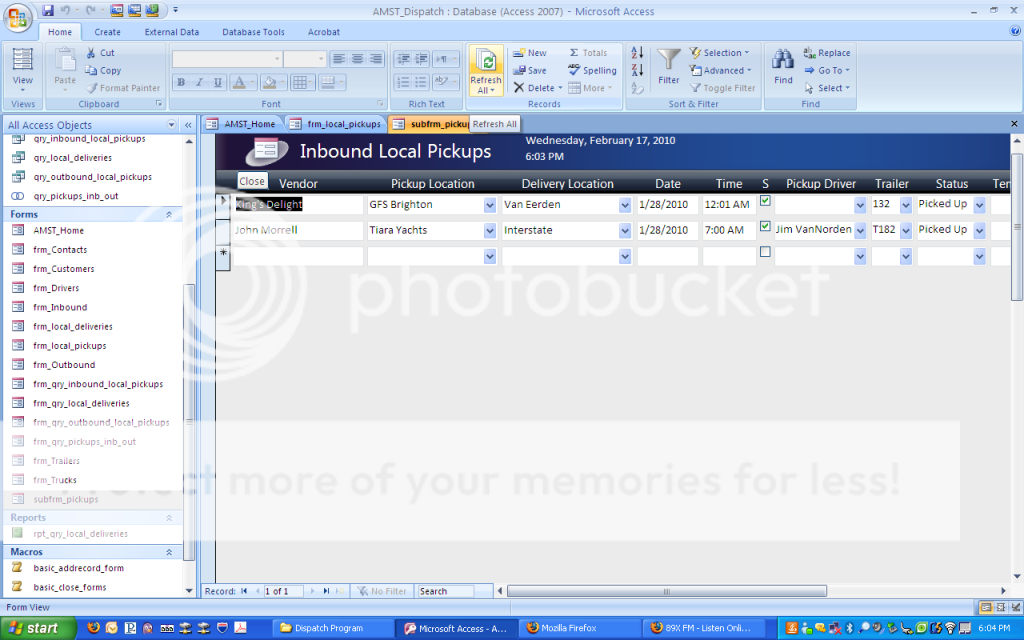
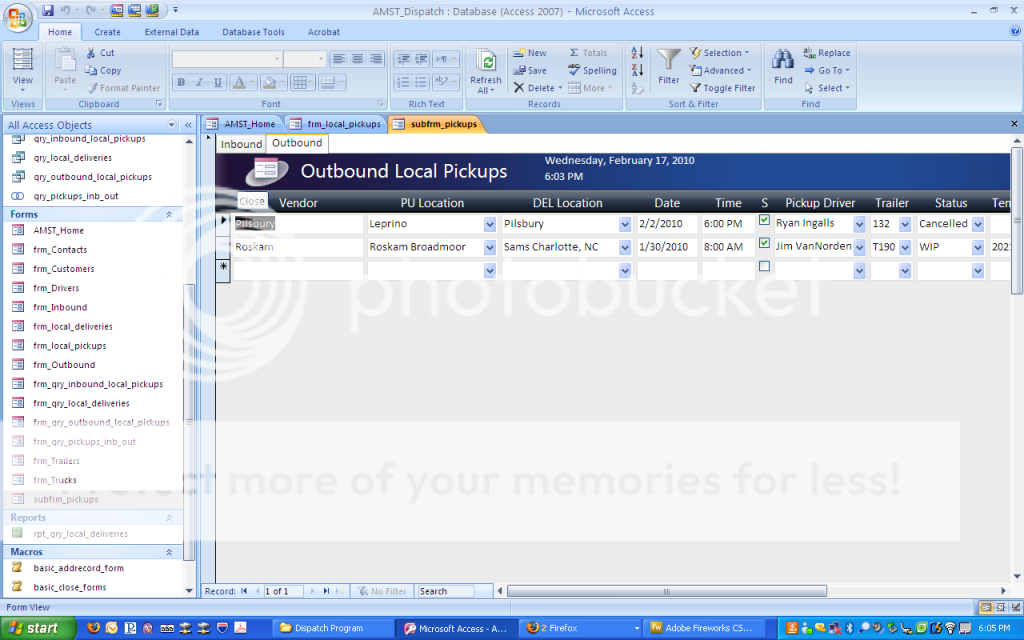
tabs with forms within auto-hides tabs?????

rmulder

Registered User.
Local time
Today, 13:40
Joined
Feb 1, 2010
Messages
77
I have 2 tabs with forms dragged and dropped in each. Every time I switch tabs, access scrolls down to the form header and hides the tabs. I can scroll up to see them but it's kind of annoying as i switch between them a lot. Any fix for this?

 
You mean it scrolls down hiding the tab's header caption?
 
yup, it scrolls down to show the header of the form within the tab and hides the tabs. i then have to scroll up a slight amount to see the tabs.
 
I haven't yet spotted why, no time to mess around with it. The work around is this. Create a button and set it at the very top of the form's Detail section (so the Top will be 0). Make the button transparent and don't set a caption. Then on the click event of a tab, set focus to the button and set focus back to the tab.
 
ok, i will try to clarify what i was saying this is when it hides itself
screenhidden.png


then this is when it is normal before i switch tabs

screenshown.png
 
not working, its prob me. i labeled the button in the other tab as focus_page1 and just doesn't change a thing. any ideas?

Private Sub Page1_Click()
Forms!subfrm_pickups!focus_page1.SetFocus
Me.SetFocus
End Sub
 
Zip, upload and post a cut-down version of your db and I'll have a look.
 
i appreciate the offer but cutting it down and zipping it would still prob be pretty big and im on a slower internet connection with crappy upload. I think it's in my syntax. I have a form named "subfrm_pickups". Within that I have a tab control with two tabs. I dragged and resized my "frm_qry_inbound_local_pickups" and "frm_qry_outbound_local_pickups" forms to page 1 and 2 of the tab control and resized them. On the "Other" tab of the properties I named the tab control to "local_pu_tabs" and the pages were "Page1" and "Page2" by default. Now I added the button to the top left corner and names it "focus_page1". The button is behind the tab control so I would think you'd refer to it as follows......

Private Sub Page1_Click()
Forms!subfrm_pickups!focus_page1.SetFocus
End Sub

I've tried referring to it a lot of different ways but nothing is working. Any ideas? Sorry I can't post my db up for you to look at, wish i could :(
 
It would depend where you're calling the button from. If it's not throwing an error then you're referencing correctly. However, the click event of a page doesn't fire when you click the tab caption, it fires when you click inside the tab. Silly right? So that won't work. FYI, you place the button on the main form.

Basically, it scrolls down to (try to) display the full contents of your tab, so you would need to decrease the height of the subform within your tab if you want that behaviour to stop.
 

Users who are viewing this thread

Back
Top Bottom