turn off macro cconfirmation messages

dubmunkey

Registered User.
Local time
Today, 21:14
Joined
Jan 6, 2006
Messages
62
Hi

i have a macro that runs a number of queries- each one assembling data- populating tables to finally make a master table of all the data i need-

it runs about 8 queries in a row- works great except i get this message at each stage of the macro:

you wont be able to undo the changes thois action query is about to make to the data in the linked table or tables.

do you want to run this action query anyway?


can i turn this off so it stops appearing? i have to run this quite regular so would be nice if i could set it to go just go and not have to keep intervening- in fact it's a real pain!!

any ideas?

greg
 
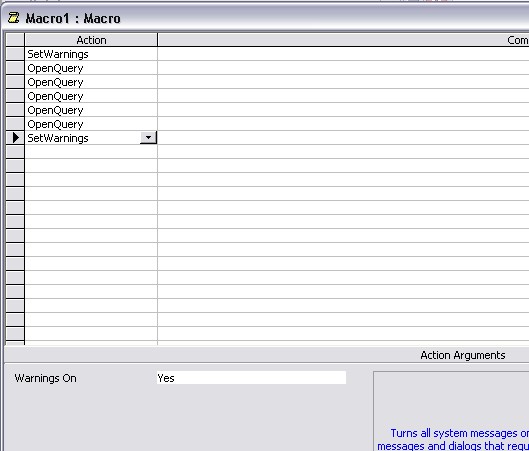
In the ACTION area select SetWarnings and in the Warnings On area that appears below in the Action Arguments select NO. To turn them back on to the same and select YES.

I would highly suggest for this that you use VBA instead as you can have error handling and if something glitches while running the 8 queries you can set the warnings back on in the error handler. If you don't, you can wind up not getting ANY error messages if something error's out before setting them back on.

To do it in VBA, select EVENT PROCEDURE from the drop down in the event list on the form's properties (for the button that runs the queries) and do this:
Code:
On Error GoTo err_handler
DoCmd.SetWarnings (False)
DoCmd.OpenQuery "PutYourQueryName1HereInQuotes"
DoCmd.OpenQuery "PutYourQueryName2HereInQuotes"
DoCmd.OpenQuery "PutYourQueryName3HereInQuotes"
DoCmd.OpenQuery "PutYourQueryName4HereInQuotes"
DoCmd.OpenQuery "PutYourQueryName5HereInQuotes"
DoCmd.OpenQuery "PutYourQueryName6HereInQuotes"
DoCmd.OpenQuery "PutYourQueryName7HereInQuotes"
DoCmd.OpenQuery "PutYourQueryName8HereInQuotes"
DoCmd.SetWarnings (True)
Exit Sub

err_handler:
DoCmd.SetWarnings (True)
MsgBox Err.Description, vbExclamation, "Error Number: " & Err.Number
 
you star!!

that's great....

in the future im hoping to actually use vb to replace the whole thing as it's very clunky as it is and know i can get vb to do it all a lost more effieciently...when i have the time ill sort it....

thanks for the code..

greg
 
bizarre ive not got a set warnings field- im using the command

openquery

is this right?

oh access 2002 btw

cheers

greg
 
If you are in macros, you have to insert an action before the openquery action. So, you can right click on the action and select INSERT ROWS to insert one above it. Then select the SetWarnings action.
QuerySetWarnings.jpg
 
what an idiot i am, if i'd just looked a little closer rather than be intimidate by the macro screen i would have caught that-

cheers

greg
 
No worries! I think we've all been there, done that, at some point in our use of Access. And, if not, there will be a time we overlook the obvious.
 

Users who are viewing this thread

Back
Top Bottom