
using combo boxes as criteria in query

aleemaher

New member
Local time
Tomorrow, 04:17
Joined
Aug 7, 2021
Messages
7
I have two combo boxes in different forms
Combo0 has names of the officers
Combo001 has names of the companies.
I want to use both combo boxes as criteria for the query, the problem i face is that i have to select options in both combo boxes to run the query successfully, i want the query to run with either combo box being empty.

SQL:
SELECT [Officers Offsite 1].[Officer Name], [PSC EXAM].[Company Name], [PSC EXAM].[Document Examined], [PSC EXAM].[If other Document Selected], [PSC EXAM].[Type of Examination], [PSC EXAM].[Action if others], [PSC EXAM].[Financial Period], [PSC EXAM].[Company Type], [PSC EXAM].Action, [PSC EXAM].Status, [PSC EXAM].[Action Date], [PSC EXAM].Remarks, [PSC EXAM].[Date of Entry]
FROM [PSC EXAM] INNER JOIN [Officers Offsite 1] ON [PSC EXAM].[Officer] = [Officers Offsite 1].[Officer Name]
WHERE ((([Officers Offsite 1].[Officer Name])=[Forms]![Officerwise]![Combo0]) AND (([PSC EXAM].[Company Name])=[Forms]![Form1]![Combo001])) OR ((([PSC EXAM].[Company Name])=[Forms]![Form1]![Combo001]) AND (([Forms]![Officerwise]![Combo0]) Is Null)) OR ((([Officers Offsite 1].[Officer Name])=[Forms]![Officerwise]![Combo0]) AND (([Forms]![Form1]![Combo001]) Is Null)) OR ((([Forms]![Officerwise]![Combo0]) Is Null) AND (([Forms]![Form1]![Combo001]) Is Null));
 
then can you use a filter?
Since a query cant use a NULL control in the where, use a continuous form that shows all records,
then user can pick 1 or both combo values,
then click a button to run this code in the buttons CLICK event:
Code:
'----------------
sub btnFilter_click()
'----------------
dim sWhere as string

sWhere = "1=1"
if not IsNUll(cboST) then sWhere = sWhere & " and [State]='" & cboST & "'"        'text
if not IsNUll(txtID) then sWhere = sWhere & " and [ID]=" & txtID                 'numeric
if not IsNUll(txtDate) then sWhere = sWhere & " and [EventDate]=#" & txtDate & "#"      'dates

If sWhere = "1=1" Then
  Me.FilterOn = False
Else
  Me.Filter = sWhere
  Me.FilterOn = True
End If
end sub
 
then can you use a filter?
Since a query cant use a NULL control in the where, use a continuous form that shows all records,
then user can pick 1 or both combo values,
then click a button to run this code in the buttons CLICK event:
Code:
'----------------
sub btnFilter_click()
'----------------
dim sWhere as string

sWhere = "1=1"
if not IsNUll(cboST) then sWhere = sWhere & " and [State]='" & cboST & "'"        'text
if not IsNUll(txtID) then sWhere = sWhere & " and [ID]=" & txtID                 'numeric
if not IsNUll(txtDate) then sWhere = sWhere & " and [EventDate]=#" & txtDate & "#"      'dates

If sWhere = "1=1" Then
  Me.FilterOn = False
Else
  Me.Filter = sWhere
  Me.FilterOn = True
End If
end sub
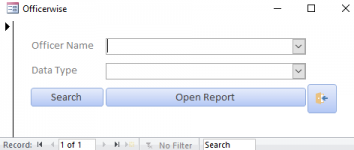
Both Combo boxes are in different forms. Form 1 is used to search by officer wise and it has the first combo box, the form 2 is used to search company wise and has second combo box.
 
Do you mean two stand-alone forms which are popped up on your screen or do you mean two sub forms which are embedded into one main form?
two stand alone popped up forms
 

Attachments

  • Screenshot (11).png
    Screenshot (11).png
    8.8 KB · Views: 545
  • Screenshot (10).png
    Screenshot (10).png
    5.2 KB · Views: 576
Code:
SELECT [Officers Offsite 1].[Officer Name], [PSC EXAM].[Company Name], [PSC EXAM].[Document Examined], [PSC EXAM].[If other Document Selected], [PSC EXAM].[Type of Examination], [PSC EXAM].[Action if others], [PSC EXAM].[Financial Period], [PSC EXAM].[Company Type], [PSC EXAM].Action, [PSC EXAM].Status, [PSC EXAM].[Action Date], [PSC EXAM].Remarks, [PSC EXAM].[Date of Entry]
FROM [PSC EXAM] INNER JOIN [Officers Offsite 1] ON [PSC EXAM].[Officer] = [Officers Offsite 1].[Officer Name]
WHERE
[Officers Offsite 1].[Officer Name]=IIF(IsNull([Forms]![Officerwise]![Combo0]), [Officers Offsite 1].[Officer Name],[Forms]![Officerwise]![Combo0])
AND
[PSC EXAM].[Company Name]=IIF(IsNull([Forms]![Form1]![Combo001]), [PSC EXAM].[Company Name], [Forms]![Form1]![Combo001]);
 
Code:
SELECT [Officers Offsite 1].[Officer Name], [PSC EXAM].[Company Name], [PSC EXAM].[Document Examined], [PSC EXAM].[If other Document Selected], [PSC EXAM].[Type of Examination], [PSC EXAM].[Action if others], [PSC EXAM].[Financial Period], [PSC EXAM].[Company Type], [PSC EXAM].Action, [PSC EXAM].Status, [PSC EXAM].[Action Date], [PSC EXAM].Remarks, [PSC EXAM].[Date of Entry]
FROM [PSC EXAM] INNER JOIN [Officers Offsite 1] ON [PSC EXAM].[Officer] = [Officers Offsite 1].[Officer Name]
WHERE
[Officers Offsite 1].[Officer Name]=IIF(IsNull([Forms]![Officerwise]![Combo0]), [Officers Offsite 1].[Officer Name],[Forms]![Officerwise]![Combo0])
AND
[PSC EXAM].[Company Name]=IIF(IsNull([Forms]![Form1]![Combo001]), [PSC EXAM].[Company Name], [Forms]![Form1]![Combo001]);
I tried implementing this code but combo001 does not return any results
 
test with query using Left Join (replace INNER JOIN with LEFT JOIN in your query).
 
test with query using Left Join (replace INNER JOIN with LEFT JOIN in your query).
The code is working fine however when i use the first form, a prompt pop up opens "Enter Parameter Value" and it asks for the combo box value from the second form and vice versa
 
The code is working fine however when i use the first form, a prompt pop up opens "Enter Parameter Value" and it asks for the combo box value from the second form and vice versa
So open both the forms if you are referring to them? :(
I tended to use Tempvars set from forms or wherever to avoid such problems? However I never considered having a criteria from more than one form? Has to be something wrong with your logic there, surely?

If you do it this way, you can set the whatever the non open form tempvar is, to something that works?
You can only refer to form controls WHEN THE FORM IS OPEN.
 

Users who are viewing this thread

Back
Top Bottom
