vba newb - want to refresh forms

rmulder

Registered User.
Local time
Today, 14:44
Joined
Feb 1, 2010
Messages
77
i have a form that has a link to add a record. Upon returning from adding the record, the combo boxes that should now have that new record in their list don't. I've been doing some googling where they say I need to call a requery of the form possibly on the trigger of the form getting access would work???? i've done simple modules in excel b4 but nothing in excel, please help. Thanks!

 
In the Form_Activate() event of the form use ...

Code:
Me.Refresh


-dK
 
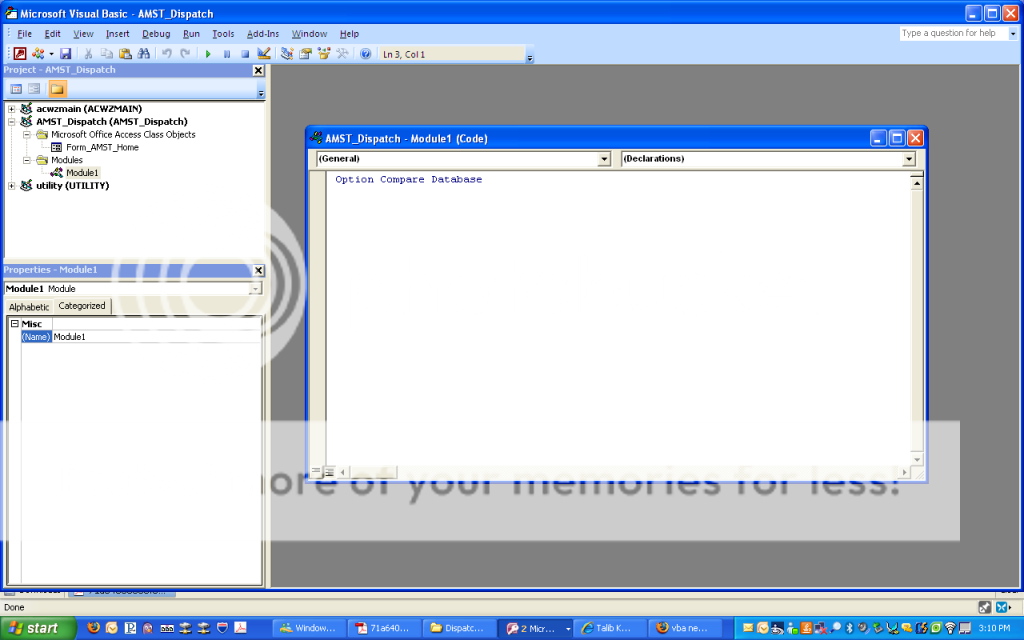
how do i navigate to the Form_Activate() event within the VBA editor. here's a pic of what I'm seeing. I keep adding a module which I'm not sure if that's what I'm supposed to do???????
screen4.png
 
You want Me.REQUERY (not refresh). Refresh will only refresh changes made to EXISTING records that are in the recordset. If you ADD a new record you need a REQUERY to be able to add it to the existing recordset.
 
Ah .... ummm no. Remove the modules. You can use those to create routines and functions that can be called from anywhere in your project.

You need to go into the properties of your form. The construct of the form properties look similar to the properties of a control on your form. In fact, if you have the properties for anything open, you can click on the drop-down box at that top of the properties pane and scroll down to form and select it.

Once there, click on the Event tab and then scroll down to "On Activate". When you click in that row, click the ellipses - that will open the VB Editor and instantiate the On Activate event for the form.

Your code should look like this ...

This will only work for the form you are currently editing, it cannot 'be seen' from outside the form (unless you are start getting all tricky - but no worries about that yet). Do this for each form where you need for this to occur.

As a last note, I would add "Option Explicit" under the Option Compare Database so it would look like this ...

Code:
Option Compare Database
Option Explicit
 
Private Sub Form_Activate()
     Me.Requery
End Sub

... along with any other code you might be executing on the form.

Hope that helps,
-dK
 
dk:

Still - refresh is NOT what to use here.
Access Help File said:
The Refresh method shows only changes made to records in the current set. Since the Refresh method doesn't actually requery the database, the current set won't include records that have been added or exclude records that have been deleted since the database was last requeried. Nor will it exclude records that no longer satisfy the criteria of the query or filter. To requery the database, use the Requery method. When the record source for a form is requeried, the current set of records will accurately reflect all data in the record source.
 
rmulder, FYI and for clarification I am posting the definitions ...

The Refresh method immediately updates the records in the underlying record source reflect changes made to the data by you and other users in a multiuser environment.

The Requery method updates the data underlying a specified form by the source of data for the form.

The Repaint method completes any pending screen updates for a specified form. When performed on a form, the Repaint method also completes any pending recalculations of the form's controls.

For three commands that you can make significant use of in the future used in the same manner.

The correct is 'Me.Requery'. I apologize and was in error and corrected in the last post. I had the title of the post in my head.

-dK


EDIT: Finger hit the enter key while typing ....
 
all you guys say makes good sense now, except the only form i see is my AMST_Home form when I have way more forms, reports, queries than just that one form. How do I see all objects in my database to attach macros to them?
 
From the project picture you posted, this is the only form in your project. That is unless the 'Has Module' property is set to 'No' in the 'Other' tab of your form properties. I thought this defaulted to 'Yes' ....

Anyhow, in your Project Explorer pane of the VBE (the one to left with the module names), you can see the form you are working on. Each form's name would appear here that has a module. You can double-click the names to open up the form module and copy and paste the same code in all of the forms.

-dK
 
Thanks guys. It's all becoming more clear. Yeah that has module property was defaulting to "No" somehow. Making it "Yes" makes it show up in my VBA explorer. Thanks SOS and dk, very helpful!
 
Thanks guys. It's all becoming more clear. Yeah that has module property was defaulting to "No" somehow.

It always defaults to NO unless you have started to add code to some event or actually just selected [Event Procedure] from the list in one of the event properties.
 
yeah the macro builder had been sufficient for me till now so makes sense. well now i know how to add vba to forms so cheers!
 
Good to go! :)

Now the tough part when you start developing in VBA is converting those macros over. :eek:

Good luck in your projects!

-dK
 

Users who are viewing this thread

Back
Top Bottom