Very Large Form

DiveKennene

Registered User.
Local time
Today, 17:03
Joined
May 8, 2008
Messages
18
Hello All,
I have a table called "Customers". I have a very large form that I can't fit all of the input text boxes on...I actually will need to create about 6 more forms that all link to the same record in my one table. My table has about 100-150 fields in it, problem is there isn't enough room on one form alone to populate all of the those fields, hence the reason I think I need to create 6 more forms or so. When going from form 1 to form 2, how do I keep it on the same record? With each form I open, it wants to start a new record.

Thanks for any help.
 
have you tried splitting your input over several tabbed pages all on the one form?
 
Could you poast your table set up? It doesn't sound correct with that many fields...
 
I have heard about using tabbed pages on the same form...not finding any info on how to do it exactly in Access 2007. My table consists of the following fields: ID, First Name, Last Name, Address, Zip, Email, Main1, Reserve1, AAD1, Harness1, etc. (where I have Main1, etc., there will actually be a total of 16 different Main(s), Reserve(s), AAD(s)). Basically one customer will have many different types of equipment linked to them. Hope this is fairly clear.
 
Can one piece of equipment be used by more that one person? i.e. could user A use harness 1 and user B use harness 1??
 
No, each user has a large set of equipment, each with different serial numbers. So, each user's equipment is specific (and unique) to each user.
 
Hey,

I don't think I've ever had more than like 15-20 columns in a table before :/

What's this for if you don't mind me asking?

I find it surprising that person A can't have piece of kit 1,2 and 3 and person B can't have 2,3,4 and 7.
 
It is a database for parachute riggers. Some riggers have customers, i.e. dropzone owners, that will have 16-20 rigs that they own. So, all of dropzone owner A's rigs, which consists of several different pieces of equipment and serial numbers to go with it, will be unique to that person only.

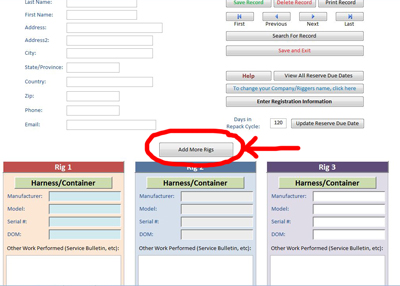
Here is my main form, that has room on it for putting the info in for 3 rigs:

Example1.jpg


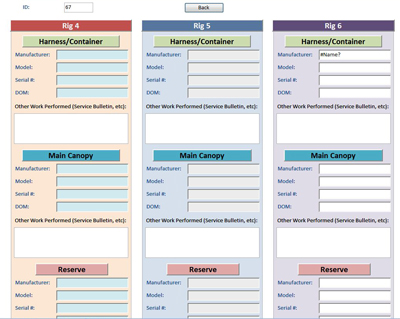
I want to then click the "Add More Rigs" button to go to the following form to add 3 more rigs, because the said owner has 6 rigs:

Example2.jpg


When I go to the second form to add 3 more rigs, it wants to start a new record in the table...which is not what I want because these additional 3 rigs also belong to the person whose info I put in on the first form.

I hope this makes more sense.
 
I have heard about using tabbed pages on the same form...not finding any info on how to do it exactly in Access 2007. My table consists of the following fields: ID, First Name, Last Name, Address, Zip, Email, Main1, Reserve1, AAD1, Harness1, etc. (where I have Main1, etc., there will actually be a total of 16 different Main(s), Reserve(s), AAD(s)). Basically one customer will have many different types of equipment linked to them. Hope this is fairly clear.

This strikes me as being non-normalized. Whenever you have repeating fields of xxx1, xxx2, xxx3, etc. those are repeating fields and indicate a one-to-many situation and that should be in a separate table.
 
I would like to put "Rigs 4,5,6" in a seperate table on a seperate form, but how do I do that and keep them linked to the person on the main form? Anytime I go from the main form to the second form to add more "Rigs" for the customer, it keeps wanting to start a new record.
 
Sounds like this to me...Like Bob said.... one to many...... In your "Rigs" table would be the "CustomerID" as a foreign key.... you would have a one (in customer table ...to many... "CustomerID" in "Rigs" table. Thus you would be able to add as many rigs with the same customerID as you need.

You might find some answers looking at some sample DBs dealing with invoicing... One invoice can have many items.... Sounds like a similar situation.
 
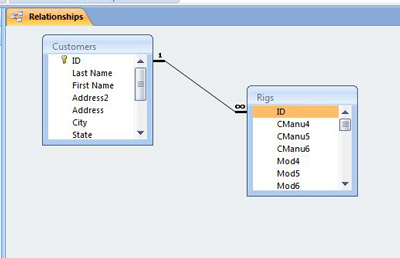
Okay, I have tried to set up the relationship with a ONE -- ID (Primary Key in Customers table (Autonumber Field)) TO MANY ID (Number Field - no "key").

relation.jpg


When I leave the main customers form (just using DoCmd.OpenForm) to enter rig information, the ID # from the main form is not populating the ID # (or record for that matter) on the rigs form. Anyone know why and how to fix this nightmare?
 
Okay, we need to revisit Normalization (read this and understand it: http://support.microsoft.com/kb/283878)

The Rigs table should not have CManu4, CManu5, Cmanu6 as again that is a one-to-many situation that requires yet another table and junction table. Same with the Mod4, Mod5, Mod6.

As for the ID it should have

tblCustomer
CustomerID - Autonumber (PK)
LastName - Text
FirstName - Text
etc...

tblRigs
RigID - Autonumber (PK)
CustomerID - Long Integer (FK which is PK in Customer Table)
RigDescription - Text


tblManu
ManuID - Autonumber (PK)
ManuDesc - Text

tblMod
ModID - Autonumber (PK)
ModDesc - Text

tblRigManu
RigManuID - Autonumber (PK)
RigID - Long Integer (FK)
ManuID - Long Integer (FK)

tblRigMod
RigModID - Autonumber (PK)
RigID - Long Integer (FK)
ModID - LongInteger (FK)
 

Users who are viewing this thread

Back
Top Bottom