Visa Database

rascot123

Registered User.
Local time
Tomorrow, 00:04
Joined
Jul 30, 2016
Messages
33
I would like to create a database for visit visa business.
Fields are as below :
ID#
Country I want country selected from list.
Type of visa e.g. : tourist visa 1 month, tourist visa 3
months, leisure visa 1 month, leisure
visa 3 months
Days e.g. : one month visa, 3 months visa
Customer rate e.g. : selling price to customer
Processing time e.g. : some visa will process in 7 days, some visa
within 10 days and some within 15 days.
Documents e.g. : documents have to submit to Embassy
(passport, Photo etc...)
Please comment how to arrange and what are the options I can include in form etc....
 
Did you already tried something ? Or do you want us to give you a working solution that meets all your requirements ?

I would start by making a diagram with all the tables/enums. Once you have a basic layout of the database, check if you can normalize it. Once that is all done, you can start making forms.
 
Looks like you already arranged it. Also add these lookup tables:
countries
length of visa
rates
process times
documents

and if needed, a child table to the Visa, tClientDocs, to hold the signed documents.
(but this may not be needed)
 
In form for example in two field how can I resize one field ? When I select field
automatically selecting all fields. Please comment.
 
Not sure what you mean. You don't resize fields when you enter data.
If you mean you want to alter the design of the table fields,
Then just edit the table design and change the field size.
 
Yes, I mean I want to alter the design of the table fields in form.
To alter what is the step please. In menu what to do. When I try to click one field and move to increase/decrease size all fields are selecting. I want to select only one field in form. I hope my point is clear.
 
Please, I need reply for my question. I want to alter form control in my form.
 
No, not clear.
You don't have to resize the fields on a form. They just show whats in the field.
You can stretch the box wider if needed. (In design mode)
 
I want to reduce or increase length of box to left or to right. I hope now you got my problem now. what is the steps to do this please.
 
As per my table fields in case of Dubai there will be 4 category visas. Bahrain, muscat, Qatar, Saudi will be two categories. I want these categories by drop down selection when I see the country name. So I need drop down under respective country. How can I do this please. Do I need extra table for this?
e.g. : Dubai have tourist visa and leisure visa. both have 1 month and 3 months.
 
Last edited:
I guess you already have a table for the country and a table for the different categories.
All you need is a intermediate table who store all the possible combinations.
Then you can use that to make a query to populate your drop-down list.
 
Reducing box lengths for every data is a waste of time.
 
Dear Grumm,
Please clarify this through an example from my database fields to make combo box.
What is difference of list box and combo box.
 
I want user not to use table from my database. How can I hide it and once I need it how can I keep it open.
 
I don't know how to do combo box or list box on the basis of my database.
Please comment through example. I need on my COUNTRY field.
 
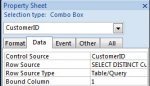
To populate a combobox you just need to put the query in the Row source and set the Row source type to table/query.

attachment.php


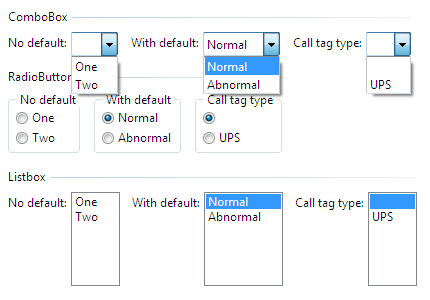
A list box just show all the data. The combo box you see only the selected data. You can pick a new one with a dropdown menu.
The listbox doesn't have a dropdown menu.
0712_enumeration_in_different_controls.png
 

Attachments

  • 2016-11-10_090648.jpg
    2016-11-10_090648.jpg
    22.1 KB · Views: 243
At least tell me how to search for different category visa for Dubai itself. Once I get this idea I will understand. Explain with example please.
 
I wait for anybody's reply for my question. Please educate me how to do combo box with an example in my database. Anybody there for this? Would appreciate.
 

Users who are viewing this thread

Back
Top Bottom