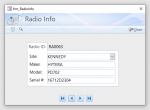
What makes good design?

@Micron
Agree with your list.
It would be helpful to many members if you could supply links to the MS standards you mentioned
Probably what I saw long ago has been replaced with new documentation. A quick search returned a lot of stuff that I never knew existed, but here's a couple of links that seem pertinent to my comment:
https://docs.microsoft.com/en-us/windows/win32/appuistart/-user-interface-principles

Here you'll find Get Started, Design, Develop

and
https://docs.microsoft.com/en-us/windows/win32/appuistart/designing-a-user-interface

Not sure where the documentation now exists for reading the standards (assuming they still exist as such) but while perusing some of the above content I did read a comment about not switching the position of buttons that Windows apps adhere to as an example of the standard. I guess the point is that I know there was documentation that specifically addressed layout as part of the 'standard' but where it is today I don't know and don't have the time to pin it down right now. Hopefully these links will illustrate that such principles of design do exist, along with a whole lot of related info that didn't exist years ago due to the added features over the years.


I hope it serves to generate some interest in what constitutes a well designed interface.:)
 
Error Trapping?
I would consider that to be function, not form (i.e. not design), so IMHO, no. The app might contain a lot of eye candy but be buggy, so it could have a pleasing design but not perform well. But I admit I tend to take a black & white view of things.;)

EDIT - Found this in my searching. You'd have to ignore the outdated metrics but there's a ton of info in it. Fortunately you can download it so that you don't have to read all 800+ pages in one session!

http://www.glyfx.com/useruploads/files/UXGuide.pdf
 
Pat Hartman said:
Unless you come up with a better way, use old solutions over and over again.

Also known as "If it ain't broke, don't fix it."

AB suggested that error trapping is a component of good design. To which I say yes and no at the same time. The way you notify the user of errors is important but maybe not so important as the fact that you trap the errors and prevent the use from seeing the dreaded "Debug/Reset" dialog box. Many of the variables you might wish to track would be affected by having to use a "Reset" option and the "Continue" option isn't always available for "Debug." You can't expect a user to fix your bad error handling and you can't expect a user to know how to continue from a severe enough error to have triggered the "Last Chance" error handler.

So is Error Trapping part of good design? Yes, in the fact you have it and control what the user sees. No, because beyond a certain point it no longer matters as to the details that you show or don't show.
 
To me error trapping and option explicit are fundamental to good overall design.
 
To me error trapping and option explicit are fundamental to good overall design.
Agreed I've seen so many Open projects without any error trapping When it's so easy to create one then copy it to all subs and functions as you go.
 
I am going to submite my employees screen as good design I'm really pleased with the way it turned out.

It is an unbound form And was begun by peter hibbs Hope you like it.
And has a complete validation system for records

It's part of my employees example currently at Version 4
https://databasedreams.createaforum...rojects/employees-example-version-4-download/


thanks mick


attachment.php
 

Attachments

  • 2019-08-26 (4).jpg
    2019-08-26 (4).jpg
    102.2 KB · Views: 403
First off, I am not designing for the masses. And I am not a particularly good at UI or report designing. I tend to look to others for my inspirations. I like the work isladogs and Pat have posted.

I do not care for the cluttered look some UI's have. I think it can be very confusing for the user to navigate busy forms. In some case the use of tabs or popups would relieve the busy feel.

I tend to look to Microsoft templates to get ideas like normalization and UI design.

attachment.php


attachment.php
 

Attachments

  • MyDB1.PNG
    MyDB1.PNG
    38.6 KB · Views: 454
  • MyDB2.PNG
    MyDB2.PNG
    32 KB · Views: 450
And I am not a particularly good at UI or report designing.
Understatement! - You design looks very clean and modern and is certainly in the upper 10% of Access UI designs I've seen.
A small hint: The Top-Property of the controls in the two columns is not aligned.


The visual layout of the user interface is certainly important, as it's the first thing any user sees of your application. However, do not ignore the behavior of your application when thinking about (UI) design. Usability, or to use the more modern term, UX (User Experience) is a topic widely neglected by Access developers. I highly recommend the books of Alan Cooper (the father of Visual Basic) on this topic. I reviewed his book About Face some time ago. It's a must read for every software developer!
 
Thanks Sonic8,

Taking nothing away from any of the excellent advice given here, but when Col started this thread, I was hoping someone would have some insight on a relevant book. I just ordered mine...
 
AB
I also think your 2 forms look good. Clean simple design. Am I right in thinking the 2 forms were based on one of the MS templates provided with Access?
 
Last edited:
Unlike many who have commented here, and without wishing to sound boastful, I consider my design skills to be reasonably good. By comparison, I know there are a significant number of AWF members whose coding skills are greater than mine. I know my areas of weakness!

Like Phillip said in his book review, I have many programming books, most of which I never look at. Indeed I gave away more than half of them when I moved house recently.
However, the book Phillip mentioned sounds very interesting. I've also ordered a copy (4th edition).

My all time favourite Access books are the 2 volume set Access 2000 Developers Handbook (Litwin, Getz & Gilbert). Its not focused on design but the vast majority of the content is as relevant now as it was 20 years ago
 
I consider my design skills to be reasonably good.

I would agree with that statement. Your Attention Seeking Database has given me a lot of inspiration, both visual and functional.
 
Glad you find that example app useful. I must admit that I haven't looked at it in a very long time...:cool:
 
I just sold a number of mine and took the rest down the charity shop I had the set of developers handbooks I still use some of the code today.


I haven't downloaded that db Isladogs but will tomorrow.


To me Access is something you never finish learning with I do find that each person has their own idears on what looks nice.
 
I use a laptop at the moment and have to agree they are also slower than most pc's but that can be a good thing as you can get a good idear of how fast it's going to be.


going back to the books side topic I used the use the Access 2000 Developers Handbook (Litwin, Getz & Gilbert) Form resize which I downloaded from one of the getz team books but it doesn't work in office 365:(
 
Last edited:
I used the Access 2000 Developers Handbook (Litwin, Getz & Gilbert) Form resize which I downloaded from one of the getz team books but it doesn't work in office 365:(

I can guarantee the automatic form resizing code I use works in all versions of Access from 2000 (possibly earlier) through to 365. It also works in both 32-bit & 64-bit and handles different screen shapes (form factors) as well as sizes/resolutions. Its based on open source code originally written by Jamie Czernak around 2003 but has been extensively revised since.
The latest version also works well with tabbed documents as well as overlapping windows.

You can find the code and an extended article about its use at: http://www.mendipdatasystems.co.uk/automatic-form-resizing-1/4594554784. A slightly shorter version can also be found at https://www.access-programmers.co.uk/forums/showthread.php?t=304090

Hope that helps
 
I can guarantee the automatic form resizing code I use works in all versions of Access from 2000 (possibly earlier) through to 365. It also works in both 32-bit & 64-bit and handles different screen shapes (form factors) as well as sizes/resolutions. Its based on open source code originally written by Jamie Czernak around 2003 but has been extensively revised since.
The latest version also works well with tabbed documents as well as overlapping windows.

You can find the code and an extended article about its use at: http://www.mendipdatasystems.co.uk/automatic-form-resizing-1/4594554784. A slightly shorter version can also be found at https://www.access-programmers.co.uk/forums/showthread.php?t=304090

Hope that helps


Thanks will have a look and see about adding it to my employee example
 
As explained in the extended article do bear in mind that if using automatic form resizing, you need to design the form for the lowest possible resolution in use by your clients. AFR works well when 'scaling up' to higher resolutions but is not intended for 'scaling down'.

For that reason it is usually best to design forms with AFR in mind rather than add it later
 
As explained in the extended article do bear in mind that if using automatic form resizing, you need to design the form for the lowest possible resolution in use by your clients. AFR works well when 'scaling up' to higher resolutions but is not intended for 'scaling down'.

For that reason it is usually best to design forms with AFR in mind rather than add it later


ok Thanks I'll keep looking for something I can replace my old one that don't work Can't really redesign all my programs lol
 

Users who are viewing this thread

Back
Top Bottom