Query multiple slightly repeated tables

Mr. SLP

Registered User.
Local time
Today, 14:51
Joined
Dec 23, 2017
Messages
56
I have multiple tables that connect back to 2 main tables, they themselves, are connected as many to many.
My goal is to get them all into a query so I can then run a report to be able to show that a teacher has the following students (or a student has the following teachers as well as the following equipment) and therefore is responsible for the following low/mid tech devices, high tech devices, and their accessories. This is a level of query I have not worked with and can’t seem to figure it out.


Sent from my iPad using Tapatalk
 
I have multiple tables that connect back to 2 main tables

1. That doesn't make sense.

2. You asked no question.

3. You've provided us no details about your tables/fields.

In your next post please tell us how we can help. Then provide us with the relevant data needed to give you that help.
 
As plog suggested, please post your schema. Make sure we can see how the tables relate.

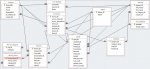
by schema I'm assuming you mean a snipping of the relationship screen? if so here it is. Its a bit of a mess I feel with all the different tables being so interconnected. Part of the mess is that I am trying to set it up to force the users to have uniformed naming of devices since right now everything is being done on excel spreadsheets and each type of device seems to be entered/spelled differently each time.
 

Attachments

  • relationship.jpg
    relationship.jpg
    76.2 KB · Views: 158
You've got to fix your relationships. You have a spider web where relationships should be more like a tree. There should only be 1 way to travel from 1 table to another. It seems every table in your system is directly related to each other, that is incorrect. You've got way to many relationships, you need to throw away everything in your relationship tool and start from scratch. Add just the main table then bring each other table in 1 by 1 and relate them to just one other table. Do that until every table is back in there but related properly.

Then after that we can work on whatever it is you initially posted about.
 
One other thing, I would include all of the information required for "iPads" in devices. They are devices so you can include the relevant fields. This cuts down some on the redundant tables.

It also looks like you can have multiple entries for the same "Device Name" and each "Device Name" belongs to a "Device Category". This seems very odd as "Name" is normally associated with a unique instance. Is this really a "Device Model", such as "HP LaserJet"?
 
Concur with the last 2 replies by plog & mark

Amongst the redundant tables, I would suggest you could immediately get rid of any with just a PK field and one other field:
Device_category table - definitely serves no real purpose
Status table - linked to 3 other tables currently but is it really needed?

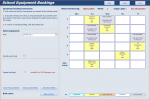
I have similar code used for booking school rooms or equipment for specific staff / lessons. See attached screenshot.

The code used to populate the timetable grid is based on just one table:
Code:
SELECT tblEquipmentBookings.ItemID, tblEquipmentBookings.ItemName, tblEquipmentBookings.BookingDate, tblEquipmentBookings.LessonID, tblEquipmentBookings.Period, tblEquipmentBookings.TeacherID,tblEquipmentBookings.AllDay, tblEquipmentBookings.ClassID, tblEquipmentBookings.RoomID, tblEquipmentBookings.SubjShort, tblEquipmentBookings.Activity, tblEquipmentBookings.Repeat FROM tblEquipmentBookings WHERE (((tblEquipmentBookings.ItemID)=1) AND ((tblEquipmentBookings.Repeat)=False) AND ((tblEquipmentBookings.Period)>0) AND ((tblEquipmentBookings.BookingDate) Between #01/08/2018# And #01/12/2018#));

Creating the placement of items on the grid involves using an array and recordset - the details of which I won't go into here
 

Attachments

  • Capture.PNG
    Capture.PNG
    58.2 KB · Views: 149
plog
Ok I am trying to start a square 1 with the relationships and the first issue I'm running into is picking the main table. I want to say that the main table would actually be the teacher/student junction table since everything is then matched up to a teacher/student combo. However, I cant figure out how to add a 1 (teacher student combo) to many device relationship. When I add a

Mark_
I decided to split them thinking that it would make reports easier as there is alot of additional information needed for ipads than most any other device that I have to track. The more I look at it now I see that was a dumb choice. sorry, still learning as I go. To answer your question about the "device name" thing, you are correct this is more like model.
 
Concur with the last 2 replies by plog & mark


Device_category table - definitely serves no real purpose

Status table - linked to 3 other tables currently but is it really needed?


I realize I have several tables that don’t seem needed but I did it in an effort to minimize the chance for my colleges, who are almost computer illiterate from entering some things in wrong. For example, device category will be used to identify devices used as writing supports/communication/vision support or other functions that they serve. Have the device category preassigned to a list of device names/models I don’t have to worry about them typing something super specific and useless for pulling a report of all kids placed with equipment for communication.

Status is pretty much the same thing. I will be using it to be able to pull a report of all items already placed with kids, ready to be delivered to kids, broken, in for repair, or unassigned. Currently coworkers say the same things a million different ways on the crappy excel sheet that is being used to track what kid has what... I have decided to condense it down to 4 main tables (student; teacher; devices; accessories).


Sent from my iPhone using Tapatalk
 
main table is a pretty ambigous term. In the end you are going to end up with every table in the relationship, its just easier to start with what you think will be the center of that picture.

You initially posted about wanting to track which teachers had which students and equipment. So that would lead me to belief that either the teacher table or an equipment table would be a good place to start. Pick one and then branch off from there.
 
Ok got ya. In this case the main would be devices I guess... sorry for all the dumb questions.


Sent from my iPhone using Tapatalk
 
Once again, plog beat me to it ...

The example I gave in my previous reply is based on:
- tblEquipment - items available for bookings
- tblEquipmentBookings - equipment item, booking date, booking time/timetable period

For the purpose of display, these are then matched to:
- tblTimetable - TeacherID, ClassID, RoomID, TimetablePeriod

To make a booking, staff just click on an empty slot on the bookings form ....

On a separate issue, did you read the various replies to the customer signature thread that you recently resurrected:

https://www.access-programmers.co.uk/forums/showthread.php?t=243577
 
To make a booking, staff just click on an empty slot on the bookings form ....


On a separate issue, did you read the various replies to the customer signature thread that you recently resurrected:


https://www.access-programmers.co.uk/forums/showthread.php?t=243577


Yeah I saw it and based on the responses realized that this was something I wasn’t even going to attempt. I’ve got a hat enough time getting the relationships and what not working that I don’t need to even think about going there. Also, coworker, even though we are the “assistive technology” department, are pretty anti tech for some things and if I was to set something up for us to go completely paperless they would utterly flip.


Sent from my iPhone using Tapatalk
 
Yeah I saw it and based on the responses realized that this was something I wasn’t even going to attempt. I’ve got a hat enough time getting the relationships and what not working that I don’t need to even think about going there. Also, coworker, even though we are the “assistive technology” department, are pretty anti tech for some things and if I was to set something up for us to go completely paperless they would utterly flip.


Sent from my iPhone using Tapatalk

Never mind - I quite enjoyed finding out how to do it anyway and plan to use the idea in one of my own databases ....! :D
 
@OP,

As to having too many files, in general the basic idea is to have few files, few columns, and many rows. This isn't perfect as a description but it does give you a general guide line when you ask "Should I add this as a table?".

For myself, I normally only ever have one table in a database for looking up values. This can have a "Sort" (think status, device type, what have you) and a "SubSort" (based off of a sort value) as well as not only the value looked up but a description of that value so others can understand what it means in depth. This tends to avoid having many of the "lookup" tables you currently have ( Device Category, Device Name, Status, iPad Model, Campus) while making it far easier on you to keep track of what is coming from where and what table you need to update.

Over holiday I may have to spend some time writing up how to do lookup tables and post a sample database. This seems to happen far to often on here...
 
Pat

You said you disagreed with my comment but I can see no possible use for either of these tables
- device category
- ipad_models

I'm far from convinced about several other tables shown in the relationships window.

Can't it be simplified to
- student / teacher / campus / equipment / booking plus the 1 junction table Tchstudent
 
@OP,

As to having too many files, in general the basic idea is to have few files, few columns, and many rows. This isn't perfect as a description but it does give you a general guide line when you ask "Should I add this as a table?".

For myself, I normally only ever have one table in a database for looking up values. This can have a "Sort" (think status, device type, what have you) and a "SubSort" (based off of a sort value) as well as not only the value looked up but a description of that value so others can understand what it means in depth. This tends to avoid having many of the "lookup" tables you currently have ( Device Category, Device Name, Status, iPad Model, Campus) while making it far easier on you to keep track of what is coming from where and what table you need to update.

Over holiday I may have to spend some time writing up how to do lookup tables and post a sample database. This seems to happen far to often on here...

I'm not sure I totally understand what you mean by "few files, few columns, and many rows" I'm assuming files is tables?... A masterlookup table sounds exactly like what I need. In my Googleing all I'm quickly seeing about lookup tables is basically exactly what I'm already doing :( If you have time I would love to try and do that.
 
Pat

You said you disagreed with my comment but I can see no possible use for either of these tables
- device category
- ipad_models

I'm far from convinced about several other tables shown in the relationships window.

Can't it be simplified to
- student / teacher / campus / equipment / booking plus the 1 junction table Tchstudent
I could see narrowing it down to student / teacher / campus / equipment. However, I am having to track accessories with the equipment and need to be able to give numbers of chargers ect that I have so I really need the accessory table. What all do you picture being in the "booking" table? I literally have a couple of thousand items to track and they are often placed with students for indefinitely, or at least until an evaluation is completed and states that the student doesn't need said item any more. Also, the more I think about it again, I question my need for the junction table. I went into it thinking "each student can have multiple teachers and each teacher can have multiple students so I need the junction". However, since every device is assigned to a student, with a teacher signing off as being responsible for it, the device table functions as that junction table correct?

Also, I feel at least 1 table is needed as a lookup table so I can limit responses.
 
In your case the booking table would probably be student id, equipment id, start date and end date. It's a junction table

A charger is just another item of equipment. It needs a separate record in the equipment table, not it's own accessory table

I don't understand your final sentence about limiting responses
 
Also, I feel at least 1 table is needed as a lookup table so I can limit responses

The lookup doesn't necessarily have to be in the relationship, it could be feeding a combo or assisting in auto filling other fields.
 
Ok charger was a poor example. I’m talking things like an auxiliary cable, usb cord, case, or a carry bag. That specifically will be used with other equipment and wouldn’t be placed on their own and can then be associated with a device as a package and can be easily identified as needing to be picked up in the event that particular device needs to be returned (like if a student leaves the district).

Limiting responses is so that other members of the team (who can barely use a computer) don’t enter a new item in as iPadAir and not iPad Air and thus muddying up the data. Currently the excel spreadsheet that this team has been using for years (I’m new to the department) has the same type of device listed in a minimum of 5 different ways all the way down to things such as “I pad” or “iPad air” (extra spaces making it appear like a different device altogether when I run a pivot table. This is 1 of the biggest reasons I’m going the access route. I’m wanting to setup forms to be able to have consistency with our data entry so that I can get a really good picture of what I have, where it’s at, and be able to better justify the need to purchase new/additional equipment.


Sent from my iPhone using Tapatalk
 

Users who are viewing this thread

Back
Top Bottom