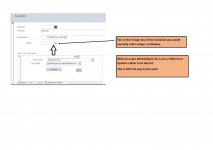
I agree with what you say Pat.
I was trying to keep it simple cause most might have a hard time following my case that's why I tried to be specific to the solution I want to apply so I could get an answer.But since you want to know I'm sending my db striped of most unnecessary stuff.
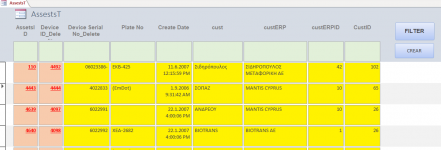
The main Table is AssetsT then we have CustomersT and CustomersERP. Forget about the rest of the tables. One Asset can have only one
CustomerID which is comprised of the combination of CustomersT and CustomersERP_T (unique combinations). I could just put in AssetsT the two fields instead of creating the 2 Customers tables but an Asset might not have a customer and that would be waste of space, isn't that what normalization is about?
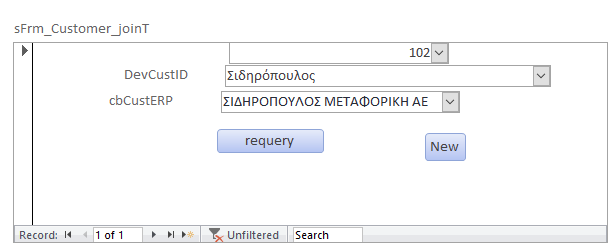
I also want the user to be able to see "Device Customer" and "customerERP" fields from inside the Form Assets and change them via a subform or another way. I used a subform like this.
Let me make a note here. I see a lot of people talking about the "best practice" etc. If I have 10 tables and I want a user to update 1 or 2 fields in each of them do I need to open 10 forms to do that? This might be best practice for the db expert but not for a user(s) who has limited knowledge and time. That's why I want from my Assets form to be able to access customers easily and ofc other fields later the same way.
My understanding so far is that you can get away with tables connected directly, by using subforms to change data (or nested subforms which is not very nice in my opinion), but when it comes to join tables where you deal with IDs that's a problem (my case).
Anyway you can see that I have finally made a button (New) for the user to open a form which manipulates the data in CustomersT and CustomersERP_T and after he has input the new data (if required) then he can select them from the combo boxes above.
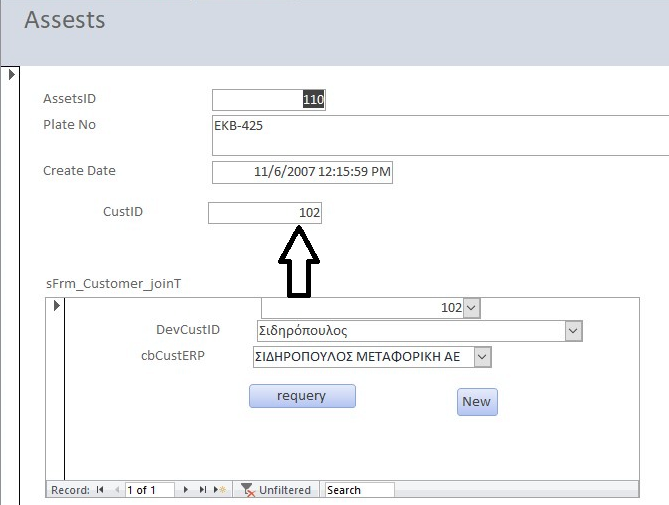
By selecting the 2 combos the custID should change (102 above) I tried using a query and update the (linked) custID in AssetsT. I couldn't make this work.
I would appreciate a specific answer to my problem.
Thanks in advance
I was trying to keep it simple cause most might have a hard time following my case that's why I tried to be specific to the solution I want to apply so I could get an answer.But since you want to know I'm sending my db striped of most unnecessary stuff.
The main Table is AssetsT then we have CustomersT and CustomersERP. Forget about the rest of the tables. One Asset can have only one
CustomerID which is comprised of the combination of CustomersT and CustomersERP_T (unique combinations). I could just put in AssetsT the two fields instead of creating the 2 Customers tables but an Asset might not have a customer and that would be waste of space, isn't that what normalization is about?
I also want the user to be able to see "Device Customer" and "customerERP" fields from inside the Form Assets and change them via a subform or another way. I used a subform like this.
Let me make a note here. I see a lot of people talking about the "best practice" etc. If I have 10 tables and I want a user to update 1 or 2 fields in each of them do I need to open 10 forms to do that? This might be best practice for the db expert but not for a user(s) who has limited knowledge and time. That's why I want from my Assets form to be able to access customers easily and ofc other fields later the same way.
My understanding so far is that you can get away with tables connected directly, by using subforms to change data (or nested subforms which is not very nice in my opinion), but when it comes to join tables where you deal with IDs that's a problem (my case).
Anyway you can see that I have finally made a button (New) for the user to open a form which manipulates the data in CustomersT and CustomersERP_T and after he has input the new data (if required) then he can select them from the combo boxes above.
By selecting the 2 combos the custID should change (102 above) I tried using a query and update the (linked) custID in AssetsT. I couldn't make this work.
I would appreciate a specific answer to my problem.
Thanks in advance