Many-to-many - Joint table and form

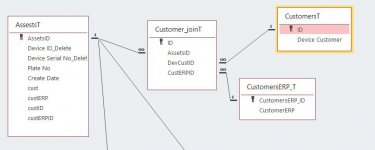
It's the customer_joinT that shows the relationship.
customerERP can have many DeviceCustomers but not the opposite. So when user selects DevCustID it will update the list of possible selectable custERPID. That's why the query is needed
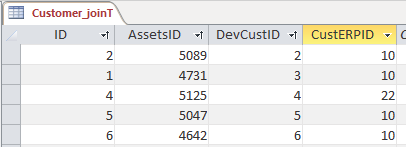
1645185760581.png


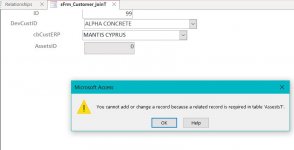
Keep in mind that it works fine if you run the sFrm_customer_joinT. It just doesn't work when it is called as a subform inside Frm_Assets
 
Last edited:
This is the Relationship Diagram

CustomerERP _T is NOT the linking Table in the uploaded Database
 

Attachments

  • ERP.JPG
    ERP.JPG
    36 KB · Views: 178
This is the Relationship Diagram

CustomerERP _T is NOT the linking Table in the uploaded Database
Why is it working on sFrm_customer_joinT when you run it ?
 
But it is not working
 

Attachments

  • Not Working.JPG
    Not Working.JPG
    39.6 KB · Views: 167
I don't have an issue with it. When I select a customer I get the correct match below on the CustomerERP

1645191460181.png
 
This is funny. I don't get the pop-up window when the sFrm_customer_JoinT is open as standalone which means that the subform inside the Frm_Assests is looking for the combo box data from the form outside not the one inside as a subform. Why is that ?
 
Thx for the effort Mike but as I explained your suggestion to delete the query is not helpful for me since that will remove the function that I'm trying to implement.
 
your "form" now has become a "subform", so a change on the Criteria on Query1 is necessary.
see Query1 in design view.
 

Attachments

Hi
Can anyone else confirm that in the database uploaded by arnelgp none of the Forms listed below actually work?

frrmAssets
frmDevices
sfrmCustomerJoin
 
I downloaded the db and they work fine for me. I got Access 2016
The only reason for having an autonumber in a table is for it to serve as the PK. If you are not going to use the autonumber in the junction table as the PK, it is best to just remove it.
I was planning on changing the relationship of customer_JoinT and AssestsT. It should be the other way around. I will also keep in mind what you said and my change fixes that issue also.

New relationship is this. Removed the AssestsID field from Customer_JoinT.
1645429965029.png


I think the setup is fine now and all forms work ok. My problem is still focused on how to make the user select combo DevCustID then the CustERPID will populate with Query1 according to what user selected, so the user can select only what is offered. The Problem is that I get an error when I try to input values even though the selections are shown correctly because Access tries to add a new record instead of using the existing.
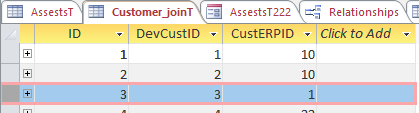
Here is an example. When I select BIOTRANS customer, I get BIOTRANS AE in customerERP but the problem is that this is added as a new record 111 (above) instead of using the existing one which is record ID 3 in customer_JoinT.
1645430453323.png

1645430704598.png

Ofc I wasn't expecting it to be that easy. So I tried to simplify selection by using the ID of customer_JoinT and not the devCustID and custERP separately, something like this below. But it's read only can't actually change it. Note that it's linked with the Frm_Assets
1645432588307.png
 

Attachments

  • 1645432525009.png
    1645432525009.png
    10.8 KB · Views: 163
  • test_Jim3.accdb
    test_Jim3.accdb
    5.6 MB · Views: 187
ok found the solution :)
I was trying to use/change the PK of the table customer_JoinT linked to the subform but I should have used the custID in AssetsT and make this a combo box
1645443138331.png


So now I will need to make a new form for the user to change/add new customers in table customer_JoinT.
 
Hi Jim

Looks like we are back to where we started.

Nothing will work because your relationships are wrong.

You would never EVER use a Junction table to add records
 
Jim

Sorry to be rude but you are talking out the back of your head in regards to Relationships

If you look at the relationship between Assets and CustJoin_T - all you are able to do is look up a value from CustJoinT

Your Assets Table is the Main Form on which you can only create a Combobox Bound to CustID to add 1 value only

Even if you create a Form to add new Customers all you would be able to do is update a Customer or add a New Asset and add a Customer
 
Jim

It would be far far easier to just have a table for Assets and a table for Customers.

Then on your Form for Assets you create a Combobox to add a Customer.

Then use a Not in List event to add a new Customer when needed
 
Pat's example is the perfect example of a Many to Many.

Do study it and amend your version to suit.
 
What I'm trying to do is a little more complicated. I have transformed that example to show you what I'm trying to do.

So I made Table1 who will hold the "bookingsID" which should be a unique number pointing at tblBookings.
1645537488969.png


The idea is that through the frmTable1 the user can select a CustID , VenueID and BookingDt and the BookingsID is changed to reflect the new value taken from tblBookings
1645537627505.png


In my case instead of CustID , VenueID and BookingDt , I have custID and CustERP which should be shown in an Assets form (Table1) so when an Asset needs to change it's custID and/or custERP then the AssetsT field containing that relation should be updated (BookingsID)
 

Attachments

Why are you needing to CHANGE a record using this method?
Forms are designed primarily as Data Input for new Records and also to Add New Records.

If you want at a later data to CHANGE a records properties then a different process is required.
 

Users who are viewing this thread

Back
Top Bottom