
Combine fielfds

Gismo

Registered User.
Local time
Today, 08:21
Joined
Jun 12, 2017
Messages
1,298
Hi all,

I need to combine 4 fields

I used below code

If field 3 and field 4 is blank, i dont want to see the seperator and the same with firled 1 and 2

Please could you advise
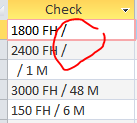
Check: [Detailed Inspections TBL]![Limit 1] & " " & [Detailed Inspections TBL]![Unit 1] & " / " & [Detailed Inspections TBL]![Limit 2] & " " & [Detailed Inspections TBL]![Unit 2]


1646833412758.png
 
If field 3 and field 4 is blank, i dont want to see the seperator and the same with firled 1 and 2
Code:
Check: trim([Detailed Inspections TBL]![Limit 1]
& (" " + [Detailed Inspections TBL]![Unit 1])
& (" / " + [Detailed Inspections TBL]![Limit 2])
& (" " + [Detailed Inspections TBL]![Unit 2]))
 
you can also create a function and call it in your Query:
Code:
Public Function fncConcat(ParamArray p() As Variant) As String
    Dim i As Integer, s As String
    For i = 0 To UBound(p)
        s = s & p(i)
        If i = 1 Then
            s = s & " / "
        Else
            s = s & " "
        End If
    Next
    s = Trim$(s)
    If Left$(s, 1) = "/" Then s = Trim$(Right$(s, Len(s) - 1))
    If Right$(s, 1) = "/" Then s = Trim$(Left$(s, Len(s) - 1))
    Do While InStr(1, s, "  ") <> 0
        s = Replace$(s, "  ", " ")
    Loop
    fncConcat = s
End Function
Check: fncConcat([Detailed Inspections TBL]![Limit 1], [Detailed Inspections TBL]![Unit 1], [Detailed Inspections TBL]![Limit 2], [Detailed Inspections TBL]![Unit 2])
 
Code:
Check: trim([Detailed Inspections TBL]![Limit 1]
& (" " + [Detailed Inspections TBL]![Unit 1])
& (" / " + [Detailed Inspections TBL]![Limit 2])
& (" " + [Detailed Inspections TBL]![Unit 2]))
Thank you for the reply

I amended my code but still get the blank from field 1 and 2

Check: Trim([Detailed Inspections TBL]![Limit 1])
& (" "+[Detailed Inspections TBL]![Unit 1])
& (" / "+[Detailed Inspections TBL]![Limit 2])
& (" "+([Detailed Inspections TBL]![Unit 2]))

1646887802759.png
 
Code:
Check: trim(
    (" "+[Detailed Inspections TBL]![Limit 1])
& (" " + [Detailed Inspections TBL]![Unit 1])
& iif(isnull([Detailed Inspections TBL]![Limit 2]) and isnull([Detailed Inspections TBL]![Unit 2]),""," /")
& (" " + [Detailed Inspections TBL]![Limit 2])
& (" " + [Detailed Inspections TBL]![Unit 2])
    )
 
i used my function on Query1.
try adding more data.
 

Attachments

Thank you
Works like a charm
Hi Arnelgp

How would I convert the code to only look at 2 controls with an " - " should the second control have any data?

I tried
RegSerial2: ([DAW Sheet Data File - Local]![Registration] & fncConcat([DAW Sheet Data File - Local]![Airframe Serial No]))
 
Last edited:
change the function to:
Code:
Public Function fncConcat(ByVal delim As String, ParamArray p() As Variant) As String
    Const single_space As String * 1 = " "
    Const double_space As String * 2 = "  "
    Dim i As Integer, s As String
    If Len(delim & "") = 0 Then delim = "/"
    delim = Trim$(delim)
    For i = 0 To UBound(p)
        s = s & p(i)
        If i = 1 Or delim <> "/" Then
            s = s & single_space & delim & single_space
        Else
            s = s & single_space
        End If
    Next
    Do While Right$(s, 2) = delim & single_space
        s = Left$(s, Len(s) - 2)
    Loop
    Do While InStr(1, s, delim & delim) <> 0
        s = Replace$(s, delim & delim, delim)
    Loop
    Do While InStr(1, s, double_space) <> 0
        s = Replace$(s, double_space, single_space)
    Loop
    s = Trim$(s)
    If Right$(s, 1) = delim Then s = Trim$(Left$(s, Len(s) - 1))
    If Left$(s, 1) = delim Then s = Trim$(Mid$(s, 2))
    fncConcat = s
End Function

now you change your Previous Queries to:

Code:
Check: fncConcat("/", [Detailed Inspections TBL]![Limit 1], [Detailed Inspections TBL]![Unit 1], [Detailed Inspections TBL]![Limit 2], [Detailed Inspections TBL]![Unit 2])

for your new Calculated column with " - ":
Code:
RegSerial2: ("-", [DAW Sheet Data File - Local]![Registration], [DAW Sheet Data File - Local]![Airframe Serial No])
 
Last edited:

Users who are viewing this thread

Back
Top Bottom