
Advice required Data looks like it is not saving until form is refreshed / Closed

tucker61

Registered User.
Local time
Today, 15:48
Joined
Jan 13, 2008
Messages
344
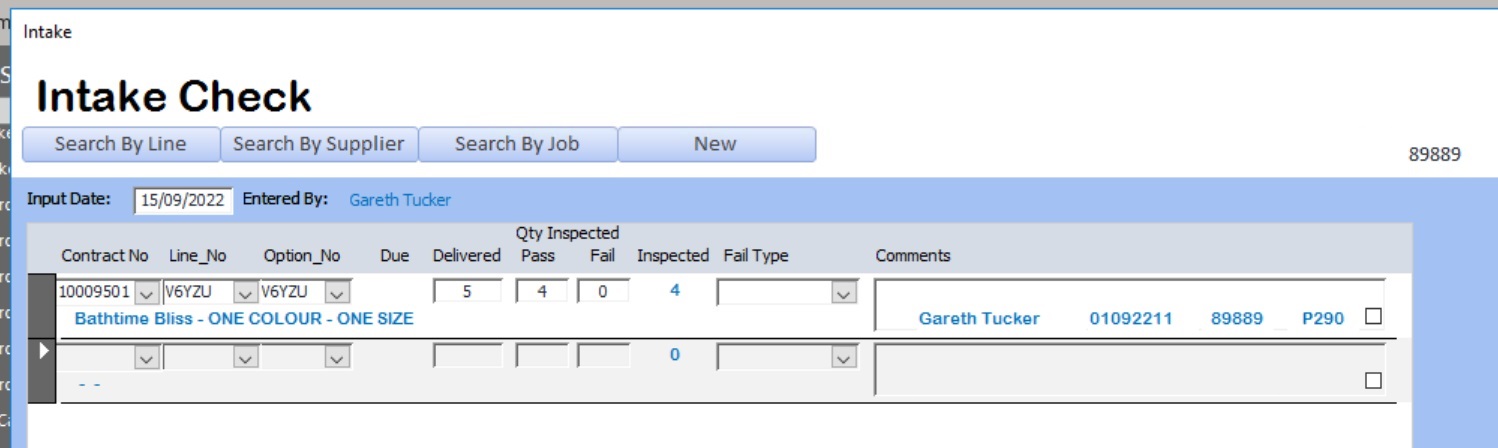
Need Advise please. Had this issue for some time now, trying to show the issue in the images below, when a user inputs some check data - they open up a form, and this assigns a job number - in the below the job number is 89889.
the data is saved in a intake Table (tblIntake) and the detail is saved in a detail table. (TblIntakeDetail)
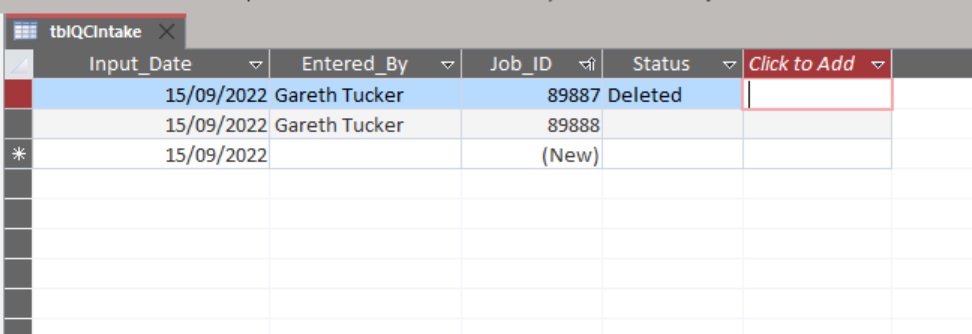
I can see the new job number is being used in the intake detail table, but when i look at the Tblintake - the job number does not look like it has been assigned.
The only time it gets assigned is when the user either closes the page down, or presses the new button to start a new job.
The sub form is a continuous form.

What am i missing ? is this possible ? Tried to force a attempt save to save the job number but it does not seem to want to work.
Screenshot 2022-09-15 164122.jpg
Screenshot 2022-09-15 163754.jpg
 
An autonumbered field's value is only assigned by Form's Update event (explicit or implied). If you "rolled your own" number, you could assign that at any time. Implied Form Update events occur when
1. You are on an record and take an action to create a new record AND at that time, the current record is dirty
2. You are on a record and have a sub-form on the form and the master record is dirty and you change focus to the sub-form.
3. You are on a dirty record and navigate to another existing record.
4. You are on a dirty record and close the form.

There may be other situations. The above are the most common cases. The common theme is when you have a dirty record (i.e. unsaved as yet) and do something to move away from that record. Access will not leave behind a dirty record if you change attention. Because Access is a black-box situation, it is possible that the Update could occur even if the current form ISN'T dirty - but we would never know the difference.

You do not get signaled for a Form Update. You get signaled for Form_BeforeUpdate (which lets you cancel the update or allow it, but if you have an autonumber, it has not yet been assigned) and for Form_AfterUpdate (at which time the update has occurred and the autonumber has been assigned and stored.)

You didn't actually say whether you were using autonumbers, but the behavior you described is why I guessed that an autonumber was involved. If you are NOT using an autonumber, then your problem is to figure out where that job ID is generated and call it sooner. But that is something under your control, whereas autonumber is Access-controlled.
 
You are correct in implying that I am using AutoNumber, So is this something that I just need to live with ?
 
I am having difficulty understanding the issue. I start new record on main form, tab into subform, checked main table and parent record is committed.
 
June7's point is valid. If there is an autonumbered field on the main and you tab into the sub-form, that should trigger the save of the parent record. At that point, if the job number field is in the main form's record, it should be in the record. From your quote:

I can see the new job number is being used in the intake detail table, but when i look at the Tblintake - the job number does not look like it has been assigned.

WHY do you believe the job number has not been assigned? Because if you have a proper parent/child setup including a formal relation between the parent and child tables, relational integrity (RI) would REQUIRE that the proper parent record exists or you wouldn't even be able to create a child record. If this is not happening, then RI isn't set up correctly and/or the parent/child form properties aren't set up correctly.

But then... do you refresh the form before you check to see whether something has been written yet? Depending on various set-up issues, it is possible for there to be at least a brief lag between the actual update and SEEING the actual update because what is on the screen in datasheet view is actually a snapshot. So... how are you actually checking for this update? (Mechanically, what steps do you take?)
 
June7's point is valid. If there is an autonumbered field on the main and you tab into the sub-form, that should trigger the save of the parent record. At that point, if the job number field is in the main form's record, it should be in the record. From your quote:


WHY do you believe the job number has not been assigned? Because if you have a proper parent/child setup including a formal relation between the parent and child tables, relational integrity (RI) would REQUIRE that the proper parent record exists or you wouldn't even be able to create a child record. If this is not happening, then RI isn't set up correctly and/or the parent/child form properties aren't set up correctly.

But then... do you refresh the form before you check to see whether something has been written yet? Depending on various set-up issues, it is possible for there to be at least a brief lag between the actual update and SEEING the actual update because what is on the screen in datasheet view is actually a snapshot. So... how are you actually checking for this update? (Mechanically, what steps do you take?)
To check for the update, i have a query to look for unmatched Jobs, and this is always showing me with that i have some jobs in the detail, but nothing saved in the master table. (TblIntake)
Code:
SELECT tblQCIntakeDetail.Delivery_Reference, tblQCIntakeDetail.Input_Date, tblQCIntakeDetail.Enterd_By, tblQCIntake.Job_ID, tblQCIntakeDetail.Job_ID, tblQCIntake.Entered_By
FROM tblQCIntakeDetail LEFT JOIN tblQCIntake ON tblQCIntakeDetail.Job_ID = tblQCIntake.Job_ID
WHERE (((tblQCIntake.Job_ID) Is Null));
 
Then relationships and/or form settings are not correct. Time to provide db for analysis? Follow instructions at bottom of my post.
 

Users who are viewing this thread

Back
Top Bottom