
List Box w/ Intervaled Time

MHO

Registered User.
Local time
Today, 05:09
Joined
Sep 17, 2006
Messages
12
I am trying to create an employee schedule.....with start shift and end shift times. I would like to utilize a list box that starts with 12:00 AM and lists the time of day in 15 minute intervals, and in 12-hour clock mode. I would then like to know the difference of the start shift and end shift times. If it matters, some of the end shift times will be after midnight the "next" day (for example: 6:00 PM to 2:00 AM).

Any help in the right direction is greatly appreciated.
 
I am trying to create an employee schedule.....with start shift and end shift times. I would like to utilize a list box that starts with 12:00 AM and lists the time of day in 15 minute intervals, and in 12-hour clock mode. I would then like to know the difference of the start shift and end shift times. If it matters, some of the end shift times will be after midnight the "next" day (for example: 6:00 PM to 2:00 AM).

Any help in the right direction is greatly appreciated.
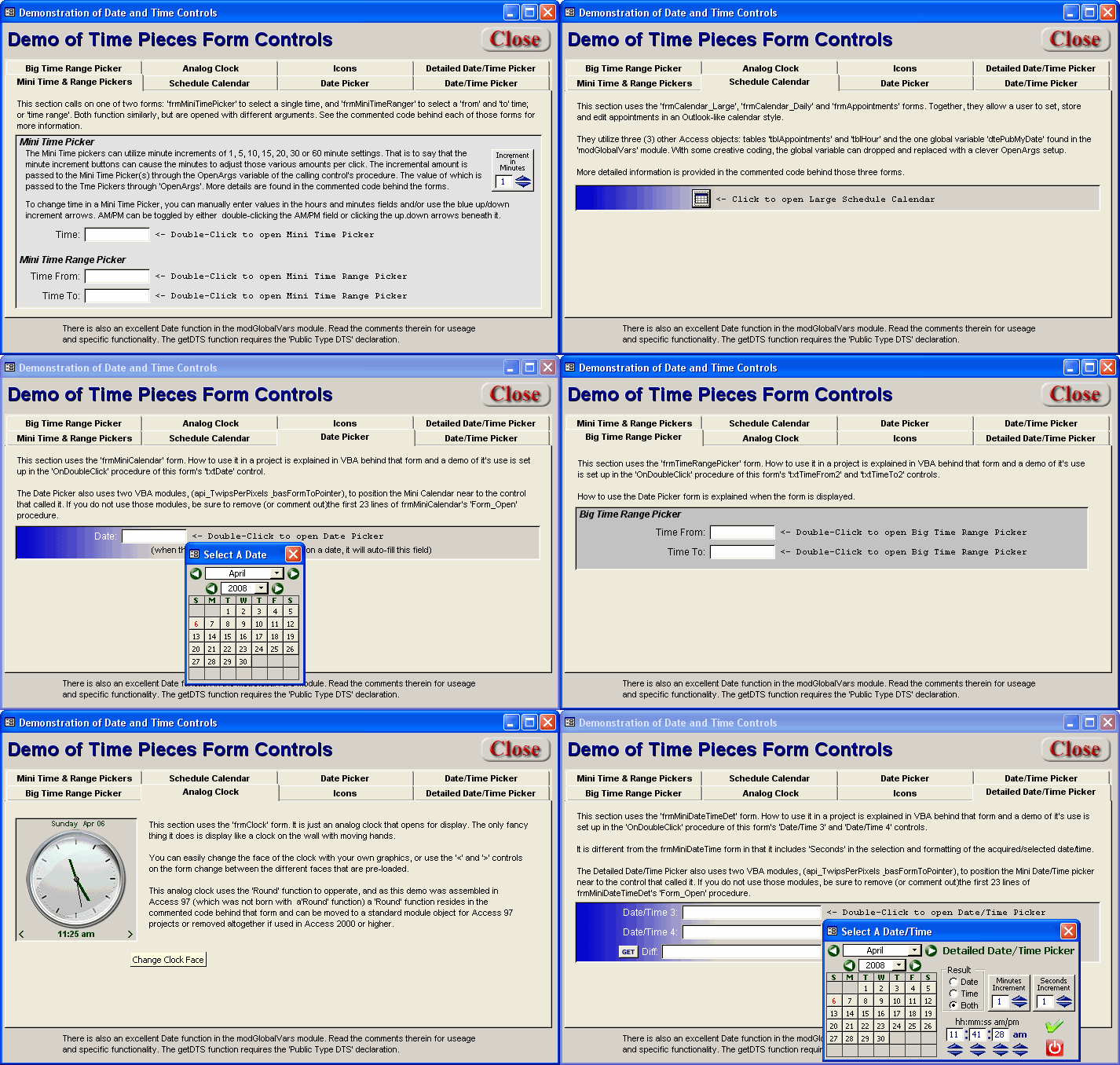
If you are open to some other methods for the UI then check out this:

Time Pieces (Date/Time Pickers; Calendar Scheduler n' Stuff) 3

timepiecesani.gif


This might give you some ideas
 
Thank you. Looks interesting. I will check it out.
 
Can someone tell me what is wrong with this? I put it in a query, and get the message:

Syntax Error (comma) in query expression......

Hours: (IIf(timevalue([Shift End]) < .25, ((datevalue([Date]) + 1) + timevalue([Shift End])) * 24),(datevalue([Date]) + timevalue([Shift End])) * 24)) - ((datevalue([Date])+timevalue([Shift Start])) * 24))

I don't get the (comma) error. IIf functions require them.

I am trying to find a formula that will take into account employee hours that traverse midnight. Knowing a shift will never start before 6:00am, I used the serial # of the time to be .25. I think my logic is ok, but I can't get the formula to take. Any thoughts?

I'm also not understanding date/time value functions. I thought they returned the serial # of the date/time? I did a query for just the date (DateValue([Date]), and in datasheet view it returned....the date.

Thanks in advance.
 
Last edited:
What Regional settings do you have on your computer, if you have somthing like mine aka NOT US or English, you have to use semicolon ; instead of comma to seperate parameters when using designveiw of queries and wizzards.

JR
 
That's good to know, but I am in the US and my settings are for English
 
Can someone tell me what is wrong with this? I put it in a query, and get the message:

Syntax Error (comma) in query expression......

Hours: (IIf(timevalue([Shift End]) < .25, ((datevalue([Date]) + 1) + timevalue([Shift End])) * 24),(datevalue([Date]) + timevalue([Shift End])) * 24)) - ((datevalue([Date])+timevalue([Shift Start])) * 24))

I don't get the (comma) error. IIf functions require them.

I am trying to find a formula that will take into account employee hours that traverse midnight. Knowing a shift will never start before 6:00am, I used the serial # of the time to be .25. I think my logic is ok, but I can't get the formula to take. Any thoughts?

I'm also not understanding date/time value functions. I thought they returned the serial # of the date/time? I did a query for just the date (DateValue([Date]), and in datasheet view it returned....the date.

Thanks in advance.

Looks like you have mis-macthed ( and )

Try:

Code:
Hours: ( IIf( timevalue([Shift End]) < .25, (((datevalue([Date]) + 1) + timevalue([Shift End])) * 24 ), ((datevalue([Date]) + timevalue([Shift End])) * 24) - ((datevalue([Date])+timevalue([Shift Start])) * 24) )
 
I can't thank you enough. This was a source of great stress the past few days. I did realize another mistake...and that was if the result was "true" I did not subtract the [Shift Start] date/time from the [Shift End] time. Was a simple fix, and the resulting formula was this:

Hours: ( IIf( timevalue([Shift End]) < .25, (((datevalue([Date]) + 1) + timevalue([Shift End])) * 24 ) - ((datevalue([Date])+timevalue([Shift Start])) * 24) , ((datevalue([Date]) + timevalue([Shift End])) * 24) - ((datevalue([Date])+timevalue([Shift Start])) * 24) ))

I post it simply if it helps anyone else.

Thanks again!
 
I can't thank you enough. This was a source of great stress the past few days. I did realize another mistake...and that was if the result was "true" I did not subtract the [Shift Start] date/time from the [Shift End] time. Was a simple fix, and the resulting formula was this:

Hours: ( IIf( timevalue([Shift End]) < .25, (((datevalue([Date]) + 1) + timevalue([Shift End])) * 24 ) - ((datevalue([Date])+timevalue([Shift Start])) * 24) , ((datevalue([Date]) + timevalue([Shift End])) * 24) - ((datevalue([Date])+timevalue([Shift Start])) * 24) ))

I post it simply if it helps anyone else.

Thanks again!

You're welcome!

Glad we could assist.
 

Users who are viewing this thread

Back
Top Bottom