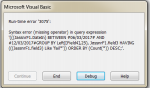
3075 missing operator

chizzy42

Registered User.
Local time
Today, 08:23
Joined
Sep 28, 2014
Messages
115
hello, im looking to seek some help in trying to locate an error (syntax error 3075 missing operator) that comes up when I try to run a SQL string in VBA. the problem looks to be the variables I am using in the string as it runs ok if I hard code in a date. The code takes a week number from a form and converts it into the date chosen...here's the code


Code:
 Dim db As DAO.Database
 Dim qdf As DAO.QueryDef
 Dim strValue As String
 Set db = CurrentDb
 Set qdf = db.QueryDefs("qryPareto")
 Dim strSQL As String
 Dim dates As Date
 Dim weekstart As Integer
 Dim Msgstart As Date
 Dim weekend As Integer
 Dim Msgend As Date
 
 weekstart = Forms![frmweekno]![Text0]
 Msgstart = DateAdd("ww", weekstart, DateSerial(Year(Date), 1, -5))
 weekend = Forms![frmweekno]![Text7]
 Msgend = DateAdd("ww", weekend, DateSerial(Year(Date), 1, 1))
strSQL = "SELECT (Count(*)) AS [Fail Count], Left([Field4],25) AS [Fail Desc], JassnrF1.field3 AS Status " & _
"FROM JassnrF1 " & _
"WHERE (((JassnrF1.DateIn) BETWEEN #" & Msgstart & "# AND #" & Msgend & "#" & _
"GROUP BY Left([Field4],25), JassnrF1.field3 " & _
"HAVING (((JassnrF1.field3) Like 'fail')) " & _
"ORDER BY (Count(*)) DESC;"
qdf.SQL = strSQL
DoCmd.OpenReport "rptParetobutton", acViewPreview
Set qdf = Nothing
Set db = Nothing

Any help would be greatly appreciated
 
LIKE needs an asterisk...

....field3) Like 'fail*'

otherwise it is =
 
Hi Ranman I tried adding the asterix but im still getting the error..

Code:
"HAVING (((JassnrF1.field3) Like 'fail*')) " & _
 
What's your SQL statement. Now, I don't care what goes into making it as you posted above. What is your actual SQL statement? Find out whats in strSQL.
 
3075as.png

heres a screenshot
 
No, that's a screenshot of the error message box. What does strSQL contain after all is said and done?
 
Code:
strSQL = "SELECT (Count(*)) AS [Fail Count], Left([Field4],25) AS [Fail Desc], JassnrF1.field3 AS Status " & _
"FROM JassnrF1 " & _
"WHERE (((JassnrF1.DateIn) BETWEEN #" & Msgstart & "# AND #" & Msgend & "#" & _
"GROUP BY Left([Field4],25), JassnrF1.field3 " & _
"HAVING (((JassnrF1.field3) Like 'fail*')) " & _
"ORDER BY (Count(*)) DESC;"
 
What's your SQL statement. Now, I don't care what goes into making it as you posted above. What is your actual SQL statement? Find out whats in strSQL.

I don't care about how the sausage is made. Show me what the actual sausage contains.

You do realize you are building an SQL string, correct? That SQL string is an actual string of text at the end of your code. What is that actual SQL string?
 
hi, you've lost me. I've shown you everything for the strSQL. This string creates a query called qryPareto which is used as part of the report info
 
strSQL = "I am building a"
strSQL &= " string. Hopefully"
strSQL &= ", it will demonstrate what I want "
strSQL &= "from you. Although the string is being build via code "
strSQL &= " when all is said and done, it will contain a message."
strSQL &= " When I ask you what strSQL contains, I don't want the "
str_SQL & = "code that builds it. I want the actual string inside strSQL."

So, what does strSQL contain?
 
You're missing a space just before the Group.
Code:
strSQL = "SELECT (Count(*)) AS [Fail Count], Left([Field4],25) AS [Fail Desc], JassnrF1.field3 AS Status " & _
"FROM JassnrF1 " & _
"WHERE (((JassnrF1.DateIn) BETWEEN #" & Msgstart & "# AND #" & Msgend & "[B][COLOR=Red]# "[/COLOR][/B] & _
"GROUP BY Left([Field4],25), JassnrF1.field3 " & _
"HAVING (((JassnrF1.field3) Like 'fail*')) " & _
"ORDER BY (Count(*)) DESC;"
 
OP

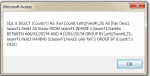
When someone asks what the SQL string is, they are asking that you put either debug.print OR a msgbox into your code just before you use said string to show what will be passed.

In your case, if you had put

Code:
msgbox "SQL is " & strSQL

just before

Code:
qdf.SQL = strSQL

you would have been able to see exactly what is being passed.

Alternative is to put a text box on your form and fill it with strSQL so you can cut/paste, but that does take a bit more effort.
 
sqlis.png

Hi JHB I tried adding in the space but still getting a fail. I've attached a screenshot as suggested by mark which shows the SQL at runtime.

Thanks for the other tips, the fields will be renamed once the fields are agreed just now i'm just trying to get the code to work before adding it into the main program
 
Only for info, when you search for dates then it need to be in US format = mm/dd/yyyy, use the function Format.
I would suggest putting the SQL-string you show here into a new query then it is easier to find the problem. Also notice what Pat writes about using WHERE clause instead of the HAVING.
 
You have two too many brackets
WHERE (((JassnrF1.DateIn)

Code:
strSQL = "SELECT Count(*) AS [Fail Count], Left([Field4],25) AS [Fail Desc], field3 AS Status " & _
    "FROM JassnrF1 " & _
    "WHERE DateIn BETWEEN #" & Format(Msgstart, "dd-mmm-yyyy") & "# AND #" & Format(Msgend, "dd-mmm-yyyy") & "# " & _
    "GROUP BY Left([Field4],25), field3 " & _
    "HAVING field3 Like 'fail' " & _
    "ORDER BY Count(*) DESC;"
 
Hi pat thanks for the tips on tidying the code up , is this the difference you mean?

Code:
SELECT (Count(*)) AS [Fail Count], Left([Field12],25) AS [Fail Desc], JasJnrF2.Field8 
FROM JasJnrF2 
WHERE (((JasJnrF2.DateIn) Between (Forms![frmweekno]![Text14]-1+#12/30/1899 8:0:0#) And (Forms![frmweekno]![Text16]+#12/30/1899 8:0:0#))) AND (((JasJnrF2.Field8) = 'fail')) 
GROUP BY Left([Field12],25), JasJnrF2.Field8 
ORDER BY (Count(*)) DESC;
 
OP,

Query for you, are you changing your file's format? I noticed you are referencing different fields in your code examples. Also, why reference by Field rather than using the field's name?

Referencing by Field is far less obvious in code than using the fields name, and can easily lead to using an incorrect function or improper formatting. Horrible when you accidentally format your BalanceAmount as a date for use...
 
Pat, if they ARE his field names, why are they changing? That is a giant concern to me...
 
Again thanks for taking the time to feedback on the code. The field names aren't named yet as there hasn't been a decision made on the data being fed in(the data is brought in by a form that searches network locations and loads it into a table...it works for me but the coding would probably give you chills). All I'm trying to do here in this code is find a way to allow blocks of data within week numbers to be used for yield purposes... field8 is a column that contains pass or fail.
Hopefully after spending more time here with people who are pros at this, ill get a bit more slick at SQL/VBA
 

Users who are viewing this thread

Back
Top Bottom