
Hello. I have a database that contains employee's details, and medicals they may have attended.
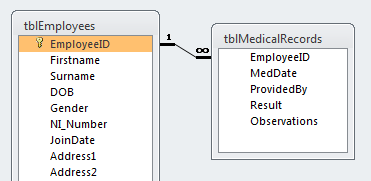
tblEmployees contains employee data, including date of birth.
tblMedicalRecords contains data about what the medical results were, including the date the medical occured.
Previously I had stored all the information on spreadsheets [see attached]
All staff will require numerous medicals, how frequent depends on thier age.
What I need to do via my database is calculate when a medical will expire.
On my spreadsheet I used a table to decide how many months to add dependant on the employee's age by VLOOKUP.
How can I achieve this in Access?
The closest I've got so far is:
tblEmployees contains employee data, including date of birth.
tblMedicalRecords contains data about what the medical results were, including the date the medical occured.
Previously I had stored all the information on spreadsheets [see attached]
All staff will require numerous medicals, how frequent depends on thier age.
What I need to do via my database is calculate when a medical will expire.
On my spreadsheet I used a table to decide how many months to add dependant on the employee's age by VLOOKUP.
How can I achieve this in Access?
The closest I've got so far is:
Code:
SELECT tblMedicalRecords.EmployeeID, Max(DateAdd("m",60,[MedDate])) AS MedExp
FROM tblMedicalRecords
GROUP BY tblMedicalRecords.EmployeeID;


