Audit Trail v2, Help!

ohphunk

A Questionnaire
Local time
Today, 17:41
Joined
Jun 6, 2007
Messages
33
My audit trail is doing fine, but now my boss needed the "memo" to be highlighted or numbered so its easier to see whether the record was updated. (And the date wasn't enough:mad: ) So is there any possible way to have it highlighted/numbered after edited??

Help me, Thanks!
 
Are you using Single Form, Continuous, or Data Sheet mode?
 
If I'm not wrong, its Single form.

I'm very new at this, and kind of clueless.
 
If it is Single form, and you want to change the text box as soon as something has been modified, you can set a text box's background color within the Change event and then in the form's On Current event you will want to set it back as the form will not be dirty (records changed) then.

Code:
Me.YourTextBox.Backcolor = 255 (or use whatever color number you want)

And then set it back to the original color in the On Current Event.
 
Erm, it didn't seem to work out. :confused:

And I'm still confused what type of form is it.
So sorry.
 
And I'm still confused what type of form is it.
If you open the form in design mode and go to the properties dialog, you will see, under the ALL tab, the DEFAULT VIEW. Whatever it says in there is what it currently is.

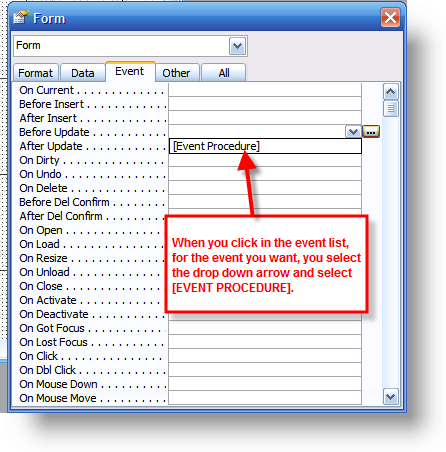
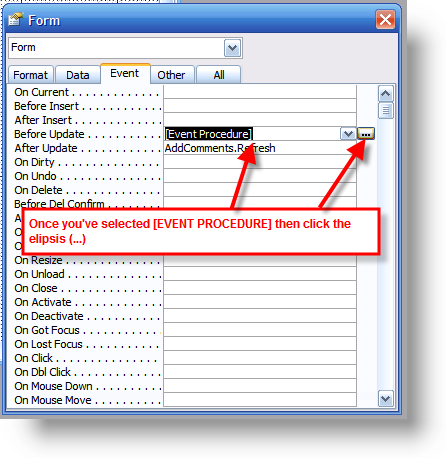
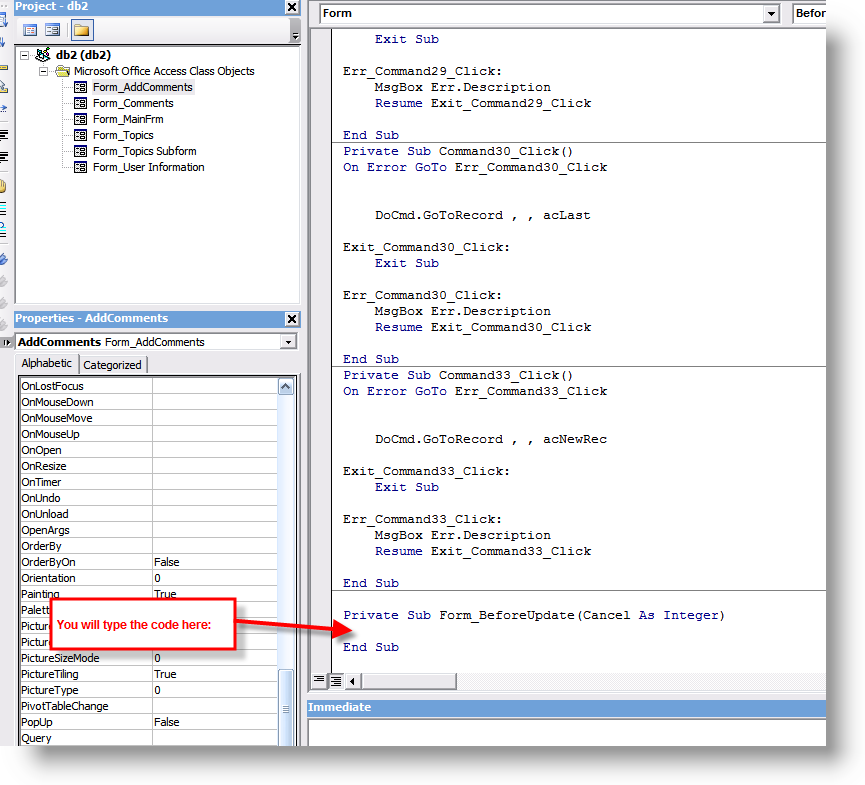
Also, did you open up the code window to enter the code in or did you try typing the code into the property? I'm attaching some screenshots (I created them for another post on this forum) that kind of show you what I mean (they don't use the same event that you need, but you should get the idea).

ev02.png


ev03.png


ev04.png


Remember to put it into the correct event and not the one showed in the example
 
LOLS, thanks for the pictures to make it clear.

But should I put the code in both OnChange in the text box and in OnCurrent in my main form??
 
LOLS, thanks for the pictures to make it clear.

But should I put the code in both OnChange in the text box and in OnCurrent in my main form??


Yes, you put the code to change the backcolor if something changes in the change event of the text box and then set it back to the original color in the form's On Current event so it resets each record as you move through them. Otherwise one change in one text box will then remain when you move from record to record, but if you put it in the on current event too it won't.
 
Well, that settles then, thanks a lot for your help, bob!
 

Users who are viewing this thread

Back
Top Bottom