Audit Trail

Hi Bob,

Thanks for all your help. I'm new to programing. I've uploaded a copy of the database with this. I would appreciate if you could guide me how to do it. Just show me at least for one field so that I can do the same to other fields too where I don't want duplicate entries. Also one more thing, when using the code to check for duplicates should I still use table properties to use indexing with no duplicates or should I remove them? Thanks again.
Okay, see my revision of your sample - see the form frm_NewMach which I have used and the table tbl_Machines which I had to modify to use a MachineID (autonumber) as a record ID.
 

Attachments

Hi Bob,

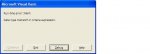
Thanks for the code. I tried to modify it to suit other data entry forms in the database but then it gives an error. I've attached the screenshots with this. I've tried to modify it for the frm_NewBrnh.

In your sample you've written "Me.Machine_Name". I'm wondering why an underscore is there between the two words as I can't find a control named as such. Sorry if I sound stupid. I would be grateful if you could clarify that to me.

Also, if you could please guide me on how to use the code in a form where there are several fields that need to be checked for duplicates. I'm not sure how to enter the parameters. Should I run several instances of Dcounts or can all the fields to be checked be specified under one? Thanks again.
 

Attachments

  • DB.JPG
    DB.JPG
    12.2 KB · Views: 339
  • DB1.jpg
    DB1.jpg
    92.4 KB · Views: 294
I bought an application from epigate software that does all that and alot more. i tried for a long time to create an audit trail but could not get it to work with subforms. this works with subforms so it was worth the money to me. it works on my access 2010 32 bit, but it says it will work with 2003 and 2007. it tells me when a person logs in and out of the application and what changes they made. it shows the before and after values, who made changes and when so it is pretty cool. i tried a ton of code i got off the web but as i said before i wasted a ton of time and could not get it to work with subforms.
 
Hi Bob,

Am I doing something wrong when replicating the code for other forms? Thanks.
 
Hi Bob,

Am I doing something wrong when replicating the code for other forms? Thanks.

1. It looks to me like you are using the wrong control reference on the form when comparing to the ID.

2. post what you have again and I'll see what I can see.

And a note to Medic11961 it works fine with subforms if you put the right function call in.
 
Hi Bob,

I've uploaded a copy of the database for your inspection. I've tried to replicate what you've done to the frm_NewMach in frm_NewBrnh but gets an error. Pls. let me know what I'm doing wrong. Also I would like an example how I could use the expression Dcount in a form where multiple controls need to be checked for duplicates (e.g. frm_EdData). Thanks a lot for all your help.
 

Attachments

Hi Bob,

Don't worry I realised what I did wrong there. It's working now. Thanks. However I would like some guidance on how to use the code on a form where multiple controls have to be checked for duplicates (e.g. like in the frm_EdData).
 
Hi Bob,

Don't worry I realised what I did wrong there. It's working now. Thanks. However I would like some guidance on how to use the code on a form where multiple controls have to be checked for duplicates (e.g. like in the frm_EdData).
Can you give me an example of how a record would contain duplicates? Which fields are we talking about (their actual field names and datatypes) and the control names for which they are bound?
 
Hi Bob,

In the frm_EdData there are multiple controls where I don't want duplicates. The form is linked to the tbl_IpAdd. In the form there are 3 fields that need to be checked for duplicates when entering data and they are "Employee Details", "Machine Details" and IP Address. Once a machine is allocated to an employee with a specific IP address that IP Address cannot be used again by another employee in the same network. Also the same machine cannot be used by two employees at the same time. That's the reason why I don't need these fields to be duplicated.

The person who assigns the machine may simply assign without the knowledge that this machine was previously assigned to someone. Suppose if an employee leave the machine will still be under his name unless the record is changed. So if this machine is assigned to a new employee it should prompt that the machine trying to assign would create duplicate values as it's already been allocated to the employee who has already left. This will make the inputter realise that this machine is under someone else's name already and therefore should amend the old record first before adding the new one. These duplicates will ruin the very purpose of the database. Down the line if I see the same machine is allocated to several employees who have changed departments it would be impossible for me to find out who's using which machine at any given time unless I physically go and find out to each and every one of them till I find the particular machine I'm looking for.

That's the reason I made this database and I need to have an audit trail just to find out who changed what and when. This will make the inputters accountable for their actions and can find out if any record has been added or amended in error.

The field names are "Machine Details", "Employee Details" and "IP Address". Data type of all the fields is Text and their control names are the same as field names. I have used combo boxes for them in the form.

Hope this gives you an idea what this database is all about. Pls. feel free to ask me if you require more info. Thanks.
 
Hi Bob,

Is it possible to do the Dcount for combo boxes? If so how can I do it? I figured out it works fine with text boxes. But in the frm_EdData I have used combo boxes which makes editing records easy. It's for these that I struggle to use Dcount to check for duplicates in the beforeupdate event. Your help is much appreciated.
 
All,

I have implemented the audit trail, and it works great, except for one of my forms which uses checkboxes. The audit trail does not record changes to yes/no boxes. Is there a way to make it recognize and record changes to these?
 
All,

I have implemented the audit trail, and it works great, except for one of my forms which uses checkboxes. The audit trail does not record changes to yes/no boxes. Is there a way to make it recognize and record changes to these?

Which one are you using?
 
I want to thank all that have posted code and methods for doing this, Great Job All of you. I unfortunately must ask if you can help me one a little more.

I created a database for tracking Police Records several years back and now have a new problem with someone making changes to those records and deleting them
which causes a major problem for police Departments.

Due to the large number of fields on my forms and the need to track all changes to any field, I don't need to track the field if it is Null unless that value is changed later, and I don't need to track record creation because I already have a field that must be filled before a record can be created. Because of all of this I have come to the conclusion I need to use a separate table to track these changes instead of just one field. What i can't seem to get past is how to do that without actually creating an Audit Table that has every field I use in all 4 of the tables I have in the database and if I do go that route how I would be able to manage adding future tables or fields to that table once data was present.

This is a very small department, they never reach the limit of entries before replication error in an Access database so I use straight Access and store the database on a Network drive instead of locally. Only 1 computer accesses the database since the Front End is only loaded on that computer.

I have 5 users and 1 or 2 of them is making changes that I need to put a stop to. We have a suspect but haven't been able to catch the person so I looked at the problem and wanted to go to an Audit Trail which is what I always wanted but had never seen a way to do it until I found this thread. I have a soft Spot for this department because they are very small and really have no budget to deal with this type of thing or to get a full blown Computer Assisted Dispatch system, most of the good ones are really high dollar.

Please help. If I were being paid for this I wouldn't even ask but in this case with no money involved I'm way more concerned with providing a working solution than being prideful and beating my head against a rock. I have a programming back ground but can't seem to get a handle on VB.

I do have the Second Version of Ghudson's AuditTrail working at the moment but that blank line it throws is making it hard for me to picture a way to drop that so the memo field can be read into a Text string then parsed out using a query. I did notice the memo field is space delimited so it can be parsed I just can't figure out the VB code to do it.
 
The audittrail mdb is brilliant but is there anyway I can adapt it so that I am able to insert the audit statements into separate records in another child table.

thanks
 
ScubaDiver, It is possible to do what you want. I use that as a back up of sorts. While it does make the information redundant because in my implementation I keep the Audit data in a separate table as well as each table that has an entry changed. I plan to remove this from the tables though.

If you keep the Audit data in a separate table it is cleaner in the overall database development and you can use queries to sort the data if you only want to see what changes were made to specific tables of data. The key is keeping track of data fields used to make the audit trail possible.

Essentially when you reference the area to store the changes you will have to ref the complete table name instead of just using 'Me!' and you will have to modify the Audit function to accept the different tables instead of looking for just the main table that it currently uses to store data.

Hope this helps.
 
ScubaDiver,

I attached a zip file of a database I've been working on that uses ghudsons version of Audit trail that saves the changes in a separate table. There are 2 photos included in the zip file. for some reason my Winzip wouldn't take the whole photo folder into the archive. You will need to create a folder called "Photos" and put the murphy.bmp file in it for the mdb to work correctly.

Administrator is the user name and Administrator is the password in this version.

Hope you can use this as an example to see how the code goes together so yo can modify the code to work with your database.

Code:
Call Audit_Trail(Me, "VID", VID.Value)

I modified the control fields to match the call for the Audit function. The field referenced in the call is the key field for the table you are tracking changes in. The code referenced above is from the CTW entry form so yo can compare how it relates to the different tables. This call is changed for each table that tracks changes and can be queried to specify what data is output in a report.
 

Attachments

Jim229,

Thanks for the database. I am not an expert and this is a bit complicated for me.

I only need to track changes for one table.
 
It's actually not that hard. Look at the Utility functions module, highlight and copy the section that is the audit trail code. You will be able to see where it switches to a calendar function. Go to your database and add a new module and then paste the copied code in it and save it as Module 1 or if you already have a Module1 use the next number that is available. Then located the form code modules above the Modules section and find a form that uses the audit trail. In most forms I put that function call in the top of the form code. Add that to your own forms where you need it. make sure you copy the tblaudit table to yours or create it yourself. save everything, I recommend you close and restart the database but that isn't required in most cases, and reopen it and it should work fine from there.

Keep in mind that code is setup to read the user login who is logged into Access. There is a commented line of code in the Audit trail code that you copied to Module1 that you can use that will read the login from the Windows login.
 

Users who are viewing this thread

Back
Top Bottom