Automation

aymanmb

Registered User.
Local time
Today, 05:20
Joined
Jan 28, 2007
Messages
96
I managed through a code on this forum to do compact and rapair on a button click as follows:

CommandBars("Menu Bar"). _
Controls("Tools"). _
Controls("Database utilities"). _
Controls("Compact and repair database..."). _
accDoDefaultAction

but then the dialogue winodw pops up to ask me to opn the comacted databse or not.

I want to set that to open automatically after the compact and rapair.

reason is that I will run another code after that to backup the databse.

any way to that
 
I've used this for the last 10 years (Access 2, 97, 2000, 2002, 2003)

Code:
        SendKeys "%(TDC)", False
 
Bob, you have been alwaysof help to me, but I tried your above code before and it did nothing (did not compact the database).

then I changes False to true (I do not know what False will do in this code so I tried to change it), then I got the warning that you can not compact a database when running a macro or visual basic code.

The main issue I an\m trying to sort out is to compact the database before running a backup code.

I can do the compact separtely, I can do the backup routien separtely but could don't do both in sequence at one time.
 
Which version are you using? And where did you call the code from. It has to be in a standard module and you have to close all forms before calling it. (sorry I didn't mention that before)
 
OK, I am using Access 2003

I put the code in the OnClick event of a button so it looks like that:
Private Sub QuitButton_Click()
On Error GoTo Err_QuitButton_Click

SendKeys "%(TDC)", False

Dim stDocName As String

stDocName = "mcrBackupFrontEnd"
DoCmd.RunMacro stDocName
DoCmd.Quit

Exit_QuitButton_Click:
Exit Sub

Err_QuitButton_Click:
MsgBox Err.Description
Resume Exit_QuitButton_Click

End Sub


The macro is just running a function that is put in a module. By itself, the backup function is working, but the databse is not compacted.

any recommendations to modify the above so that before running the backup, we get the databse compacted.
 
then I changes False to true (I do not know what False will do in this code so I tried to change it), then I got the warning that you can not compact a database when running a macro or visual basic code.

Doesn't that violate the 8th Commandment of Access? :)

"Thou shalt not copy and paste other people's code without at least attempting to understand what it does."
 
Just so you know, when you run the compact code it needs to have all objects closed first, and then it will compact and then reopen the database so you will need to set a flag in a table somewhere and have code that happens when the database opens to check that flag to see if the compact was done and then run the back up code and then reset the flag to False, zero, or however you wind up doing it, so that when the database is opened it doesn't make a backup every time it's opened.

Next, the code you have shows that you didn't put the sendkeys in a standard module. It can't be in a form's module on a click event because the form has to be closed before it can be run. To do that change your code to something like this:
Put this code in a standard module:
Code:
Public CompactData ()
     ' Create code here to set the flag first then call the send keys
...
     SendKeys "%(TDC)", False
End Sub

and this is your click event:
Code:
Private Sub QuitButton_Click()
On Error GoTo Err_QuitButton_Click

    DoCmd.Close acForm, Me.Name, acSaveNo

    Call CompactData

Exit_QuitButton_Click:
Exit Sub

Err_QuitButton_Click:
MsgBox Err.Description
Resume Exit_QuitButton_Click

End Sub

And like I said you will have to do the backup in a slightly different way, by putting it into a standard module and then calling it when the database OPENS depending on a flag you've set. And the reason why it wasn't working before was it was on the form's event (not to mention that you were quitting the app before it was done).
 
Wow, despite bing a beginner, I think I fugured out the above and can try. However, I have no idea about the flaging issue, how could it be done
 
1. Create a table that has just one YES/NO field - Name it BUFlag

2. When opening the database use DLookup to find the value (you'll have to have a form's load event set to do that).

3. In that code check to see if it is a -1 or a 0; if it is a 0 then bypass making the backup, if it is a -1 run the backup code.

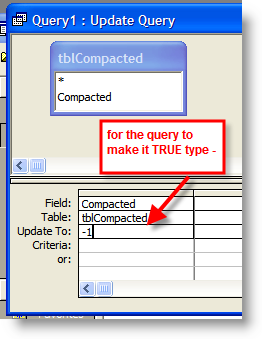
4. When running the compact code use an update query to update the BUflag field in the table to -1.
 
I never used DLookUp before, so here is my trial which is obviously wrong because it gives a compliation error:

dlookup ("[update]", "BUFlag", "[update] = 1")

I assume I need to use an IF statement after above (when written correctly) to check for the value whther 1 or 0 then execute the backup routine
 
I never used DLookUp before, so here is my trial which is obviously wrong because it gives a compliation error:

dlookup ("[update]", "BUFlag", "[update] = 1")
You probably shouldn't name the field UPDATE as that is a reserved word. Also, since you will only ever be setting and reading one row, you can just use
Code:
Dim blnCheck As Boolean

blnCheck = DLookup("[YourFieldName]","YourTableName")

If blnCheck=True Then
    ...put code here
Else
    ...put code if false here
End If
I assume I need to use an IF statement after above (when written correctly) to check for the value whther 1 or 0 then execute the backup routine

If you set it as a YES/NO datatype it will be -1 (NEGATIVE ONE) if true and 0 if False but you can do the check with = True or = False.
 
OK here is what I did:

(1) table created with field names "Comapcted" with yes/no

(2) standard module tohold the Comact funaction wher I put the code to set the flag to false ebfore the sendkeys %TDC. to set the flag to false I worte tbl_BUFlaf.Comapcted = False (gave a an invalid something...). Then a code to set the flag to yes.

(3) in the main form load I wrote: if flag is True, set flag to False

(4) in th exit button click I wrote: If flag is yes, then run backup code


if my logic above correct then guide me how to set the flag correctly in above codes
 
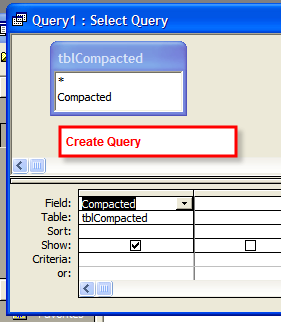
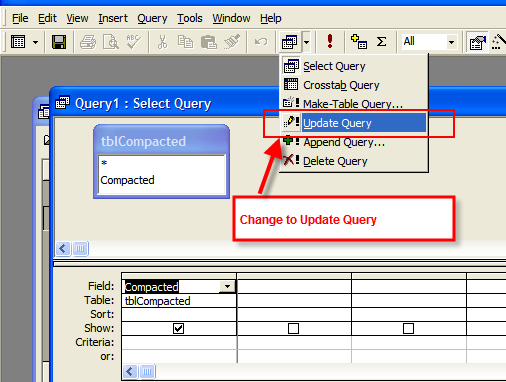
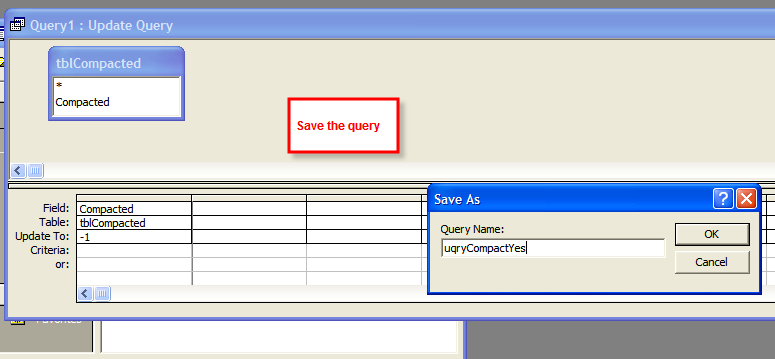
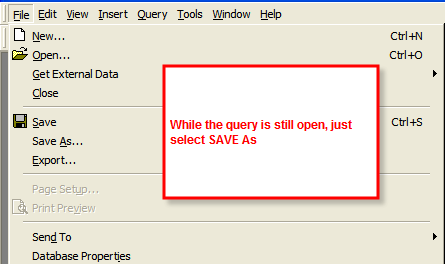
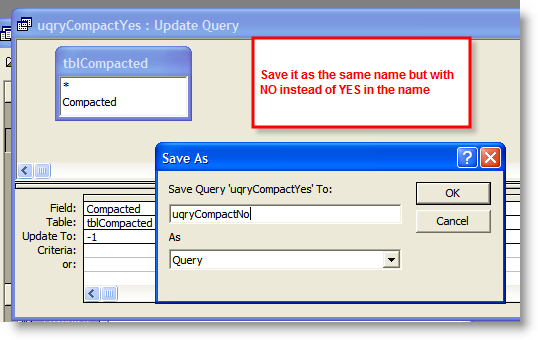
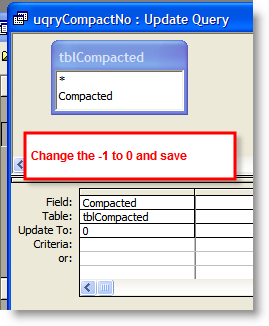
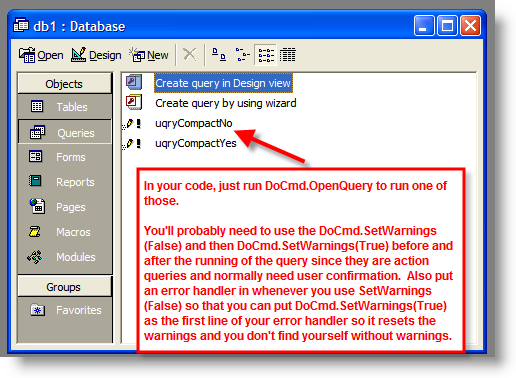
The easiest way is to just create two update queries, save them and call them at the time. One to set it to True and one to set the field to false. (See example below)

(3) in the main form load I wrote: if flag is True, set flag to False

(4) in th exit button click I wrote: If flag is yes, then run backup code

not quite - you need in the form load - If flag is true then create backup, then set to false.

In the exit you just need to set the flag to yes if you are going to want to compact and backup.

com01.png


com02.png


com03.png


com04.png


com05.png


com06.png


com07.png


com08.png


com09.png
 
Thanks Bob or allthe time you put to help us.

to b Honest, I gave up and decided to let the user do it in 2 steps, one button to compact and another to backup.

in Compact button click:
DoCmd.Close
SendKeys "%(TDR)", False
SendKeys "%(TDC)", False

in the backup button, I put the usual (working) code.

I tried looks OK so after hitting the compact, it copact r\ and reopen the databse then click the backup, it backups and quite BUT starnage enough the backup file is compact and the original file is inflated (7 MB Vs 12 MB).

So some how the backup routine gets it inflated before exit.

I will try to set the option of auto compact upon exit, it mau solve the issue.

thanks againa but just wanted to sahre you what I did
 

Users who are viewing this thread

Back
Top Bottom