
Build Query Headrs based on Table Cells

Ossama22

Registered User.
Local time
Today, 04:27
Joined
Aug 31, 2018
Messages
52
Hello Guys ,
I have a question and i hope to find a solution here ,
iam working to create a database to help my in my work ,
all i need is
i have a lot of companies codes in a table
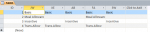
each company has a specific items for example (Xerox : Basic Salary & Meal Allowance &Incentive)
if i create a table consists of all companies codes as headers and below every code the items which belong to this company ,
is there anyway to generate a separate query with specific items(as a query headers) for every company which i assigned it before based on a choose from text box .. i attach photos to be more clear.

Hope to help me guys as i tried to search for the last 3 hours and it seems that its a hopeless case .
 

Attachments

  • Untitled.png
    Untitled.png
    8.9 KB · Views: 486
I'm not clear on the goal, but the table is not normalized. I'd expect fields for company and items:

Xerox Basic
Xerox Incentive

Then it's easy to query the items associated with a company. You don't want a field for every company, it would be a nightmare to maintain.
 
I'm not clear on the goal, but the table is not normalized. I'd expect fields for company and items:

Xerox Basic
Xerox Incentive

Then it's easy to query the items associated with a company. You don't want a field for every company, it would be a nightmare to maintain.

Iam sorry for not being clear, all i need is a tool to generate a query with items for every company,
For example : when i choose XE, it generates query with salary items i assigned to XE only
Is that possible
 
Iam sorry for not being clear, all i need is a tool to generate a query with items for every company,
For example : when i choose XE, it generates query with salary items i assigned to XE only
Is that possible

That is definitely not "all you need". You have built a spreadsheet in Access.

You need to either restructure the data as a database or put your spreadsheet in Excel. There is no point using Access with data like that.
 
What Paul is saying is that you haven't stored your data correctly, and therefore your task / query is being made very difficult.

You have stored your data as if access was a spreadsheet, not in correctly designed tables.

Whenever you see a field name that has effectively been created as an actual data point, you will have a problem. So as Paul described you should be storing your data "vertically" not "horizontally" , have a read here http://www.niftyaccess.com/normalization-tool/ and the link in my signature.

Edit: Damn those Galaxiom faster fingers....
 
What Paul is saying is that you haven't stored your data correctly, and therefore your task / query is being made very difficult.

You have stored your data as if access was a spreadsheet, not in correctly designed tables.

Whenever you see a field name that has effectively been created as an actual data point, you will have a problem. So as Paul described you should be storing your data "vertically" not "horizontally" , have a read here http://www.niftyaccess.com/normalization-tool/ and the link in my signature.

Edit: Damn those Galaxiom faster fingers....

hello , thanks for your answer ,

i bought that tool and iwatched the video , but i think that it wont help me to do what i need . :( , i think that its a hopeless case ,
iam so beginner in access , if you can guide me how to create what i need using transpose tool plz tell me :)
 
Post up some sample data as you have it in an excel spreadsheet. I would zip it.
Uncle Gizmo may be able to better steer you through the process as he wrote the guide.
 
Post up some sample data as you have it in an excel spreadsheet. I would zip it.
Uncle Gizmo may be able to better steer you through the process as he wrote the guide.

I Create it in both ways , Vertical and horizontal , i know that its kind of annoying but iam seeking your help guys to be able to finalize this issue
 

Attachments

Please see the attached.

3 Tables - Companies, ExpenseItems, CompanyExpenses.

You can easily add more companies and more expenses without redesigning anything.

Your query becomes a simple cross tab.
 

Attachments

Please see the attached.

3 Tables - Companies, ExpenseItems, CompanyExpenses.

You can easily add more companies and more expenses without redesigning anything.

Your query becomes a simple cross tab.

i Wanna to thank you for ur great efforts with me ,
Thx :)
 
I think Minty has hit the Nail on the head! ... If that's the way you want to go with it, then I can do a demo video showing you how to get there. Otherwise (and I think you should probably do this) you need to give a good explanation of what you are doing.

Thanks Uncle for your support and collaboration , it will be a great favor if you create that video ,

Thanks again bro :)
 

Users who are viewing this thread

Back
Top Bottom