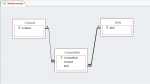
I have an already existing database of 500 odd contacts, and I need to set up 2 competency/skills matrices that can be completed for them.
For either matrix, there are 38 categories/skills, and there are 4 possible options that they can select (red, amber, green, and specialist).
I'm new to databases and my first instinct is just to set up a sub-form, but I have the phrase 'data normalization' stuck in my head, and I don't want to just go ahead and assume I know what I'm doing when I probably don't. As the four options that can be selected are uniform across all 38 (actually 76) categories/skills, is there a better way for me to do this? Ideally I want to be able to print reports of any of the different skills with a ranking of the contacts by the four categories.
I could use an excel spreadsheet, but the contacts already exist in Access, and I'd rather keep all the information in one place. If anybody could point out where I'm going to go wrong before I start, I'd be grateful.
For either matrix, there are 38 categories/skills, and there are 4 possible options that they can select (red, amber, green, and specialist).
I'm new to databases and my first instinct is just to set up a sub-form, but I have the phrase 'data normalization' stuck in my head, and I don't want to just go ahead and assume I know what I'm doing when I probably don't. As the four options that can be selected are uniform across all 38 (actually 76) categories/skills, is there a better way for me to do this? Ideally I want to be able to print reports of any of the different skills with a ranking of the contacts by the four categories.
I could use an excel spreadsheet, but the contacts already exist in Access, and I'd rather keep all the information in one place. If anybody could point out where I'm going to go wrong before I start, I'd be grateful.