
HI there - I have a query as follows:
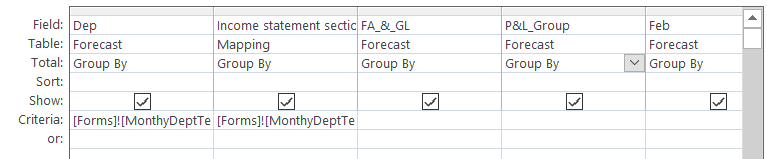
which returns
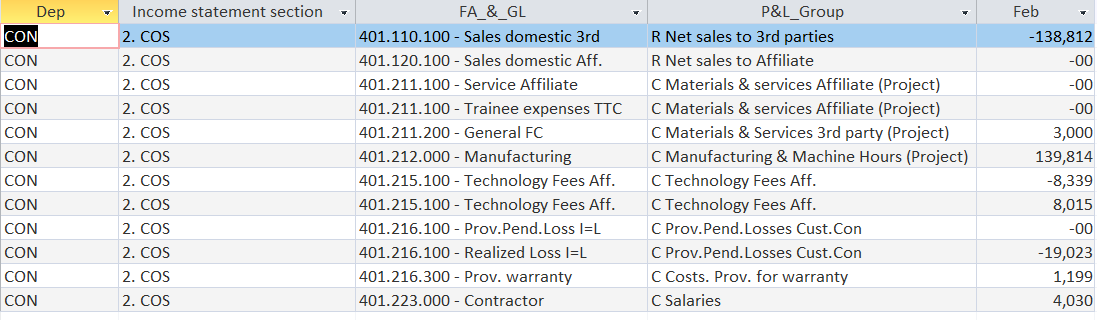
Where the P&L Group is the same I'd like the total to be added together and just show 1 entry so for example C Technology Fees Aff. just show one line with a total of -8,339 + 8015 (-384) and 1 line for C Materials & Services Affiliate (Project) and C Prov.Pend.Losses Cust.Con with the relevant total.
In another subform it will be possible to expand this out to see what that P & L Group for that Department and Income Statement section is made up of so for example click on C Technology Fees Aff and see both entries shown. The data above is just a small sample of the full data so there could be a lot of lines making up one P&L Group sometimes with different FA_&_GL
P.S I will likely remove out any null/zero value lines later but am keeping them in for now for testing purposes.
Thanks
Paul
which returns
Where the P&L Group is the same I'd like the total to be added together and just show 1 entry so for example C Technology Fees Aff. just show one line with a total of -8,339 + 8015 (-384) and 1 line for C Materials & Services Affiliate (Project) and C Prov.Pend.Losses Cust.Con with the relevant total.
In another subform it will be possible to expand this out to see what that P & L Group for that Department and Income Statement section is made up of so for example click on C Technology Fees Aff and see both entries shown. The data above is just a small sample of the full data so there could be a lot of lines making up one P&L Group sometimes with different FA_&_GL
P.S I will likely remove out any null/zero value lines later but am keeping them in for now for testing purposes.
Thanks
Paul


