
Controlling forms and Subforms

bernmc

Camel Spotter
Local time
Today, 21:10
Joined
Oct 3, 2004
Messages
14
Howdie y'all

I need a few pointers wrt the relationship between a form and its subform.

I have the following form:
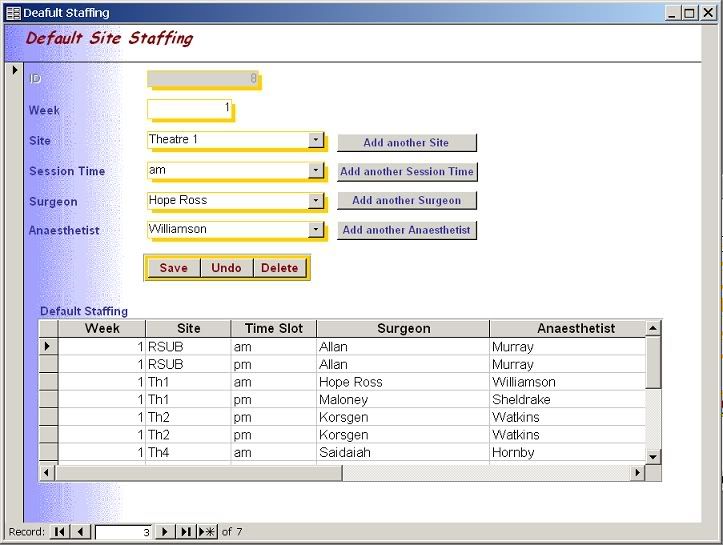
DefaultStaffingscreenshot.jpg


Top part of the form is for adding/editing etc.

The subform is based on a query. The two are linked on the 'week' value.

Now, this is what I want to do:
  1. The user must not be able to edit data in the subform (so should I use a report instead... but then will I be able to do 2...).
  2. Selecting a row in the subform should cause the whole form to go to that record so that the user can then modify info in the fields of the main form.
I don't know VB - the only code I've used is gleened from searching these forums (a great resource, so I'm learning slowly), so I'll need a bit more than 'Do a wrzmitchigob on the bleedlethrop'!
 
To lock the subform, set the subform's properties in design view (in the subform itself) to
Add Data - NO
Edit Data - NO

Then, set the Master /Child links for the subform control in the main form to the field, or fields, that would be linked. So, I'm assuming that ID is the primary key in the main form, so set the Master / Child links to be set on ID. To set those, click on the subform control in the main form and open the properties window, if not already opened, and then set the "Link Child Fields" and "Link Master Fields" property (on the Data tab of the properties dialog).
 
Thanks for the advice BL. Bit confusing the way access handles the subform - I didn't see the options to disable adding/edditing because I simply clicked on the edge of the subform to select it, rather than clicking the little block top-left that you would normally use to select a form. So that's sorted now thanks to you.

Now, in terms of linking, if I do it the way you suggest, the subform only shows one row - equivalent to the record in the main form.

What I want is to show all the records for a given week (1,2,3 or 4) as you can see above, and then by clicking on a record in the subform, have the main form display the corresponing information from that row. If I link on 'week' as above, I get the subform displaying what I want, but clicking on the rows in the subform has no effect...
 
Can you post a stripped down version of your database?
 
boblarson said:
Can you post a stripped down version of your database?

I'll post the whole thing (not big) - problem is it's @ work, so it'll be on Tuesday.
 
Right, here it is, with some random data. Form is 'Default Staffing'

(Be gentle - there's a lot that doesn't work atm, and my coding ability = copy and paste!!!!)
 

Attachments

Rats... is it really that difficult then? Thought it might just be a simple bit of code.

Note to self: Learn VB! :D
 
First of all, I apologize as it seems I didn't post my original findings here.

I think you are looking the wrong direction. You don't want to have a subform in a main form and click on the subform to go to something in the main form. In fact, the use of a subform is meant to bring in related records from those in the main form, not vice-versa. For your purpose a listbox would be more appropriate. The listbox would show everything and when clicked would take you to the appropriate record in the form.
 
Top man Bob - sorted in an instant.

Reputation added to :)
 

Users who are viewing this thread

Back
Top Bottom