Custom Ribbons...

QMDirk

Member
Local time
Yesterday, 16:44
Joined
Nov 16, 2019
Messages
52
my source gave me this:

<customUI xmlns="http://schemas.microsoft.com/office/2006/01/customui">

as the first line of the XML when creating a new ribbon, but it is not current. Does anyone have a more current reference to schema?
 
Hi. I think the current one simply changes from "/2006/01/" to "/2009/07."
 
ok. thanks.
 
I agree with the DBGuy but AFAIK the original values still work
 
Hi. @isladogs had a good point. If you don't need to customize the backstage, for example, then the old schema should still work for you. Cheers!
I'm using 2009 but can't hide home tab from backstage in Office 365.
This doesn't work. Any Idea?
<tab idMso ="TabHome" visible="false"/>
 
Last edited:
I'm using 2009 but can't hid home tab from backstage in Office 365.
This doesn't work. Any Idea?
<tab idMso ="TabHome" visible="false"/>
Hi @Tera, have you tried this?
<tab idMso="TabInfo" visible="false"/>
 
Yes, this is my xml

XML:
<tab idMso="TabInfo" visible="false"/>
<tab idMso="TabOfficeStart" visible="false"/>
<tab idMso="TabRecent" visible="false"/>
<tab idMso="TabSave" visible="false"/>
<tab idMso="TabPrint" visible="false"/>
<tab idMso="TabHelp" visible="false"/>

But still Home tab is sitting above my backstage.
 
Yes, this is my xml

XML:
<tab idMso="TabInfo" visible="false"/>
<tab idMso="TabOfficeStart" visible="false"/>
<tab idMso="TabRecent" visible="false"/>
<tab idMso="TabSave" visible="false"/>
<tab idMso="TabPrint" visible="false"/>
<tab idMso="TabHelp" visible="false"/>

But still Home tab is sitting above my backstage.
Oh wait, you said "Home" tab. I don't think you can take that out. You can make it empty, but it will still stay there.
 
Oh wait, you said "Home" tab. I don't think you can take that out. You can make it empty, but it will still stay there.
Pardon me, I was thinking of the "File" tab. To get rid of the "Home" tab, have you tried using?
<ribbon startFromScratch="true">
 
Yes.
XML:
<customUI xmlns="http://schemas.microsoft.com/office/2009/07/customui" onLoad="OnRibbonLoad" loadImage="LoadImages">
    <commands>
        <command idMso="Help" enabled="false"/>
        <command idMso="WindowClose" enabled="true"/>
        <command idMso="WindowRestore" enabled="true"/>
        <command idMso="WindowMinimize" enabled="true"/>
        <command idMso="ApplicationOptionsDialog" onAction="OnActionOptionsButton"/>
    </commands>
    <ribbon startFromScratch="true">

It seems Access 365 doesn't allow home tab to be removed from backstage.
 
Yes.
XML:
<customUI xmlns="http://schemas.microsoft.com/office/2009/07/customui" onLoad="OnRibbonLoad" loadImage="LoadImages">
    <commands>
        <command idMso="Help" enabled="false"/>
        <command idMso="WindowClose" enabled="true"/>
        <command idMso="WindowRestore" enabled="true"/>
        <command idMso="WindowMinimize" enabled="true"/>
        <command idMso="ApplicationOptionsDialog" onAction="OnActionOptionsButton"/>
    </commands>
    <ribbon startFromScratch="true">

It seems Access 365 doesn't allow home tab to be removed from backstage.
We may have to wait for Colin to chime in, because I don't have O365 to be able to test it. In the meantime, would you mind downloading any of the demos on my website and let me know if you see the Home tab? Thanks!
 
2.jpg


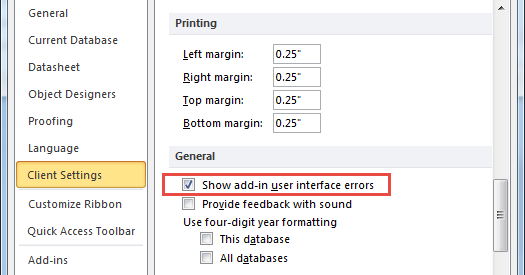
I have to add, your sample database gives me 8 errors when I click on file menu above ribbon.

As a practice to be safe , I normally have set my options to receive UI errors to be sure I'm errorless.

1.jpg
 
Last edited:
afaik, there is no solution yet to hide the Home group on the backstage.
 
put this after the </ribbon>
Code:
...
...
    </ribbon>
    <backstage>
        <tab id="tabAbout" label="About" title="Custom Backstage" insertBeforeMso="FileSave">
            <firstColumn>
                <group id="grpBS1">
                    <topItems>
                        <labelControl id="lblBS1" label="For Tera" />
                        <labelControl id="lblBS2" label="from ArnelGP" />
                        <!-- <imageControl id="imgArnel" getImage="getImages" tag="RibbonName:=IDBERibbonCreator;inMenu:=;CustomTagValue1:=;CustomTagValue2:=;CustomTagValue3:=;CustomPicture:=Arnel_small.jpg;CustomPicturePath:=" getVisible="GetVisible" /> -->
                    </topItems>
                </group>
            </firstColumn>
            <!-- Uncomment this to add you Own Picture to display on the backstage
            <secondColumn>
                <group id="grpBS2">
                    <topItems>
                        <imageControl id="imgArnel" getImage="getImages" tag="RibbonName:=IDBERibbonCreator;inMenu:=;CustomTagValue1:=;CustomTagValue2:=;CustomTagValue3:=;CustomPicture:=Arnel_medium.jpg;CustomPicturePath:=" getVisible="GetVisible" />
                    </topItems>
                </group>
            </secondColumn>
            -->
        </tab>
        <!-- Info -->
        <tab idMso ="TabInfo"  visible="false"/>
        <!-- New -->
        <tab idMso ="TabOfficeStart"  visible="false"/>
        <!-- Open -->
        <tab idMso="TabRecent"  visible="false"/>
        <!-- Save -->
        <button idMso="FileSave"  visible="false"/>
        <!-- Save As -->
        <tab idMso="TabSave"  visible="false"/>
        <!-- Print -->
        <tab idMso ="TabPrint"  visible="false"/>
        <!-- Close -->
        <button idMso="FileCloseDatabase"  visible="false"/>
        <!-- Account -->
        <tab idMso="TabHelp"  visible="false"/>
        <!-- Options -->
        <button idMso="ApplicationOptionsDialog"  visible="false"/>
    </backstage>
</customUI>
 
if it matters, i am using this:

Code:
<customUI xmlns="http://schemas.microsoft.com/office/2009/07/customui" onLoad="OnRibbonLoad" loadImage="LoadImages">
 
View attachment 81419


I have to add, your sample database gives me 8 errors when I click on file menu above ribbon.

As a practice to be safe , I normally have set my options to receive UI errors to be sure I'm errorless.

View attachment 81420
Hi @Tera. Thanks for testing it for me. I guess Access changed the way it behaves in O365. The UI error setting was also mentioned in that blog link I posted earlier. Cheers!
 
You definitely can hide the Home tab from backstage view.
In addition, you can also hide all items in the File menu with the apparent exception of the Feedback item in A365

Capture.PNG

The screenshot was done just now in Access 365 64-bit version 2003.

Please see my detailed instructions and example app here Securing your database - a tutorial

NOTE If anyone knows how to remove the Feedback item without removing the ribbon completely, please let me know
 
Last edited:
@isladogs I'm at work and can not read the whole documentaion of your Demo. Tonight I'll take a look.
For now just a quick question.

When the demo file is in Unlocked mode, is the home Tab in Backstage supposed to be seen or not?
Thanks.
 

Users who are viewing this thread

Back
Top Bottom