mjn015
Registered User.
- Local time
- Today, 15:36
- Joined
- Apr 10, 2007
- Messages
- 29
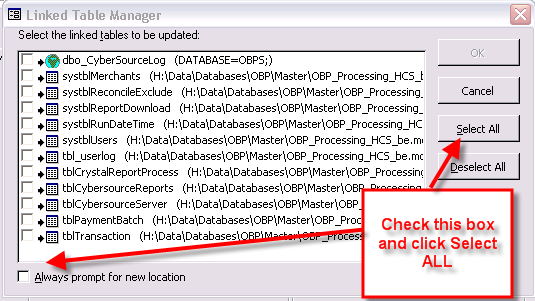
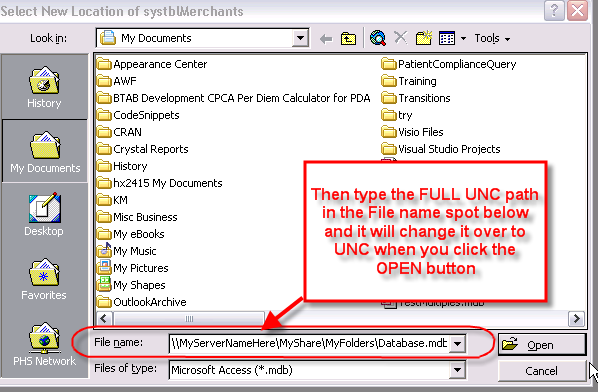
I recently split my database and also used Bob Larson's Autoupdating tool. Everything appeared to be working fine until a few users were unable to access the db. I later found out that because they are at a different site, they don't map to the server that houses the database BE. However, even if they manually map to the correct server, they are unable to bring up the db Form. They get an error stating the BE "...is not a valid path". My questions are:
1) If I were to copy all the files (the Master FE, BE, and MDE) to a public folder that ALL users have access to, will everyone be able to bring up the database Form?
2) How would this affect what was already set up when I ran Bob Larson's utility (or even the splitting and MDE creation)?
3) Is there a way to "Undo" what was previously "Done" to this database (ie: Splitting, Larson Utility, MDE creation) in order to correct the issue, or do I need to start from scratch and split the database while it's on a Public drive.
I hope this makes sense. Thanks in advance for your help.
Michael
1) If I were to copy all the files (the Master FE, BE, and MDE) to a public folder that ALL users have access to, will everyone be able to bring up the database Form?
2) How would this affect what was already set up when I ran Bob Larson's utility (or even the splitting and MDE creation)?
3) Is there a way to "Undo" what was previously "Done" to this database (ie: Splitting, Larson Utility, MDE creation) in order to correct the issue, or do I need to start from scratch and split the database while it's on a Public drive.
I hope this makes sense. Thanks in advance for your help.
Michael