Did I break a design rule?

rmulder

Registered User.
Local time
Today, 10:50
Joined
Feb 1, 2010
Messages
77
Ok, I'm new to Access. I am designing a access database for a trucking company to track all orders from ordering to delivering. I have created a "Customers" table which I want to pull from in the "Orders" table as "Who to Bill," "Delivery Location," and "Pickup Location". I created one-to-many relationships back to the "Customers" table for each as lookup fields and all seems well. I also did something similar for "pickup driver" and "delivery driver" looking up from one drivers table. Now my prob is when I go to query "Orders", it doesn't know which info to show when i start dragging customer information like address or driver info like name intgo the query. I think it soesn't know whether i want the pickup driver info or delivery driver info. Did I break the many-to-many design principle or what do I need to do to correct this. Sorry for the long ?, and thanks billions to whoever can help!

 
My rule of thumb when working out relationships is to have one parent record. Also decide who is the parent? Is it the customer or the order? In your case its the Customer.

One customer can have many orders
One order can have many lines
One order has one billing address (normally)
One order has one delivery address (normally)
One delivery is made by one driver (normally)

Look at how you ordering works now.

First you generate an order number
Then you assign a customer to it
Then you pick the items and add them to the order
Finally you plan the delivery by assigning a driver

In theory though you should pick the customer first, why? well they may be on stop or have limited credit, etc. It would be pointless and time consuming to create a 20 line order then only to find out that the customer is on hold for none payment of account.

Get yourself a big piece of paper and a pencil and try and draw the relationships out correctly and the folw of data. If you can do that then all you need to do is to replicate it in Access. Good Luck.

David
 
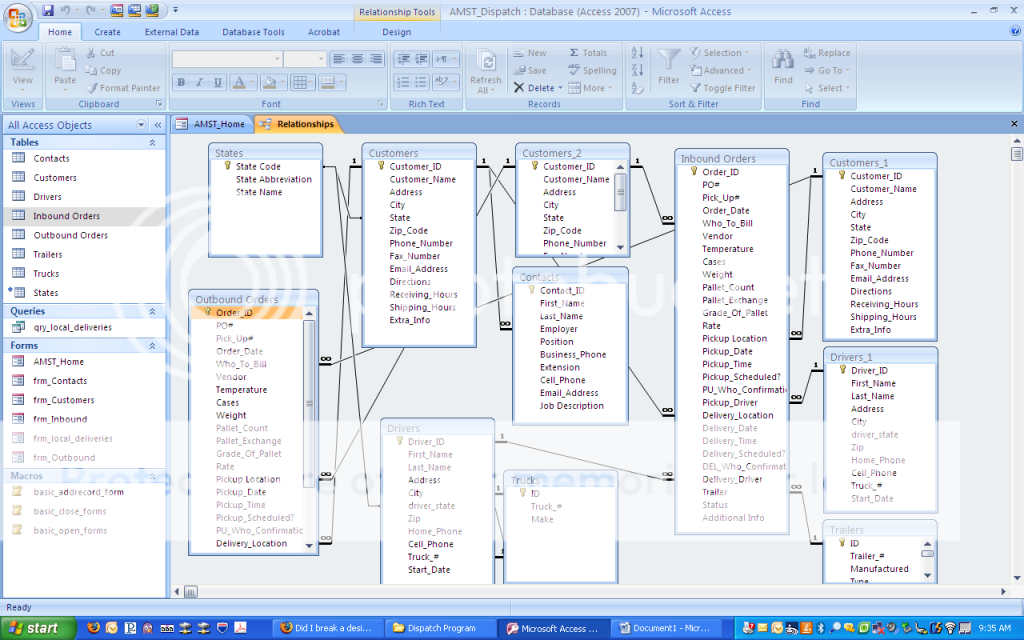
[FONT=&quot]ok, but we usually have different pickup and delivery drivers. and i don't want to have two tables with the same driver info for "pickup driver" and "delivery driver" lookup fields in the "order" table. but when i want to run a query, can i drag the details from the "driver" table into the query and distinguish between pickup and delivery driver info somehow, "name, cell phone, truck #" in the results. Here's a screenshot of my relationships.

screen1.png

[/FONT]
 
In your query you need to provide the alias name of the table that has been used more than once in the relationship.

If you just have Driver_ID it cannot distinguish between the Inbound and outbound tables. Prefix this field with the table alias and you should be alright.

David
 
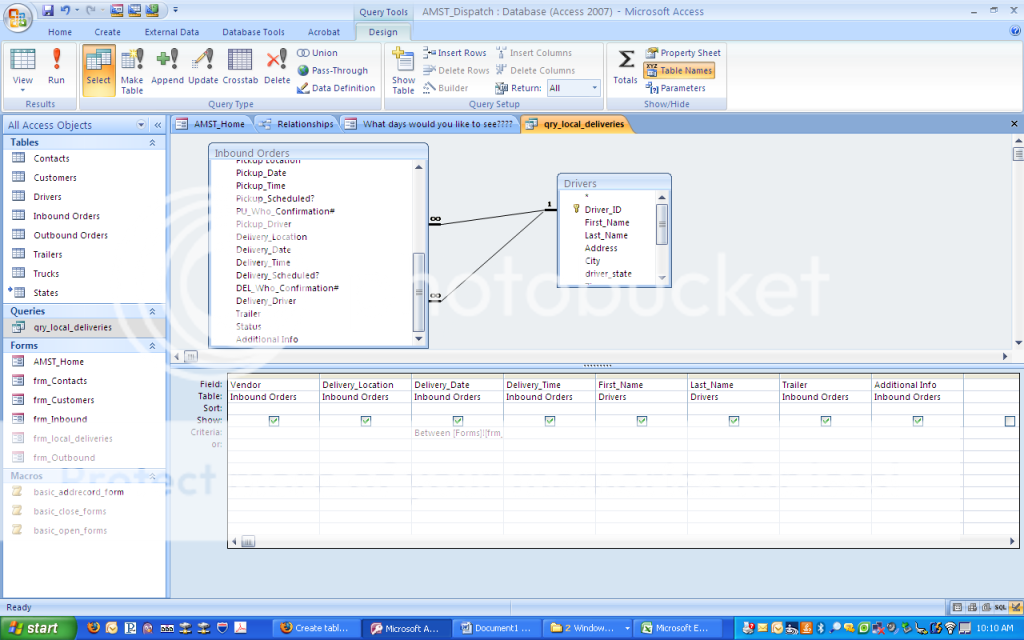
Ok, here's my query. What would I use for the alias name in the query to pull say the delivery driver name into the query or the pickup driver name. I'm sorry, I'm still not getting it. This is my major hangup keeping me from moving forward.
screen2.png
 
As you can see you have one master table drivers linked to both the driver fields.

First Delete one of the links.

Next add the drivers table again to the query, upon wich Access will give it an alias,such as Drivers_1 Point the link to the previously deleted link and create a join. This way the query will know which driver to pick.

David
 
Could you not Add the drivers table twice?
(I know you can do this on access2003)

Then in your query, link the Id of Drivers table 1 to delivery driver, and link drivers table 2, to Pickup driver. (you don't actually have 2 tables, it's just referenced 2 times in the query) Then you display your fields for each table.

hopefully that makes sense.
 
Thanks guys! I got it figured out with your help. I added the table twice deleted and created a new join. Both joins had to be type 3 (not exactly sure why) or else it would not pull up the records if the delivery or pickup driver fields were blank for the order. Thanks again, I now can move on :)
 

Users who are viewing this thread

Back
Top Bottom