Display connected data through duplicate data

Interninneed

New member
Local time
Today, 07:16
Joined
Jul 21, 2021
Messages
6
I am sorry if my title makes little sense, I am learning Access as I go and I do not have all of the vocabulary. I will try to explain but I think the pictures I have will work better.
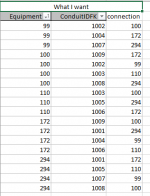
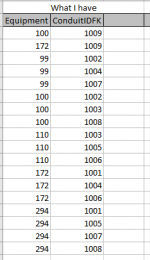
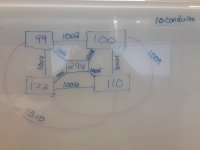
I am trying to show that two pieces of equipment are connected by the same conduit/wire (see drawn pic).
I need to be able to :
-Input the two pieces of equipment and the conduit at the same time (from combo boxes from connected already populated tables)
ex. [equip 99 ]-[conduit 1002]-[equip100]
-Create a query that shows all of the equipment and their connected equipment.
-Create a report that shows all of the equipment, its information, and the connected equipment and its information.

Issues:
-Creating a to/from field does not allow all of the equipment to be displayed at the same time. ex I can only show the to but not the from on a report.

I am not afraid to use code if needed. I know I showed pics from excel but It was the best way I could think of showing what I wanted.
 

Attachments

  • 20210726_123007.jpg
    20210726_123007.jpg
    1.4 MB · Views: 279
  • AccessWhatIWant.PNG
    AccessWhatIWant.PNG
    10.5 KB · Views: 275
  • accessWhatIHave.PNG
    accessWhatIHave.PNG
    7.6 KB · Views: 271
Thank you for replying.
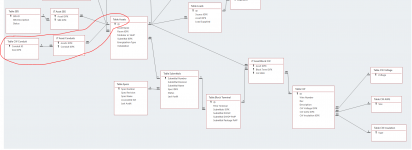
I do have Junction tables. The naming is different but Asset = Equipment and JT =Junction Table. Also, I know that the spaces need to be removed from the fields... long story.
There can only be two pieces of equipment to one conduit.
One Piece of equipment can have many conduits.
 

Attachments

  • Capture of Tables.PNG
    Capture of Tables.PNG
    76.3 KB · Views: 272
on your relatation,
remove the Join from Assets IDFKto.
drag another Table Assets and you connect the Assets IDFKto to this table.
 
I found the solution, but due to a time crunch I am only now able to post it.
I needed to write the SQL to create the solution not change the tables. Changing the table to have keys or to/from creates issues down the line for what we need the data for. Here is my solution:

The tables and relationships:
1628794671650.png

I created two queries of the same data (technically I added one extra field) and then combined them in a third Query. Reminder Assets=Equipment
1628794739762.png

Also, the previous example was a borrowed database where the creator had not used naming conventions. This is mine.

Here is the SQL for the combined query

SELECT QryTerminationA.ConduitFK, QryTerminationA.ControlTypeFK, QryTerminationA.SizeFK, QryTerminationA.WireNumber, QryTerminationA.ControlWireGaugeFK, QryTerminationA.ColorFK, QryTerminationA.ControlWireInsulationFK, QryTerminationA.EquipmentName, QryTerminationA.TerminalBlockandNumber, [QryTerminationA]![Expr1] & Chr(13) & Chr(10) & [QryTerminationB]![Expr1] AS Expr2, QryTerminationB.ConduitFK, QryTerminationB.WireNumber, QryTerminationB.EquipmentName, QryTerminationB.TerminalBlockandNumber, QryTerminationB.ControlWireVoltageFK, QryTerminationB.Description, QryTerminationA.Section, QryTerminationB.Section, [QryTerminationB]![Expr1] & Chr(13) & Chr(10) & [QryTerminationA]![Expr1] AS Expr3

FROM QryTerminationA, QryTerminationB

WHERE (((QryTerminationA.ConduitFK)=[QryTerminationB].[ConduitFK]) AND ((QryTerminationA.WireNumber)=[QryTerminationB].[WireNumber]) AND ((QryTerminationA.EquipmentFK)<>[QryTerminationB].[EquipmentFK]));

In order to create the setup I wanted I told Access to show the records where the conduits were the same in both A and B. I did the same for the wire numbers. I also had it only show the records where the equipment names were not equal (<>).

The result
I removed the extra data not needed for the answer. The conduit 16631 shows two equipment names and below it shows the same names in reverse.
1628797163351.png


I hope this is helpful to others who have similar questions.
 
Because conduits hold multiple wires and each duplicate is a wire number (1,2,3,...). That is why I included this in the SQL
QryTerminationA.ConduitFK)=[QryTerminationB].[ConduitFK]) AND ((QryTerminationA.WireNumber)=[QryTerminationB].[WireNumber]
 

Users who are viewing this thread

Back
Top Bottom