Don't visualize label

fibonacci

Registered User.
Local time
Today, 15:58
Joined
May 5, 2015
Messages
13
Hi evryone,
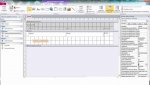
I want delete the label Volumi like you show in the image in the attachement (there is a red x in the exact point).
How can I proceed ?

Thank in advance
 

Attachments

  • Immaginee.jpg
    Immaginee.jpg
    64.1 KB · Views: 154
OK I will spell it out for you... According to the image posted you have the form open in design view. If this is the case then select the offending label, then press the delete button, the label should be deleted. If that's not what you want then please enhance your explanation.....
I do not want to delete the label but what the photo is marked with a red X (see it is made with paint). I did not know what to call it and I called the label even if it is not
 
I did not know what to call it and I called the label even if it is not
It is called a tab and you cannot delete it as such. What you can do is make the form popup and/or modal (which means it will open in it's own window) - find these on the forms properties 'Tutte' tab

Alternatively, if you don't want these tabs on all forms or reports, you can go into File>Options>Current Database and a few rows down, either untick the 'display document tabs' option or select 'Overlapping Windows', then click OK at the bottom - you will need to close and reopen Access for these to take effect.

 
It is called a tab and you cannot delete it as such. What you can do is make the form popup and/or modal (which means it will open in it's own window) - find these on the forms properties 'Tutte' tab

Alternatively, if you don't want these tabs on all forms or reports, you can go into File>Options>Current Database and a few rows down, either untick the 'display document tabs' option or select 'Overlapping Windows', then click OK at the bottom - you will need to close and reopen Access for these to take effect.
Excellent, your second option is perfect for me.
Thank you very much!
 

Users who are viewing this thread

Back
Top Bottom