
Hi all,
Ill try and explain what I need and if you can help?
I am trying to create a macro that will email a report for a item when the item number is put in the Parameter query.
This Is My Current Macro:
>Open Report (View - Print Preview)
>Maximize
>MsgBox
>SendObject
I can get this bit to work but what I want when the user types in the parameter the item code e.g. 123456 it brings up the details of the item and a pop up message saying is this information correct the a clickable"YES" or "No" if yes the Email attachment is send if no it stops the macro is this possible?
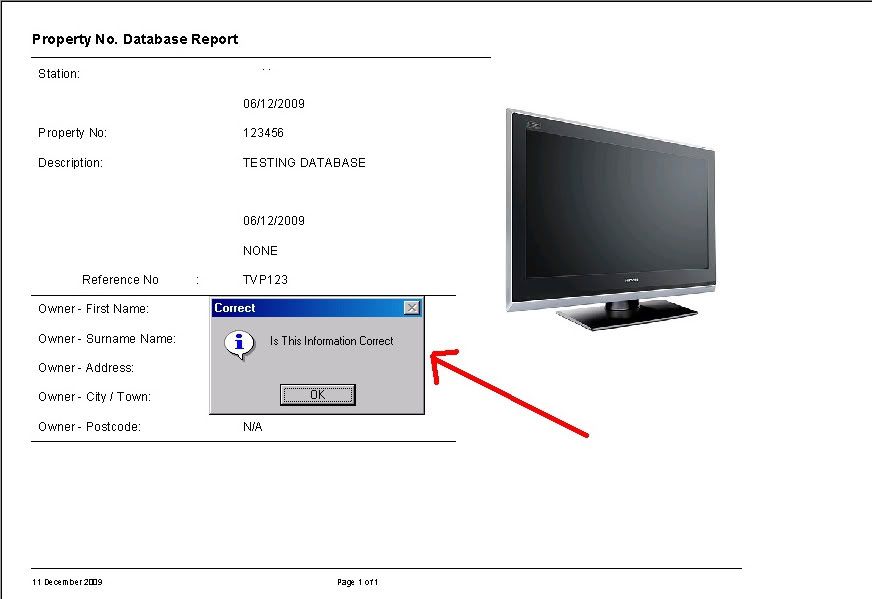
I have got everything working apart fromt he popup message yes or no, I currently got a information popup where you can only click yes. screen shot below....
Ill try and explain what I need and if you can help?
I am trying to create a macro that will email a report for a item when the item number is put in the Parameter query.
This Is My Current Macro:
>Open Report (View - Print Preview)
>Maximize
>MsgBox
>SendObject
I can get this bit to work but what I want when the user types in the parameter the item code e.g. 123456 it brings up the details of the item and a pop up message saying is this information correct the a clickable"YES" or "No" if yes the Email attachment is send if no it stops the macro is this possible?
I have got everything working apart fromt he popup message yes or no, I currently got a information popup where you can only click yes. screen shot below....

