
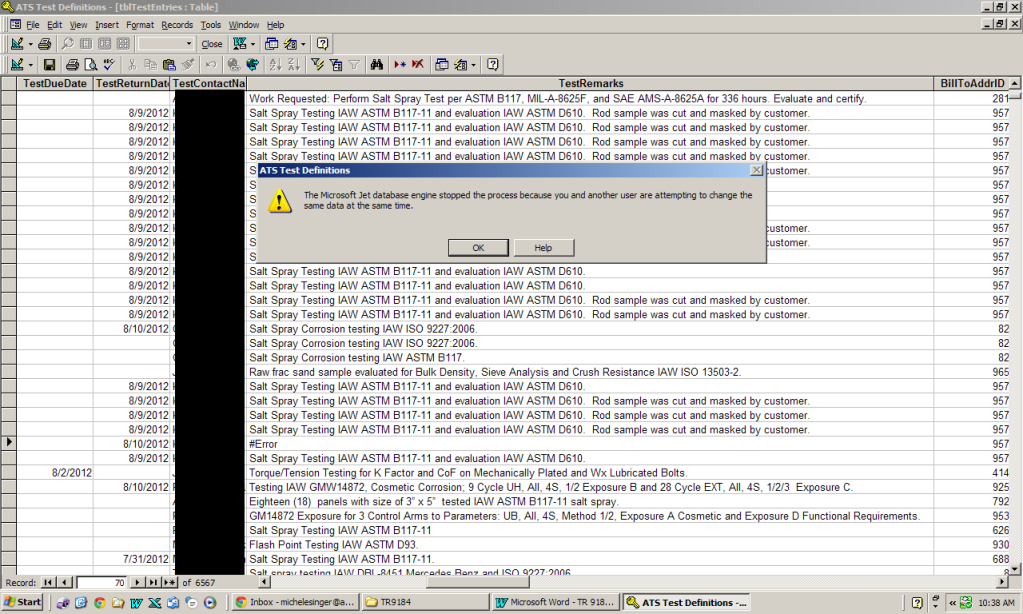
#Error in Table. Wont let me Change it.

alnilla

Registered User.
Local time
Today, 15:52
Joined
Jul 19, 2012
Messages
39
image1.png


I am getting this error (As in pop up from Microsoft) in the form and also in the table. I see what the issue is in the field it has #Error. When i go and try to change it also gives me the same error. I can go ahead and copy the information from the table above into it. But when i go and try to save it it freezes and wont let me change it. How can i go about and delete and or fix this record??

Thanks guys!!
 
How many users are involved? If more than just you, have you split your database?
If only you, do you have other windows open, or queries running etc?
 
There are 4 users of this db i made sure no one else was in it when i tried to edit the table. Restarted the server and it still gives the error.
 
This also happens when i am the form view and i am scrolling through the records. A new one was created and is working fine just need to somehow get rid of this entry.
 
I have an idea. What if i just copy the table with the main ID on it and remove the one thats giving it issues and then rename it back to the current table would that work??
 
From the Screen shot you seem to have a rather De-Normalised table structure. If it's not already doing so this structure will cause you headaches.
 
This problem is normally associated with corruption. I can't see the screenshot big enough on my phone to be certain but make a backup and then run compact and repair and then the PK for that record will go away and you can then delete that record and recreate it.

Is this a split database with tables only in the backend and everything else in the frontend and each user have their own cot of the frontend on their machine? If not, they do need to have that done.
 

Users who are viewing this thread

Back
Top Bottom