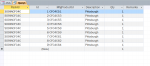
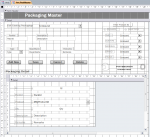
Existing Data in field of subform also filtered by combo box on main form

Ramnik

Registered User.
Local time
Today, 19:08
Joined
Jul 12, 2012
Messages
145
Hello everyone,
I have a form with subform (datasheet) .

On my subform i have one field which shows the
productId ( which is filtered from combo boxes on main form) .
productId contains two columns
1 bound column(id) ( hidden with width 0 )
2 column (desription) ( shown with width 2 )

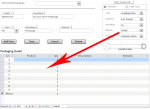
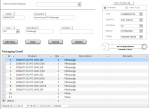
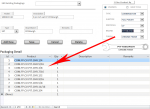
Now after entering the data when i come back to the form again . It hides the data from the productId field on subform , because data in combo box (on main form) doesn't match. Although the row is showing up , only the text in field (productId) is hidden.

Now when i change data in combo box on main form to match the ProductId , then the productId field text shows again.

after changing combo box it hides . What i need is the existing data should not hide when i change the combo box selection.

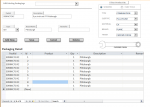
see pic 1 where product matches and pic 2 where not.
please note i am using master child relationship on the form/subform.

Please help and ask for more info if needed.

Thanks .
 

Attachments

  • 1.PNG
    1.PNG
    63.2 KB · Views: 417
  • 2.PNG
    2.PNG
    50 KB · Views: 465
No the ProductId doesn't change after updating the combo box . It shows again when changing the combo box to PIT again . What i need is to not to hide when the filter is applied . Thanks
 
everything is working fine . But i don't want the productId for existing data hidden as i change product type through combo boxes.

The connected fields are the Pack Id which is Hidden column in subform (datasheet).
 
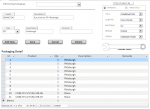
Please look at attachments again. Only the product Id relevant to combo boxes show. Although every other type is present(but hidden.
 

Attachments

  • 22.PNG
    22.PNG
    50.7 KB · Views: 179
  • 11.PNG
    11.PNG
    42.8 KB · Views: 193
Hello ,
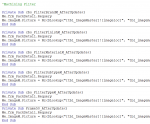
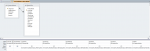
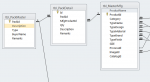
Attached are the images which includes row source for productId, table design and form with master child relation.
 

Attachments

  • filtercode.PNG
    filtercode.PNG
    36.3 KB · Views: 177
  • form.PNG
    form.PNG
    48.6 KB · Views: 264
  • row source productId.PNG
    row source productId.PNG
    37.3 KB · Views: 320
  • table design pack.PNG
    table design pack.PNG
    26.4 KB · Views: 185
I think I could not provide required information for this question .
 
<<<<It looks like your subform results set is controlled by criteria. The criteria is provided by the combobox selections under "Filter Product By".

Am I Correct?>>>>>

Yes you are correct, the criteria is provided by the filter combo boxes.

<<<<<<But in both cases 9 records are returned, is this correct? Do you have exactly 9 records "PLANE" and 9 records "PITTSBURG".. ?>>>>>>

No the records are only 9 ( i.e. only pittsburgh ) . After updating the combo boxes only the product name hides although the records still the same ( i.e pittsburgh).
If i have the plane products then if filter is "plane" it will show the product name but if filter is other "e.g. pittsburgh" it also hides the product name ....


The condition is "after updating the combo boxes the product name show/hide according to filter although the entire row is there".
only the product name field hides. ( which is product id ( width 0) and product Name (width 2).

Thanks
 
Thanks, But my master/child relationship is behaving exactly how i need .
The problem is only with the product Id field on subform which is filtered by combo boxes on main form .The previously entered rows for particular set remains there even after updating the filter , But the particular field (Product Name ) which has two columns in it , hides the text only . It shows data only when a relevant filter is applied according to product , although data is always there .
 
Here is what you need

sql

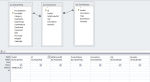
SELECT tbl_PackDetail.PackId, tbl_PackDetail.Id, tbl_PackDetail.MfgProductId, tbl_MasterMfg.ProductName, tbl_PackDetail.Description, tbl_PackDetail.Qty, tbl_PackDetail.Remarks
FROM tbl_PackMaster INNER JOIN (tbl_MasterMfg INNER JOIN tbl_PackDetail ON tbl_MasterMfg.ProductId = tbl_PackDetail.MfgProductId) ON tbl_PackMaster.PackId = tbl_PackDetail.PackId
WHERE (((tbl_PackDetail.PackId)="S09INCFC4C"));


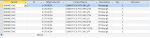
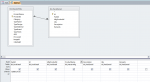
and see the attached images ...
Thanks
 

Attachments

  • QRYDESIGN.PNG
    QRYDESIGN.PNG
    30 KB · Views: 137
  • qryresults.PNG
    qryresults.PNG
    29.6 KB · Views: 154
The results will be exactly the same my friend . There is no difference at all .
 
check it . But i don't think it will make any difference at all...


SELECT tbl_PackDetail.PackId, tbl_PackDetail.Id, tbl_PackDetail.MfgProductId, tbl_MasterMfg.ProductName, tbl_PackDetail.Description, tbl_PackDetail.Qty, tbl_PackDetail.Remarks
FROM tbl_MasterMfg INNER JOIN tbl_PackDetail ON tbl_MasterMfg.ProductId = tbl_PackDetail.MfgProductId
WHERE (((tbl_PackDetail.PackId)="S09INCFC4C"));


Thanks...
 

Attachments

  • new qry.PNG
    new qry.PNG
    32.1 KB · Views: 140
  • qry new.PNG
    qry new.PNG
    37.7 KB · Views: 141
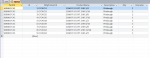
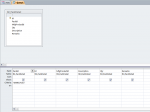
Here are the images.
Hope we will find something about it.


Thanks.
 

Attachments

  • qry_design.PNG
    qry_design.PNG
    23.5 KB · Views: 127
  • qry_result.PNG
    qry_result.PNG
    28.7 KB · Views: 140
  • frm_design_view.PNG
    frm_design_view.PNG
    64.2 KB · Views: 134
I ave already sent it to you .
Here it is attached again.

Thanks
 

Attachments

  • row source productId.PNG
    row source productId.PNG
    37.3 KB · Views: 142
SELECT tbl_MasterMfg.ProductId, tbl_MasterMfg.ProductName
FROM tbl_CategoryMaster INNER JOIN tbl_MasterMfg ON tbl_CategoryMaster.CategoryId = tbl_MasterMfg.Category
WHERE (((tbl_MasterMfg.TypeName)=[Forms]![frm_PackMaster]![cbo_FilterTypeM]) AND ((tbl_MasterMfg.TypeDesign)=[Forms]![frm_PackMaster]![cbo_FilterSubtypeM]) AND ((tbl_MasterMfg.TypeMaterial)=[Forms]![frm_PackMaster]![cbo_FilterMaterialM]) AND ((tbl_MasterMfg.TypeBrand)=[Forms]![frm_PackMaster]![cbo_FilterBrandM]) AND ((tbl_MasterMfg.TypeFinish)=[Forms]![frm_PackMaster]![cbo_FilterFinishM]) AND ((tbl_CategoryMaster.SerialNo)=[Forms]![frm_PackMaster]![Frame50]));
 
Because its based on the combo boxes on the form , Thats why.

Its simple actually
Select [results[ from [tablename[ where [(filter1 & filter2 & ... )]
 
It will list all the rows of product Name, In this case it will a hell lot harder for user to find the product from 1000 products .
 
Is there any other method to filter the productName from combo boxes???????
 
Yes it does.
Obviously it will do it But now how would i select a new product from near 1000 products ????? How do i filter it?
 
Ohhhhhhhhh!!!!!! You are GREAT!!!!! Its been like 2 weeks i'm stuck in this problem and giving you as much info i can and after that what have u came up with ????????????

and you think you solved it ????????

Is it you call a solution ?

well i don't want to say anything .

Thanks for ur time .
see u next time ...
 

Users who are viewing this thread

Back
Top Bottom