Explanation of a complex JOIN

mcdhappy80

Registered User.
Local time
Today, 15:10
Joined
Jun 22, 2009
Messages
347
Can someone explain to me this complex JOIN:
Code:
FROM tblTipDokumentacije INNER JOIN ((tblMesto INNER JOIN tblPorodica ON tblMesto.txtPTTBr = tblPorodica.txtPTTBr) INNER JOIN (tblMestaPohadjanja INNER JOIN (tblDete INNER JOIN tblZahtev ON tblDete.txtSifraDetetaID = tblZahtev.txtSifraDetetaID) ON tblMestaPohadjanja.txtMestoPohID = tblDete.txtMestoPohID) ON tblPorodica.intPorodicaID = tblZahtev.intPorodicaID) ON tblTipDokumentacije.intTipDocID = tblZahtev.intDocTipID
I've read this http://www.w3schools.com/Sql/sql_join.asp and I understand how the JOINS work but on this example I've supplied I'm lost.

Thank You
 
Does the attached picture provide a more clear perspective of the table relationships via this complex Join?
 

Attachments

  • Query1.JPG
    Query1.JPG
    15.3 KB · Views: 160
Does the attached picture provide a more clear perspective of the table relationships via this complex Join?
Yes, now I can clearly see the route the JOIN goes, what I don't understant why it first starts from tblTipDokumentacije if my main table for holding records is tblZahtev?
 
For the answer to that, you would have to ask the person who wrote the original SQL statement. Personally, I think it's badly structured SQL syntax.
 
For the answer to that, you would have to ask the person who wrote the original SQL statement. Personally, I think it's badly structured SQL syntax.

The "person" is none other than Microsoft Access 2007 Query Builder :)
How would You write the same query, but better?
 
I would structure the FROM clause thus:

FROM ((((tblZahtev
INNER JOIN tblDete ON tblZahtev.txtSifraDetetaID = tblDete.txtSifraDetetaID)
INNER JOIN tblMestaPohadjanja ON tblDete.txtMestoPohID = tblMestaPohadjanja.txtMestoPohID)
INNER JOIN tblPorodica ON tblZahtev.intPorodicaID = tblPorodica.intPorodicaID)
INNER JOIN tblMesto ON tblPorodica.txtPTTBr = tblMesto.txtPTTBr)
INNER JOIN tblTipDokumentacije ON tblZahtev.intDocTipID = tblTipDokumentacije.intTipDocID
 
Does the attached picture provide a more clear perspective of the table relationships via this complex Join?
Is there a way to structure this SQL statement without JOINS just using the WHERE clause?

Thank You
 
Why would you not want the JOINs?

Because this qry (and its code) doesn't perform as expected on the form I'm using it:

Code:
SELECT tblZahtev.intZahtevID, tblZahtev.dteDatumZahteva, tblZahtev.txtBrUgovora, tblZahtev.bolDoc1, tblZahtev.bolDoc2, tblZahtev.bolDoc3, tblZahtev.bolDoc4, tblZahtev.intDocTipID, tblTipDokumentacije.intTipDocID, tblTipDokumentacije.txtTipDocNaziv, tblZahtev.txtSifraDetetaID, tblDete.txtSifraDetetaID, [tblDete].[txtIme] & " " & [tblDete].[txtPrezime] AS Dete, tblDete.dteDatumRodjenja, tblDete.txtMBDeteta, tblMestaPohadjanja.txtMestoPohID, tblMestaPohadjanja.txtNazivMesta, tblZahtev.intPorodicaID, tblPorodica.intPorodicaID, [tblPorodica].[txtImePotp] & " " & [tblPorodica].[txtPrezPotp] AS Potpisnik, [tblPorodica].[txtImeBDrugPotp] & " " & [tblPorodica].[txtPrezBDrugPotp] AS BDrug, tblPorodica.txtAdresa, tblPorodica.txtBrTel, tblPorodica.txtPreduzeceOca, tblPorodica.txtPreduzeceMajke, tblPorodica.intBrClanova, tblZahtev.dblUkupnoPrimanje, tblZahtev.dblPoClanu, tblZahtev.txtSkala, tblZahtev.dblVrednostSkale, tblZahtev.memNapomena, tblDete.txtSrednjeIme, tblDete.bolDrugoDete, tblDete.bolTreceDete, tblDete.bolCetvrtoDete, tblDete.bolDeteRadnika, tblDete.txtFDZBrUgovora, tblDete.bolSituacija1, tblDete.bolSituacija2, tblDete.bolSituacija3, tblDete.bolKorekcijaSkale, tblDete.dblVrednostKorekcije, tblDete.bolOslobodjenPlacanja, tblPorodica.txtImeBDrugPotp, tblPorodica.txtPrezBDrugPotp, tblPorodica.txtMBOca, tblPorodica.txtMBMajke, tblPorodica.txtPTTBr, tblMesto.txtNazivMesta, tblPorodica.bolNezaposlenRoditelj, tblPorodica.bolVlasnikPreduzeca
FROM tblTipDokumentacije INNER JOIN ((tblMesto INNER JOIN tblPorodica ON tblMesto.txtPTTBr = tblPorodica.txtPTTBr) INNER JOIN (tblMestaPohadjanja INNER JOIN (tblDete INNER JOIN tblZahtev ON tblDete.txtSifraDetetaID = tblZahtev.txtSifraDetetaID) ON tblMestaPohadjanja.txtMestoPohID = tblDete.txtMestoPohID) ON tblPorodica.intPorodicaID = tblZahtev.intPorodicaID) ON tblTipDokumentacije.intTipDocID = tblZahtev.intDocTipID
ORDER BY tblZahtev.intZahtevID;
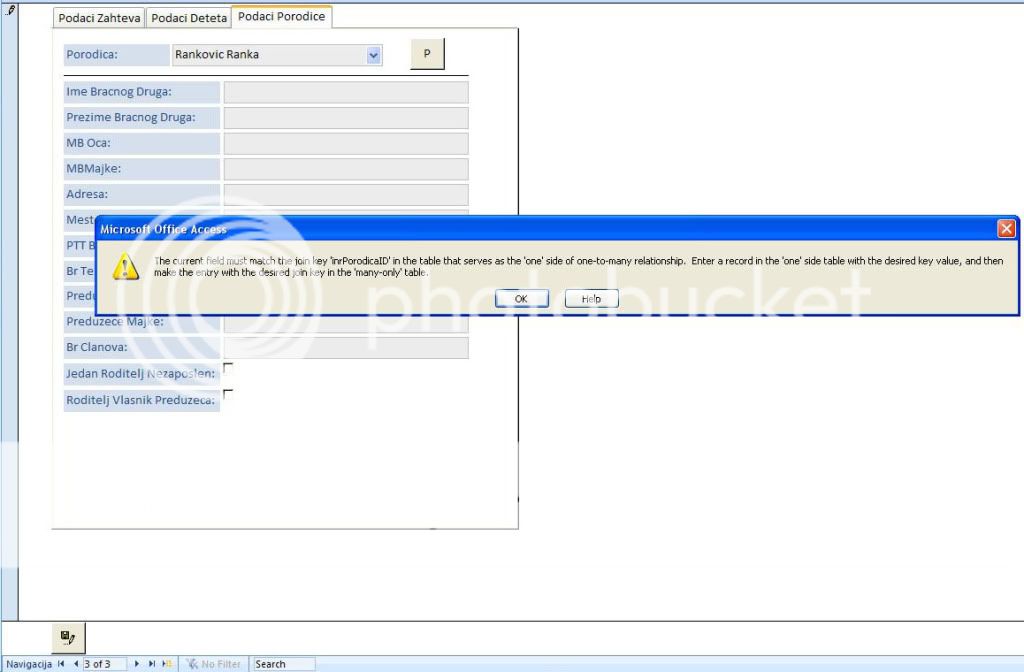
The problem is in the second combo box I have on form, which draws data from tblPorodica, and the problem is, when I'm on the new record, and try to make combo box selection, I get an error that there is no related record:

PodaciPorodice.jpg


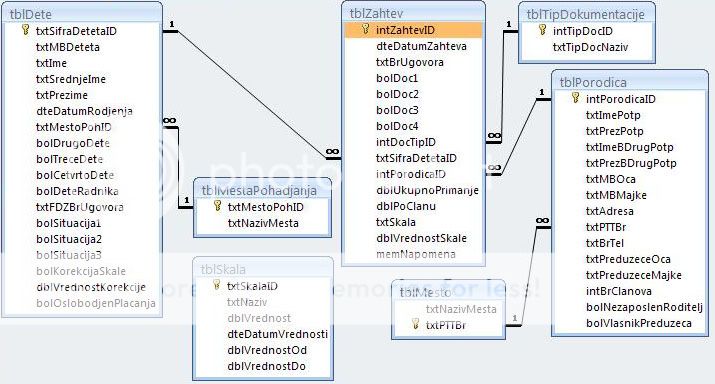
And here is the database relations:

RacunovodstvoRelations.jpg


If someone can explain to me why I'm getting this error, it would be a life saver.

Thank You

P.S. - I've done some testing with this sql in the query builder by eliminating some fields from it, and I've found out that if, from the query as is, I remove two fields bolNezaposlenRoditelj and bolVlasnikPreduzeca, everything works fine. That confused me more.
 
Last edited:
tblSkala doesn't seem to be joined to any of table. if it has no fields being queried, then it should be removed from the query to avoid erroneous & extraneous results.
 
tblSkala doesn't seem to be joined to any of table. if it has no fields being queried, then it should be removed from the query to avoid erroneous & extraneous results.
tblSkala is not joined to any table (you'll see if you look at the sql code).
I gave You database relations on that picture, not the qry relations from the query builder.
The tables that are joined int this query (qryZahtev) are tblZahtev, tblTipDokumentacije, tblPorodica, tblMesto, tblDete, tblMestoPohadjanja.
The form is bound to qryZahtev.
 
My apologies. I missed the line right above the image.

That said, I use this to beautify the SQL code for the readability:
Code:
SELECT   tblzahtev.intzahtevid, 
         tblzahtev.dtedatumzahteva, 
         tblzahtev.txtbrugovora, 
         tblzahtev.boldoc1, 
         tblzahtev.boldoc2, 
         tblzahtev.boldoc3, 
         tblzahtev.boldoc4, 
         tblzahtev.intdoctipid, 
         tbltipdokumentacije.inttipdocid, 
         tbltipdokumentacije.txttipdocnaziv, 
         tblzahtev.txtsifradetetaid, 
         tbldete.txtsifradetetaid, 
         [tblDete].[txtIme] & " " & [tblDete].[txtPrezime]                        AS dete, 
         tbldete.dtedatumrodjenja, 
         tbldete.txtmbdeteta, 
         tblmestapohadjanja.txtmestopohid, 
         tblmestapohadjanja.txtnazivmesta, 
         tblzahtev.intporodicaid, 
         tblporodica.intporodicaid, 
         [tblPorodica].[txtImePotp] & " " & [tblPorodica].[txtPrezPotp]           AS potpisnik, 
         [tblPorodica].[txtImeBDrugPotp] & " " & [tblPorodica].[txtPrezBDrugPotp] AS bdrug, 
         tblporodica.txtadresa, 
         tblporodica.txtbrtel, 
         tblporodica.txtpreduzeceoca, 
         tblporodica.txtpreduzecemajke, 
         tblporodica.intbrclanova, 
         tblzahtev.dblukupnoprimanje, 
         tblzahtev.dblpoclanu, 
         tblzahtev.txtskala, 
         tblzahtev.dblvrednostskale, 
         tblzahtev.memnapomena, 
         tbldete.txtsrednjeime, 
         tbldete.boldrugodete, 
         tbldete.boltrecedete, 
         tbldete.bolcetvrtodete, 
         tbldete.boldeteradnika, 
         tbldete.txtfdzbrugovora, 
         tbldete.bolsituacija1, 
         tbldete.bolsituacija2, 
         tbldete.bolsituacija3, 
         tbldete.bolkorekcijaskale, 
         tbldete.dblvrednostkorekcije, 
         tbldete.boloslobodjenplacanja, 
         tblporodica.txtimebdrugpotp, 
         tblporodica.txtprezbdrugpotp, 
         tblporodica.txtmboca, 
         tblporodica.txtmbmajke, 
         tblporodica.txtpttbr, 
         tblmesto.txtnazivmesta, 
         tblporodica.bolnezaposlenroditelj, 
         tblporodica.bolvlasnikpreduzeca 
FROM     tbltipdokumentacije 
         INNER JOIN ((tblmesto 
                      INNER JOIN tblporodica 
                        ON tblmesto.txtpttbr = tblporodica.txtpttbr) 
                     INNER JOIN (tblmestapohadjanja 
                                 INNER JOIN (tbldete 
                                             INNER JOIN tblzahtev 
                                               ON tbldete.txtsifradetetaid = tblzahtev.txtsifradetetaid) 
                                   ON tblmestapohadjanja.txtmestopohid = tbldete.txtmestopohid) 
                       ON tblporodica.intporodicaid = tblzahtev.intporodicaid) 
           ON tbltipdokumentacije.inttipdocid = tblzahtev.intdoctipid 
ORDER BY tblzahtev.intzahtevid;

With that in mind, I want to verify this: Is your combobox bound to the tblporodica.intporodicaid or other fields?

Normally, when I create a query for a form, I don't bother to join other tables that I would represent via comboboxes. I just retrieve the ID from the table itself and let combobox display the values.

To illustrate, imagine I have a form listing players and what team they play on. In this simple example, we would have two tables:

tblTeams:
-TeamID
-TeamName

tblPlayers:
-PlayerID
-TeamID
-PlayerName

When I create a query for the form to list all players, I just use a query like this:

Code:
SELECT 
   PlayerID,
   TeamID,
   PlayerName
FROM 
   tblPlayers;

Note that I don't even join the tblTeams.

For the combobox, I set the following properties:

ColumnCount= 2
ColumnWidht = 0;
Controlsoruce = TeamID (that comes from the query above)
Rowsource =
Code:
SELECT 
   TeamID, 
   TeamName
FROM tblTeams;

Then everything would work. If I tried to use TeamID as control source while displaying only TeamName, I would get same error as you did.

Is your form set in similar manner as I described?
 
Last edited:
With that in mind, I want to verify this: Is your combobox bound to the tblporodica.intporodicaid or other fields?
I'll elaborate each of my answer.

My combobox is bound to the intPorodicaID field in tblZahtev (because that is the place where values from the combobox would be stored, and they are integers). The row source for the combobox is set to following query:
Code:
SELECT tblPorodica.inrPorodicaID, [txtPrezPotp] & " " & [txtImePotp] AS Porodica 
FROM tblPorodica;
In the combobox properties the bound column is 1 (tblPorodica.intPorodicaID), column count is 2, and colum width is set to 0; 2,54 cm

Normally, when I create a query for a form, I don't bother to join other tables that I would represent via comboboxes. I just retrieve the ID from the table itself and let combobox display the values.

This is definetly not the way I've done it.
I've put all the fields from the table the form is bound to (which I will use to store the values in from the form), and from joined tables (which I only use for display and information purposes - which is indicated by a different background color of the fields, in white BG color fields You can enter value while in gray BG color fields are locked and you can only read values from them)

To illustrate, imagine I have a form listing players and what team they play on. In this simple example, we would have two tables:

tblTeams:
-TeamID
-TeamName

tblPlayers:
-PlayerID
-TeamID
-PlayerName

When I create a query for the form to list all players, I just use a query like this:

Code:

Code:
SELECT 
   PlayerID,
   TeamID,
   PlayerName
FROM 
   tblPlayers;

Note that I don't even join the tblTeams.

Then everything would work. If I tried to use TeamID as control source while displaying only TeamName, I would get same error as you did.
If I understood the way You've done it, correctly, then there is no need to even create the query that will just hold the data which is already in the table, I would then select table as the data source for the form.

For the combobox, I set the following properties:

ColumnCount= 2
ColumnWidht = 0;
Controlsoruce = TeamID (that comes from the query above)
Rowsource =

Code:
SELECT
TeamID,
TeamName
FROM tblTeams;

If You see my answer for the combo box, I think we can both agree that I'm doing the same thing about the data I want to display in the combobox (display the name, while keep PK value hidden, but its there because You need to store it in the Foreign key field).
So when I analyze your answer closely I think I can draw the conclusion that can be answer to You:
The reason I'm joining fields in the query is because I want to display all the data from the other table on my form just for refference to the user.
In the example You've showned here there is really no need to join the tables, but then again from the second table You're only selecting values that You want to display in the combobox, not in other controls as I'm doing here.

Thank You for the answer. I hope mine clarified things a little bit, and that You will be able to help me some more.

Thanks again.

Is your form set in similar manner as I described?
 
My combobox is bound to the intPorodicaID field in tblZahtev (because that is the place where values from the combobox would be stored, and they are integers). The row source for the combobox is set to following query:
Code:
SELECT tblPorodica.inrPorodicaID, [txtPrezPotp] & " " & [txtImePotp] AS Porodica 
FROM tblPorodica;
In the combobox properties the bound column is 1 (tblPorodica.intPorodicaID), column count is 2, and colum width is set to 0; 2,54 cm

Looks right to me.

This is definetly not the way I've done it.

I've put all the fields from the table the form is bound to (which I will use to store the values in from the form), and from joined tables (which I only use for display and information purposes - which is indicated by a different background color of the fields, in white BG color fields You can enter value while in gray BG color fields are locked and you can only read values from them)

I see. Joining other tables to obtain fields for reference does makes sense, though to be honest I usually only do this in context of reporting rather than in context of forms. Whenever I use forms, more often than not, I just bind one table to form and use subforms when I need to cover more than one table.

If I understood the way You've done it, correctly, then there is no need to even create the query that will just hold the data which is already in the table, I would then select table as the data source for the form.

As I said, it was an simple example to make sure I didn't overlook anything in your setup. Even so, I make it a habit to use only queries, even if I select all fields because there's a slight performance gain in explicitly selecting column rather than SELECT * FROM or using table as the source and is much more amenable to upsizing should that ever be necessary.

If You see my answer for the combo box, I think we can both agree that I'm doing the same thing about the data I want to display in the combobox (display the name, while keep PK value hidden, but its there because You need to store it in the Foreign key field).

Indeed.

The reason I'm joining fields in the query is because I want to display all the data from the other table on my form just for refference to the user.
In the example You've showned here there is really no need to join the tables, but then again from the second table You're only selecting values that You want to display in the combobox, not in other controls as I'm doing here.

As mentioned above, I usually do it for reporting but not really forms. This is for the simple reason that queries are much more likely to be updatable when we're dealing with a one-one correspondence from the query to the table. You *could* use multi-table query and still have it updatable but in my experience they usually are more painful and more hassle compared to just using subforms.

But that's not the answer to your question. You are selecting both primary key and foreign key from the recordsouce:
Code:
tblzahtev.intporodicaid, 
tblporodica.intporodicaid,

But which is actually the control source of the combobox? You would want the foreign key (tblzahtev.intporodicaid), not the primary key). You say you have it bound to tblPorodicia.intporodicaid. That would cause the error you saw. In fact, you don't have to select both fields, just one would suffice.

Does it fix the problem?

EDIT: I'm blind. You have it correctly set it up. My apologies.

Since everything in regards to the combobox itself seems to be correctly set up, I would want to investigate the query itself. If you open the query in query builder and switch to datasheet, are you able to manually update/insert any rows in that query (only for the table tblzahtev's fields, of course)?

Were you able to update any other white fields?
 
Last edited:
As mentioned above, I usually do it for reporting but not really forms. This is for the simple reason that queries are much more likely to be updatable when we're dealing with a one-one correspondence from the query to the table. You *could* use multi-table query and still have it updatable but in my experience they usually are more painful and more hassle compared to just using subforms.

My first build of the frmZahtev was just like that, tblZahtev as Data Source and 2 subforms (one for tblDete other for tblPorodica). That seemed to work, but because after putting the subforms the frmZahtev was to big (lot of scrolling), and I abandoned that idea (it wasn't estetic enough for my liking).

But that's not the answer to your question. You are selecting both primary key and foreign key from the recordsouce:
Code:
tblzahtev.intporodicaid, 
tblporodica.intporodicaid,
But which is actually the control source of the combobox? You would want the foreign key (tblzahtev.intporodicaid), not the primary key). You say you have it bound to tblPorodicia.intporodicaid. That would cause the error you saw. In fact, you don't have to select both fields, just one would suffice.

Does it fix the problem?

EDIT: I'm blind. You have it correctly set it up. My apologies.

I think I wrote the answer to that :)

Since everything in regards to the combobox itself seems to be correctly set up, I would want to investigate the query itself. If you open the query in query builder and switch to datasheet, are you able to manually update/insert any rows in that query (only for the table tblzahtev's fields, of course)?

Strangely, yes. From the datasheet view I was able to update every field (event porodica combobox), and I was able to fill all other controls (I mean fields) in all three tables.

Were you able to update any other white fields?

If You look at that picture above (where the error is) You won't see white fields (because on the picture we are at Podaci Porodice tab). The white fields are on the Podaci Zahteva tab, and those controls are bound to fields from tblZahtev. They update normally, the only problem is with that combobox?

P.S. - After I created tables, before I've created forms, adn wueries, I've put Lookup fields in some of the table fields. Was that wrong?

Hope my answer clarifies little more.
 
Hmmm. So we know the query itself works but the form has problem, then.

The fact there are Lookup fields concerns me somehow, especially considering that you have properly setup the fields that wouldn't require a lookup field at all.

Here's an article discussing the Evils of Lookup fields.

I'm kind of confused with whether the combobox should be updated or is there for references? You say gray fields are for references and are not updatable, right? The combobox is grayed out but in your earlier post, it sound like user should be able to make a selection from the combobox?
 
Hmmm. So we know the query itself works but the form has problem, then.

The fact there are Lookup fields concerns me somehow, especially considering that you have properly setup the fields that wouldn't require a lookup field at all.

Here's an article discussing the Evils of Lookup fields.
So, based on this text, You suggest that I remove the lookup fields and then build combo boxes from scratch?

I'm kind of confused with whether the combobox should be updated or is there for references? You say gray fields are for references and are not updatable, right? The combobox is grayed out but in your earlier post, it sound like user should be able to make a selection from the combobox?
Don't be confused with the background color here. I mentioned that I use two different background colors to represent updatable and not-updatable fields, but in this particual case combo boxes are greyed out but they are not locked up. They are grey because I wanted to associate users with the fact that they do not need to enter anything in combo box field but simply select values that are already there. Both combo boxes are set to Enabled: Yes, Locked: No.

If we cannot come to the conclusion what is wrong here, can You give me directions what to do and not to do, and let me begin this from scratch?

Thank You.
 
I don't think you need to rebuild your combobox from the scratch. As I indicated earlier, everything is set up correctly as if it was not using lookup fields. My memory may be faulty but I *think* if a lookup field was used, then we wouldn't/shouldn't be using the ID but actually the text value for the combobox.

So to remove the lookup, just go to the table design view and change all lookup back to "Textbox" and the appropriate data type (e.g. Long Integer for ID, Text for the text values).

See how this gets you.
 
I don't think you need to rebuild your combobox from the scratch. As I indicated earlier, everything is set up correctly as if it was not using lookup fields. My memory may be faulty but I *think* if a lookup field was used, then we wouldn't/shouldn't be using the ID but actually the text value for the combobox.

So to remove the lookup, just go to the table design view and change all lookup back to "Textbox" and the appropriate data type (e.g. Long Integer for ID, Text for the text values).

See how this gets you.
I've recreated query (removed some joins ad made it shorter):
Code:
SELECT tblZahtev.intZahtevID, tblZahtev.dteDatumZahteva, tblZahtev.txtBrUgovora, tblZahtev.bolDoc1, tblZahtev.bolDoc2, tblZahtev.bolDoc3, tblZahtev.bolDoc4, tblZahtev.intDocTipID, tblZahtev.txtSifraDetetaID, tblDete.txtMBDeteta, tblDete.txtSrednjeIme, tblDete.dteDatumRodjenja, tblDete.txtMestoPohID, tblDete.bolDrugoDete, tblDete.bolTreceDete, tblDete.bolCetvrtoDete, tblDete.bolDeteRadnika, tblDete.txtFDZBrUgovora, tblDete.bolSituacija1, tblDete.bolSituacija2, tblDete.bolSituacija3, tblDete.bolKorekcijaSkale, tblDete.dblVrednostKorekcije, tblDete.bolOslobodjenPlacanja, tblZahtev.intPorodicaID, tblPorodica.txtImeBDrugPotp, tblPorodica.txtPrezBDrugPotp, tblPorodica.txtMBOca, tblPorodica.txtMBMajke, tblPorodica.txtAdresa, tblPorodica.txtPTTBr, tblPorodica.txtBrTel, tblPorodica.txtPreduzeceOca, tblPorodica.txtPreduzeceMajke, tblPorodica.intBrClanova, tblZahtev.dblUkupnoPrimanje, tblZahtev.dblPoClanu, tblZahtev.txtSkala, tblZahtev.dblVrednostSkale, tblZahtev.memNapomena
FROM tblPorodica INNER JOIN (tblDete INNER JOIN tblZahtev ON tblDete.txtSifraDetetaID=tblZahtev.txtSifraDetetaID) ON tblPorodica.intPorodicaID=tblZahtev.intPorodicaID;
Removed lookup fields from all the tables, the comboboxes remained the same.
It still doesn't work, but again, when I remove two fields bolNezaposlenRoditelj and bolVlasnikPreduzeca, everything works. The error message has changed though, now it says "... join key '?' ... "
Why can these two fields cause so much trouble?
 

Users who are viewing this thread

Back
Top Bottom