Finding in which Recordset range is entered value

mcdhappy80

Registered User.
Local time
Today, 20:04
Joined
Jun 22, 2009
Messages
347
Here's what I want to do:

I have a value which I enter in text field. The value type is double.
I have a table in my database, that constantly holds 6 records, from which I create recordset.
Here's the table with the data it holds:

tblScale
dblScaleValue--------dblValueFrom--------dblValueTo
0,00--------0,00--------0,00
1.000,00--------0,01--------4.000,00
1.500,00--------4.000,01--------5.500,00
2.300,00--------5.500,01--------8.000,00
3.000,00--------8.000,01--------15.000,00
4.000,00--------15.000,01--------99.999.999.999,00

Now, I need to loop through all 6 records in the recordset, compare in which range (dblValueFrom - dblValueTo) is the entered value, end depending on that write down the according value from dblScaleValue field.

Can someone write down the code template on how would I do this?

Thank You.
 
Last edited:
0,00 0,00 0,00
1.000,00 0,01 4.000,00
1.500,00 4.000,01 5.500,00
2.300,00 5.500,01 8.000,00
3.000,00 8.000,01 15.000,00
4.000,00 15.000,01 99.999.999.999,00

What you need actually is a Select Case statement based on the value entered in the form, such as:


Code:
Select Case dblScaleValue
   Case < 5 :Answer = 1
   Case < 6: Answer = 2
   Case < 7: Answer = 3
   Case Else : Answer = 0
End Select

Obviously these are not the correct paramters, just to show for brevity.

Using this method you do not need to use a recordset.

David
 
0,00 0,00 0,00
1.000,00 0,01 4.000,00
1.500,00 4.000,01 5.500,00
2.300,00 5.500,01 8.000,00
3.000,00 8.000,01 15.000,00
4.000,00 15.000,01 99.999.999.999,00

What you need actually is a Select Case statement based on the value entered in the form, such as:


Code:
Select Case dblScaleValue
   Case < 5 :Answer = 1
   Case < 6: Answer = 2
   Case < 7: Answer = 3
   Case Else : Answer = 0
End Select
Obviously these are not the correct paramters, just to show for brevity.

Using this method you do not need to use a recordset.

David

You said I don't need the recordset, what I don't understand now, how do I put those values from tblScale into VBA if I don't use a recordset?
Other question that occured is, if I need to change the values for, lets say, dblScaleValue, and I don't use the table and recordset that means I will need to rewrite my VBA code right?

Thank You
 
You are correct in that respect that if the values change then the vba needs updating. But you then need to look at proberbility. An alternative would be to use a DLookup()

Code:
n = DLookup("[field]","Table","[LowerValue] >=" & TxtLower & " And [UpperValue] <= " & TxtUpper)


David
 
You are correct in that respect that if the values change then the vba needs updating. But you then need to look at proberbility. An alternative would be to use a DLookup()

Code:
n = DLookup("[field]","Table","[LowerValue] >=" & TxtLower & " And [UpperValue] <= " & TxtUpper)
David
Nope, this won't do.
My real problem with the code I've written is that the Me.Recalc command triggers the form's before update event (asking me do I want to save) which I do but not at that point.
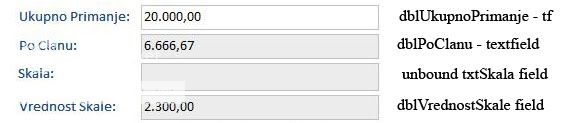
Now I will put entire code here for the three events, but first here's the picture of the controls involved:

skala.jpg


Code:
Private Sub dblUkupnoPrimanje_AfterUpdate()

On Error GoTo Obrada_Greske

'PROMENLJIVE PROCEDURE
Dim dblUkupnaPrimanja As Double
Dim dblPoClanu As Double

'PROMENLJIVE RECORDSET-a
Dim rs As DAO.Recordset
Dim strSQL As String
Dim txtBrojZahteva As String
Dim intBrojClanova As Integer
Dim dblVrednostSkale As Double

'POCETAK RECORDSETA
If Not IsNull(Forms![frmZahtev]![intZahtevID]) Then
    txtBrojZahteva = Forms![frmZahtev]![intZahtevID]
End If

strSQL = "SELECT tblPorodica.intBrClanova " _
    & "FROM tblPorodica INNER JOIN tblZahtev ON tblPorodica.inrPorodicaID=tblZahtev.intPorodicaID " _
    & "WHERE tblZahtev.intZahtevID=" & txtBrojZahteva & ";"
    
Set rs = CurrentDb.OpenRecordset(strSQL)

intBrojClanova = rs.Fields("intBrClanova").Value

rs.Close

Set rs = Nothing


'POCETAK SUBPROCEDURE
If Not IsNull(Trim(Me.dblUkupnoPrimanje)) Then 'DA LI UNETA VREDNOST NIJE NULL
    If IsNumeric(Trim(Me.dblUkupnoPrimanje)) Then 'DA LI JE UNETA VREDNOST NUMERICKA
        If Not IsNull(Trim(CStr(intBrojClanova))) Then 'DA LI BR CLANOVA PORODICE NIJE NULL
            dblUkupnaPrimanja = CDbl(Me.dblUkupnoPrimanje)
            dblPoClanu = dblUkupnaPrimanja / intBrojClanova
            Me.dblPoClanu = dblPoClanu
            Me.dblVrednostSkale = dblVrednostSkale
            [B]Me.Recalc[/B]
            Me.dblPoClanu.SetFocus
        Else 'PORUKA AKO JE BR CLANOVA NULL
            MsgBox "Morate prvo uneti broj clanova porodice", vbInformation, "Porodica nema clanova"
            Me.Undo
        End If
    End If
End If

Izadji_Ovde:
Exit Sub

Obrada_Greske:
MsgBox Err.Number & " - " & Err.Description, vbInformation, "Greska je!"
Resume Izadji_Ovde

End Sub
Code:
Private Sub dblPoClanu_GotFocus()

Dim rs As DAO.Recordset
Dim txtVrednostSkale As String
Dim strSQL As String
Dim dblPoClanu As Double
Dim txtSkala As String

If Not IsNull(Trim(Me.dblPoClanu)) Then
dblPoClanu = Forms![frmZahtev]![dblPoClanu]


strSQL = "SELECT [tblSkala.txtSkalaID] & ' ' & [tblSkala.txtNaziv] AS Skala, tblSkala.dblVrednost " _
        & "FROM tblSkala, tblZahtev " _
        & "WHERE ((([tblZahtev].[dblPoClanu]) Between [tblSKala].[dblVrednostOd] And [tblSkala].[dblVrednostDo]));"
        
Set rs = CurrentDb.OpenRecordset(strSQL)

txtVrednostSkale = rs.Fields("dblVrednost").Value
txtSkala = rs.Fields("Skala").Value

rs.Close
Set rs = Nothing

Me.txtSkala = Trim(txtSkala)
Me.dblVrednostSkale = Trim(txtVrednostSkale)
End If

End Sub
Code:
Private Sub Form_BeforeUpdate(Cancel As Integer)

If Not (Me.NewRecord) Then
    If MsgBox("Da li zelite da snimite podatke na ovom zapisu?", vbQuestion + vbYesNo + vbDefaultButton1, "Snimanje promena zapisa?") = vbNo Then
           Me.Undo
    End If
Else
    If MsgBox("Da li zelite da snimite ovaj novi zapis?", vbQuestion + vbYesNo + vbDefaultButton1, "Snimanje zapisa?") = vbNo Then
        Me.Undo
    End If
End If
End Sub
So with this code, everything works if I remove the forms Before Update events code, but i want to be able to be prompted to save changes and new records as well.

If the code stays as is I'm prompted to save changes before I want to and that I don't want.

As I see it this happens because this line of code
Code:
"WHERE ((([tblZahtev].[dblPoClanu]) Between [tblSKala].[dblVrednostOd] And [tblSkala].[dblVrednostDo]));"
where I'm instructing the program to pick a value from table that is not yet updated. I am however, updating it with Me.Recalc command but then I'm prompted to save the record.

So, the next thing that occured to me, to solve my problem, Not to compare with the data from the table that is not yet updated, but to extract the values from tblSkala (tblScale) into a recordset and then do the comparison in VBA without using this part of code:
Code:
If Not IsNull(Trim(Me.dblPoClanu)) Then
dblPoClanu = Forms![frmZahtev]![dblPoClanu]


[B]strSQL = "SELECT [tblSkala.txtSkalaID] & ' ' & [tblSkala.txtNaziv] AS Skala, tblSkala.dblVrednost " _
        & "FROM tblSkala, tblZahtev " _
        & "WHERE ((([tblZahtev].[dblPoClanu]) Between [tblSKala].[dblVrednostOd] And [tblSkala].[dblVrednostDo]));"[/B]
        
Set rs = CurrentDb.OpenRecordset(strSQL)

txtVrednostSkale = rs.Fields("dblVrednost").Value
txtSkala = rs.Fields("Skala").Value

rs.Close
Set rs = Nothing

Me.txtSkala = Trim(txtSkala)
Me.dblVrednostSkale = Trim(txtVrednostSkale)
End If
but what is problem to me here, if I create recordset from tblScale how do I move trough it to make comparison?

Maybe I could also modify the code in the forms Before Update event, but I want to retain the functionality of prompting me in either cases (record change and adding new record)?

Maybe Me.Recalc is not a god choice?

Can someone help me now when I explained in more detail? Any ideas and approaches are welcome.

Thank You
 
Last edited:
I've tried this DLookup code:
Code:
dblVrednostSkale = DLookup("[dblVrednost]", "tblSkala", "[dblVrednostOd] >= " & dblPoClanu & " And [dblVrednostDo] <= " & dblPoClanu)
And, I assume because my double value was for example 13333,33, I was getting "comma, SQL syntax error".
Is my suspicion about this right?

After that I tried converting the dblPoClanu value to integer by declaring intDblPoClanu As Integer value and then doing intDblPoClanu = CInt(dblPoClanu) conversion, but after that I was getting "Invalid use of Null" error message.
Can someone tell me what is the problem here?

Can this be solved with DLookup or I would ultimately need to use the recordset?

Thank You.
 
[SOLVED] Finding in which Recordset range is entered value

I've solved my problem but not with the DLookup function but with recordset. The problem was in pair of ' ' I've used while I should have used " ". For the Nth time the MsgBox function solved the problem here. I still wonder though whie the DLookup function returned Null.
 
A DLookup will return Null if no records meet the condition that you passed to it. To get around this problem and return a 0 if Null is encountered use the Nz() function, as mentioned earlier.

If you think there should be a value returned the do a Debug.Print on the where condition and test the syntax through a query.

David
 

Users who are viewing this thread

Back
Top Bottom