Get a textbox to behave like an excel cell.

Attachments

Would a simple pop up calculator work? I have one you can click in a field and do the calculations, returning the value back to the control.

Whilst not convinced of the usefulness of the threads desire to treat Access like Excel, thanks for this popup - I have incorporated it into my standard library database. And I'm happily fiddling with it to see where I can get to!

First one is to define a sub-macro ( I've assigned to ^+K) so I don't have to assign any code to particular fields.

Next step is to make sure it only works on numeric text fields by:

Code:
replace
    
    If Not BoundControl Is Nothing Then
            If IsNumeric(BoundControl) Then strArgs = BoundControl.Value
    End If

with

    If Not BoundControl Is Nothing Then
      If BoundControl.ControlType <> acTextBox Then Exit Function
      If IsNumeric(BoundControl) Then
        strArgs = BoundControl.Value
      Else
        Exit Function
      End If
    End If
 
Last edited:
Lot's of creativity coming out of this idea. Way to go guys.
 
So when I'm entering the total say $525.00 for 20 units from a vat inclusive bill I was planning just to input "=525/1.125" in the Cost Field.
This is an interesting exercise and the proposed solutions are more flexible, but if it is simply what you say and it is in single form view why not simply have the extra controls to do the calculations. An unboudn bound quantity control and Vat control then the form has a built in calculator. I would think the Vat control could even be a combo so you can pick a common value and not have to type 1.125 each time.
Even if this is in continuous view you could make the controls only "visible" in the active record.
 
I would think the Vat control could even be a combo so you can pick a common value and not have to type 1.125 each time.
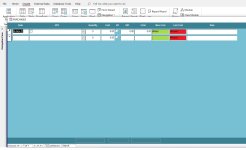
My data entry form is set up to enter
PurDate, Item, Quantity, Cost (which is the Vat Exclusive Cost) and a Check box to select if the Item is Vatable or not (all fields are bounded)
Once I have that data everything else (Cost/Unit, Vat Amount etc) can be calculated with queries.

The problem arises when a Vat Inclusive Invoice comes in. In the [Cost] control I would be using the code.

See the attachment. All controls after ZR are unbounded and just for information.
 

Attachments

  • Purchase Form.jpg
    Purchase Form.jpg
    101.3 KB · Views: 152

Users who are viewing this thread

Back
Top Bottom