
You are using an out of date browser. It may not display this or other websites correctly.
You should upgrade or use an alternative browser.
You should upgrade or use an alternative browser.
Hide System Tables When Connecting To SQL Server
- Thread starter raziel3
- Start date

GPGeorge
George Hepworth
- Local time
- Yesterday, 23:54
- Joined
- Nov 25, 2004
- Messages
- 3,401
Perhaps, if this question is asked in the context of an end user, and not the developer, it would be better not to allow the user that level of access to tables at all. Perhaps it would be a better strategy to provide the accdb already linked to the appropriate database and tables. And, if the end user is going to make changes at this fundamental level, it would be safer to provide a VBA procedure to relink backends under your control via that procedure.

Isaac
Lifelong Learner
- Local time
- Yesterday, 23:54
- Joined
- Mar 14, 2017
- Messages
- 11,621
Perhaps
The understatement of the day. Yes ... as a developer, you want end users to only use, not design, your database!

raziel3
Registered User.
- Local time
- Today, 03:54
- Joined
- Oct 5, 2017
- Messages
- 315
I did some testing. I set up passwords and credentials for the SQL sever so in order to link to the server, even if the user finds the dns file, they will need a password to login.
The question, Does access store this password anywhere? Can a user 'hack' and find it?
The question, Does access store this password anywhere? Can a user 'hack' and find it?
Isaac
Lifelong Learner
- Local time
- Yesterday, 23:54
- Joined
- Mar 14, 2017
- Messages
- 11,621
There are several ways you should be hiding all that stuff from your users. Accde is one of them, other ones are in the Options
or really get fancy and do this:
or really get fancy and do this:
Disabling the Access X “close”
Hi guys I am trying to not allow users to close the application using the Access X button. I have an public variable called fcanIclose as Boolean here is the code: Private Sub Form_Unload(Cancel As Integer) If fcanIclose = False Then Cancel = True MsgBox "You cannot close using tis button.You...
www.access-programmers.co.uk
Last edited:
GPGeorge
George Hepworth
- Local time
- Yesterday, 23:54
- Joined
- Nov 25, 2004
- Messages
- 3,401
In addition to creating an accde and other steps, why not create a custom ribbon that doesn't include those functions you don't want available?The user does not need to but they still can click the link table wizard.
This what I'm try to prevent. I want to disable the link table/external data button.
raziel3
Registered User.
- Local time
- Today, 03:54
- Joined
- Oct 5, 2017
- Messages
- 315
Of course I didn't even think of thatwhy not create a custom ribbon that doesn't include those functions you don't want available?
 . Thanks @GPGeorge
This also helped.
https://www.access-programmers.co.uk/forums/threads/change-custom-ribbon-with-password.295785/
raziel3
Registered User.
- Local time
- Today, 03:54
- Joined
- Oct 5, 2017
- Messages
- 315
Yes, you made a point that I didn't even consider. Someone can open up a blank access file and try to link to the server. How do you normally deal with that?As I said, locking down your application, while good practice, will not actually solve the problem if you are worried that the users are smart enough to create a new, empty Access app and just try to link to the SQL Server tables.
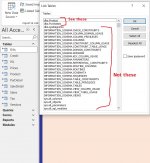
That is what I was thinking in the op. Can I hide all system tables on the server side and have only dbo.*** available to view when linking weather it be Access, Excel, Oracle etc.
GPGeorge
George Hepworth
- Local time
- Yesterday, 23:54
- Joined
- Nov 25, 2004
- Messages
- 3,401
You could break their fingers so they can't use a keyboard.Yes, you made a point that I didn't even consider. Someone can open up a blank access file and try to link to the server. How do you normally deal with that?
Seriously, the problem of users "exploring" on their own is one that really can't be entirely addressed from the developer side. It's partially a training and HR problem as well. If you work in an organization where people are encouraged and incentivized to act responsibly, you're less likely to have problems related to undisciplined exploration.
If, on the other hand, you know that rogue actors are going to try to exploit loopholes and get to data they should not see, Access is probably not the most appropriate tool.
raziel3
Registered User.
- Local time
- Today, 03:54
- Joined
- Oct 5, 2017
- Messages
- 315
Well one time, I linked to a clocking machine system table and changed my credentials to admin and I was able to make changes to the clock in/out data.What is your obsession with hiding the system tables? The users can't do any damage with those.
The IT Department controls were sub-par at best.
raziel3
Registered User.
- Local time
- Today, 03:54
- Joined
- Oct 5, 2017
- Messages
- 315
This was done with Access, and even though I signaled to them to secure the database properly, they didn't even try. And I'm not even a db specialist. I'm mediocre at best.
That's my obsession with locking down my db frontend.
That's my obsession with locking down my db frontend.
A question if you don’t mind.One way to handle this is to not use Windows authentication but instead to create a separate account for each user. Use the user's own login ID but use a different password. You can use code to generate a password that you can reconstruct based on user info plus some known characters. Then, the app logs on when the user opens the app and uses the reconstructed password.
I assume after reconstruction of the password, you should relink the tables too. Am I correct?
If yes, then the password can be extracted from An external database by reading the connect string of linked tables. Isn’t that so?
Thanks.
GPGeorge
George Hepworth
- Local time
- Yesterday, 23:54
- Joined
- Nov 25, 2004
- Messages
- 3,401
As I suggested, this is only partly an IT problem....Well one time, I linked to a clocking machine system table and changed my credentials to admin and I was able to make changes to the clock in/out data.
The IT Department controls were sub-par at best.
Where can I find some tutorials?You can always link the tables on the fly with credentials and use dsn-less tables. and a sql auth account
The only thing that I know, dsn-less tables have a connect string and if I specify the password, the connect string contains the password.
What does exactly "Linking on the fly" means? How the queries that are the source of the bound forms behave then?
thanks.
Isaac
Lifelong Learner
- Local time
- Yesterday, 23:54
- Joined
- Mar 14, 2017
- Messages
- 11,621
it means linking a table using vba, which doesn't necessarily require dsn-less connection. the queries will be no different once the linking is done.
if you have a well locked down accde, I don't really see people being able to get that connect string, unless they went into the vba project and used the immediate window, not sure that's even possible in an accde. access security isn't 100%, but these are ideas to get you closer.
yes, you then hvae a connect string in your db - but you also hvae a sql auth account that nobody can get to anywhere else. everything is a trade off
if you have a well locked down accde, I don't really see people being able to get that connect string, unless they went into the vba project and used the immediate window, not sure that's even possible in an accde. access security isn't 100%, but these are ideas to get you closer.
yes, you then hvae a connect string in your db - but you also hvae a sql auth account that nobody can get to anywhere else. everything is a trade off
You can open a blank database, from vba create an Access object, open the database, loop through table def and read their connect string. Which takes us back to first point. If You can not hide the password, then I don’t see how Pat’s method can help.I don't really see people being able to get that connect string,
If you have a method to hide password, her solution works. Otherwise it’s too much trouble for no additional security.
Last edited:
GPGeorge
George Hepworth
- Local time
- Yesterday, 23:54
- Joined
- Nov 25, 2004
- Messages
- 3,401
Pat's approach seems to be basically the one demoed back then, although in retrospect my demo was a bit crude, IIRC.I've been looking for the code. I haven't watched the videos George posted but they might have the answer. When I had to solve this problem, I used code that logged into the server separate from the table links which did not include the password. Once I was logged in, the links without the password were fine.
Alternatively, if you hide the linked tables they cannot be seen by other databases so you cannot see the connection strings.
The way I would do it is to create and run a "pilot" passthru query in VBA, using credentials stored in the VBA. That establishes the connection as you describe it. As long as the connection is complete, it stays alive during that session. And, if the passthru is deleted or not saved at all, it can't be used to retrieve the connection string.
You can password protect the VBA project itself even before creating an accde. Run from an accde, it should hide the credentials from all but the most determined and knowledgeable hacker. They'd have to inspect the binary in the accde to find the credentials, which I'm not even sure is possible anyway if it's been password protected.
Anders mostly talked about securing the database from the SQL Server side, but it's seminal stuff.
Similar threads
- Replies
- 19
- Views
- 1,050


- Replies
- 10
- Views
- 2,016

- Replies
- 3
- Views
- 448
- Replies
- 8
- Views
- 1,148
Users who are viewing this thread
Total: 1 (members: 0, guests: 1)