How to add a field and auto-populate values

DampFloor

Registered User.
Local time
Yesterday, 19:44
Joined
Nov 16, 2017
Messages
37
I have a Database which is linked to several spreadsheets. I use an append query to move the sheets into a table while also filtering unwanted rows. What i would like to do is add a two fields to each table and auto-populate those fields with a specific text (dependent on which sheet the table came from).
 
For specific advice, we need specifics of your database. In general

1. Go into design view of the table(s), add the new fields you want.

2. Change the APPEND queries to populate those new fields with the appropriate values.
 
The sheets which are linked are quotes from suppliers. So each sheet is from a specific vendor and is for a specific category of supplies. The sheets themselves do not state in them which category or supplier. in the tables I appended them to, i would like a field which states supplier and a field which states vendor. From there i will put all tables into one.
 
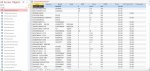
The attached screenshot shows what my current append tables look like. You can see that the table names have both the category and supplier in them. For instance the open table is the supplier "Centennial" and the category is "protein". I would like two more fields in these tables which have the category and supplier named in them for each record.
 

Attachments

  • Table_Screenshot.jpg
    Table_Screenshot.jpg
    106.9 KB · Views: 159
My apologies, I am very new to Access and this is for a school project. So if this is not proper technique let me know. Right now the words are separated by capital letters. So a capital letter is the beginning of each word.

I am I required to get this data from the table name? Is there a way to simply make a field and manual enter the word which will then auto-populate all records with this word?
 
To add new fields to a table you can use sql
Code:
alter table TABLENAME add FIELDNAME DATATYPE

to update records in a table you can also use sql
Code:
update TABLENAME set FIELDNAME1='some string',  FIELDNAME2='some other string' [WHERE some condition is met]

To split a string up into different parts you can use the split() function.
Since the split char is based on capitalisation I used option compare Binary and inserted a character to split on into the string.


Code:
Option Compare Binary

Private Sub Command1_Click()

    Const tbl As String = "CentenialProteinImport"
    
    'Add new fields 'supplier' and 'category', both text, max 30 chars
    CurrentDb.Execute "alter table " & tbl & " add [supplier]  text (30), [category] text (30)"
    
    'split string up based on caps
    Dim i As Integer
    Dim s As String
    Dim v As Variant
    Dim d As String
    For i = 1 To Len(tbl)
        Select Case Mid(tbl, i, 1)
        Case "A" To "Z": d = ";"
        Case Else: d = ""
        End Select
        s = s & d & Mid(tbl, i, 1)
    Next
    If Left(s, 1) = ";" Then s = Mid(s, 2)
    
    'assume first array element is supplier and second is category
    Dim supplier As String
    Dim category As String
    supplier = Split(s, ";")(0)
    category = Split(s, ";")(1)
    
    'update table
    CurrentDb.Execute "update [" & tbl & "] set [supplier]='" & supplier & "',  [category]='" & category & "'"
End Sub

 
I have a Database which is linked to several spreadsheets. I use an append query to move the sheets into a table while also filtering unwanted rows. What i would like to do is add a two fields to each table and auto-populate those fields with a specific text (dependent on which sheet the table came from).

You have started a few threads around this common theme. In the future, I would highly suggest you start by letting others know you are doing this for a school project. This will help with getting answers better aimed to your skill set and more detailed answers.

For myself, I would have a form that prompts for "spreadsheet Name" that would open each spreadsheet and append from it. In addition you could also prompt for category and supplier (possibly using lookup fields, either lookup by value or by reference if you need to make sure these link back to a "Supplier" or "Category" record) with a default based on the name of the spreadsheet.

As a user interface this would be fairly straight forward, would allow for changes if the file name isn't accurate, and would allow you to add to ONE table used for inputs that you could then review. After review you would then append to your real table and delete all records in the review table.

If this is a way that would work for your assignment let us know so we can guide you on how to do this.
 

Users who are viewing this thread

Back
Top Bottom