
How to export a report to Excel

greaseman

Closer to seniority!
Local time
Today, 09:18
Joined
Jan 6, 2003
Messages
360
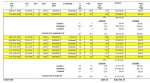
I've been asked to export an MS Access report to Excel. I'm having trouble with including subtotals, totals, etc. in the Excel sheet. I've enclosed a picture of how my report looks in Access, and was wondering if there's a way to export everything the report has into Excel......

Can anyone maybe point me in a good direction, or to a link that has info re: what I want to do?

And before anyone asks, it's for a manager who insists that everything be done in Excel, since that is what he's comfy with. Outside of that, I wouldn't be giving myself headaches, since my Access report contains everything needed.

Thanks in advance!
 

Attachments

  • Capture1.jpg
    Capture1.jpg
    98.6 KB · Views: 324
Hi, Pat and thanks for responding! The funny thing is, they originally had this little thingie in Excel and asked that it be put into Access, but now the new kid on the block wants it in Excel! What goes 'round, comes 'round.

The hardest part is that the amount of data and number of rows "floats" from month to month, so that aso adds to the mess. In other words, I will never have a fixed number of lines per onth of data.

Again, thanks for your reply. If I get something figured out, I'll post it back to the forum. :D
 
It is possible if u r using CFML

Hi,

Well It is possible to export the report of MS-ACCESS to MS-Excel if u r using Cold Fusion. Check the following sample code:

Code:
<cfquery name="qry" datasource="mydsn">
	SELECT * FROM MYTABLE ORDER BY ID
</cfquery>

<cfheader name="Content-Disposition" value="inline; filename=MYEXCEL.xls">
<cfcontent type="application/msexcel" >

<TABLE WIDTH="100%"  BORDER="1" CELLSPACING="0" CELLPADDING="2" ALIGN="CENTER">
<TR>
	<TH SCOPE="col">ID</TH>
	<TH SCOPE="col">MYCOL1</TH>
	<TH SCOPE="col">MYCOL2</TH>
</TR>
<CFOUTPUT QUERY="GETCARS">
	<TR>
		<TD>#ID#</TD>
		<TD>#MYCOL1#</TD>
		<TD>#MYCOL2#</TD>
	</TR>
</CFOUTPUT>
</TABLE>

When this code will be executed from browser, it will automatically export the report to the excel and ask to download the excel file or open it directly from source.

I hope this will help u.

Jigs :)
 
And hello again, Pat.....you are right, regarding finding the number of rows and end of the data. What I'm endeavoring to do, is a loop within a loop, so to speak. I short, a do while nnot EOF, and within that, for each month's worth of data, a do while it's the same month. Then, when the month changes, do my subtotaling stuff, and at EOF, do my grand totaling stuff.

And yeah, bosses are kinda strange, aren't they? But, they probably think the same about us "geeks."

Thanks for your help..... I appreciate it.
 
Jig, good morning! Thanks for your response, however, we are not usig Cold Fusion where I work and therefore, I cannot put your suggestion to use. :( I appreciate your willingness to help, though. Have a great day!
 

Users who are viewing this thread

Back
Top Bottom