
How to see the UN and PC Name of locked Records

Local time
Today, 06:57
Joined
Apr 25, 2019
Messages
69
I am using Access in a slightly unconventional way, though I highly doubt I am the only one. I have a PEER TO PEER network, no client server. ONE of my PCs on my Peer to Peer Network has Windows Server 2019 installed with 20 user licenses and 20 RDP licenses. All the others are Windows 10/11.

I have 5 total locations (Stores) in 5 separate cities in Illinois. My network is located only in my main location (Palatine, IL).

All 20 of my users, including the ones located in my main location (Palatine, IL), where my network is located, use RDP (All using the same Public IP Address with a dedicated port forwarded to the PC with the Server OS) to access my Access DB.

I have FE files on each RDP users' Desktop and the all point to ONE BE file located in a folder on the Server PC.

This configuration works very well and very fast and allows very easy maintenance of FE and BE updates.

The issue I am having is that we use Record Level Locking and occasionally a record is left in editing mode. I have some code i found that is supposed to tell me User Name and PC Name of the locked record, but because of my "special" configuration, it shows the wrong UN and PC Name.

I have a small FE and BE file but cant seem to upload here. Please contact me if you would like me to send them to you. Thanks!


Does anyone have any ideas? Thanks!
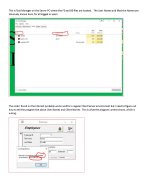
 

Attachments

  • Who has record locked.jpg
    Who has record locked.jpg
    123 KB · Views: 162
Does the code you found examines the LACCDB file to get the user info?
 
Pat Hartman, Im not controlling anything. I just wanted to see if anyone knew how to get the information. Tahnks!
 
Pat, maybe you want to re-read my original post. I'm not asking about whether to lock or not lock records. thanks jm
 
Is it possible, that you have an orphaned/invisible Microsoft Access instance running on any client when this occasionally locking of a record happens?
Take a look in the processes list of the Windows Task Manager and search for 'msaccess.exe'.
 
Is it possible, that you have an orphaned/invisible Microsoft Access instance running on any client when this occasionally locking of a record happens?
Take a look in the processes list of the Windows Task Manager and search for 'msaccess.exe'.
I checked that, an no, that is not the case. thanks
 
There is an inherent assumption in what I'm about to tell you. The idea is that if you have a record locked, you have a file handle open, unless there has been a failure and the file locking mechanism thinks it has released the record when it actually has not. (If THAT happens, you are kind of screwed anyway.)

Windows uses Distributed Lock Management, which means that the "owning host" of a file manages all of its locks. That means the lock information you need is on the machine hosting the back-end file. Therefore, on that server machine, the one that holds the "back-end" file that is getting locked AND the machine that manages your RDP functions, use the Windows Start (lower left Window icon) >> Windows Tools >> Resource Monitor. Launch it. Give it about 2 seconds to stabilize.

Now look at the display. You will see four sections. For Win11, they are CPU, DISK, NETWORK, and MEMORY. You can use the mouse to drag over the top and bottom of each section to change its size. There is a down-arrow (for Win11) to expand or totally shrink each section. If you click on a column header, you will sort the display according to what is in that column, whether it is alphabetic or numeric.

In the DISK section, click in the File column. This sorts the column by alphabetic order of drive letter, complete folder path, name, and type (i.e. the fully qualified file specification). You WILL see the same file in several rows if that file is being shared. After you have the file column sorted by file spec, scroll to find your back-end file. In the PID (process ID) column you will see numbers from (probably) single-digits to maybe as high as 5 digits. Record the PID of each process listed as having opened your back-end file.

In each of the other sections, the PID has the same meaning and you could correlate activity if it suits you. That is, if you look at PID 1234 in each section, you would see statistics on what that process with that PID was doing.

You said that every user RDP'd in to a PRIVATE copy of the Front-End file. If each user has their own little private niche, you can do this. So still in the DISK section, now click on the PID column and scroll to find the PIDs that you discovered were using the BE file. This will show multiple lines which tell you the files each process has open, and each process will have ONE file that uniquely corresponds to one of the private profile paths on that server. If you know the private path for each RDP user, then you can see which user is represented by each PID and that will tell you who has the file open.

So far as I know, the only way to know which user has the specific record open would be a device-driver hack to see what SMB network connection pointed to a particular record, which does you no good because Access is not OpenSource and therefore, you have no reasonable way to know the disk address of the locked record. So this is as far as you can go.

NOTE that some folks do this the easier way by knowing the name of each user's computer, but I'm not sure what you would see in this case since ALL of your users are coming in through the same computer - the server. But if they have different login names, opening the .LACCDB file might show you usernames. Depending on how you manage logins, it might NOT show you distinct usernames.
 
Thank you for all that info! I am reviewing your suggestions, but in the File list the are referring to in RM, the only reference to the BE file, While multiple users are accessing the BE, is a system access with PID 4. That is probably not what i want. I can see references to the FEs of the users, and I do know the paths, but that wont help with the record locking on the BE file. At this point, I am convinced that the way I am doing it prevents me from any "simple" way of retrieving the information I need, so I am abandoning this project. Thanks for your detailed attempt! JM
 

Users who are viewing this thread

Back
Top Bottom