
ignor the string in my maths and put 0 if it is

rainbows

Registered User.
Local time
Today, 11:22
Joined
Apr 21, 2017
Messages
428
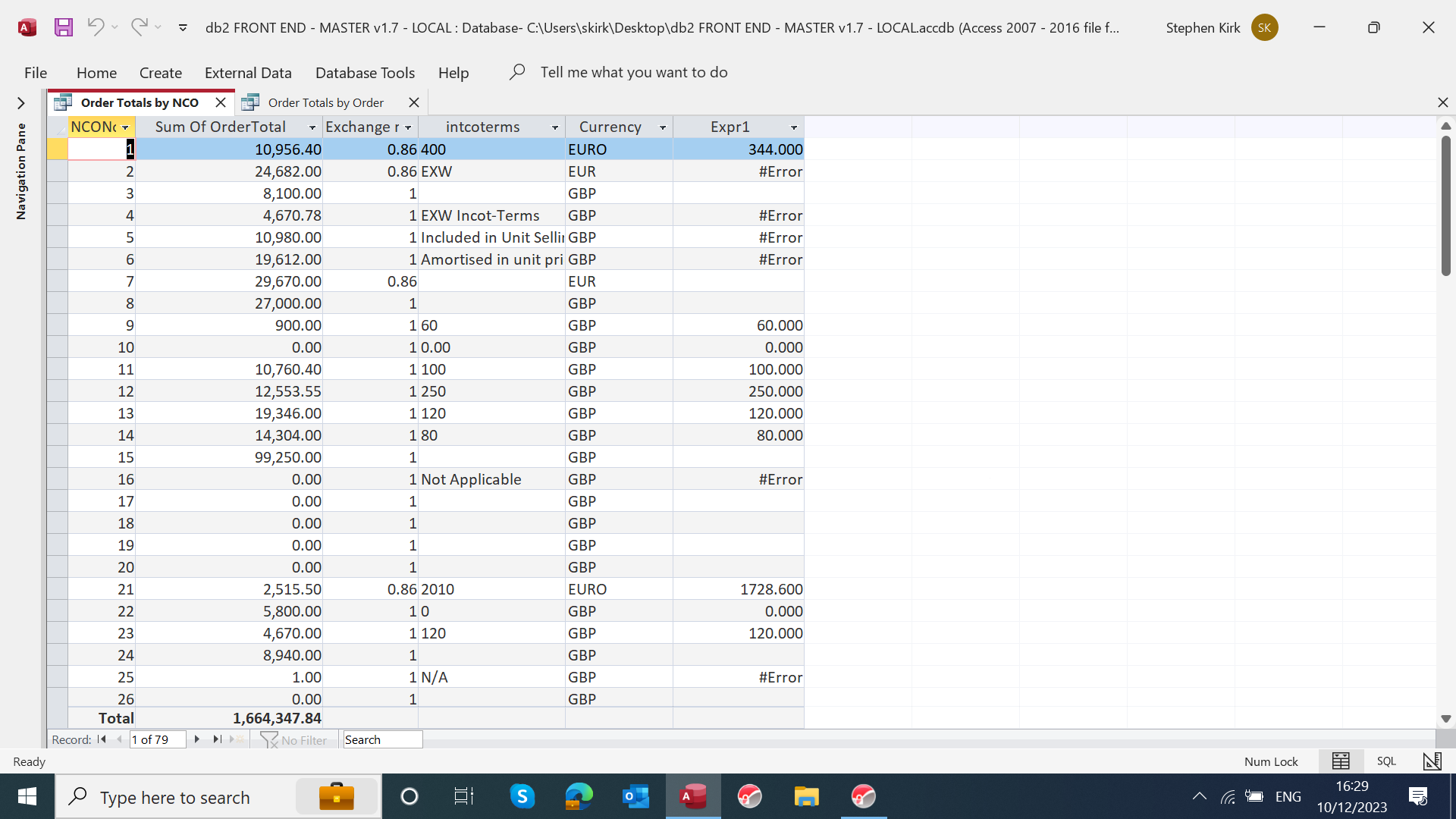
hi, i have discovered that the sales people need to put a value or text in the feild called " intcoterms , i also see they have not been entering any date in that field also so i will default that to 0
what i am trying to do is add the "expr1" field value to the " sum of ordertotal field " so for example the top line would now have a total of "11300"
line 2 would stay at "24682" etc etc

any help appreciated

steve


1702225789960.png
 
You didn't show us the expression you're using. Are you already using the Nz() function in it?
 
after nearly 400 posts, you should know by now to provide the information that would enable us to help you. We shouldn't have to keep asking for it.

So I'm not going to ask, I'll wait for you to think about what is needed to solve your problem and for you to then provide it.
 
You require a value in that field. Access supports that by allowing you to make the field "Required".
Open the table in design view and change "No" to "Yes"
1702227433296.png


You can also assign 0 as the Default Value for the field in question. This screen shot shows a text field, but yours, of course, will be a number.
 
SELECT [Order Details].BatchNo, Orders.OrderID, [Order Details].OrderDetailID, Orders.CustomerName, Orders.OrderNo, Orders.NCONo, [Order Details].ProductNo, [Order Details].OrderQty, Sum([OrderQty]*[Price]) AS OrderTotal, [Acknwoledge order].intcoterms, Orders.[Exchange rate2], [intcoterms]*[exchange rate2] AS Expr1
FROM (Orders INNER JOIN [Order Details] ON Orders.OrderID = [Order Details].OrderID) INNER JOIN [Acknwoledge order] ON Orders.NCONo = [Acknwoledge order].[NCO No]
GROUP BY [Order Details].BatchNo, Orders.OrderID, [Order Details].OrderDetailID, Orders.CustomerName, Orders.OrderNo, Orders.NCONo, [Order Details].ProductNo, [Order Details].OrderQty, [Acknwoledge order].intcoterms, Orders.[Exchange rate2];


hopefully i have sent what you need to look at to help me
 
Access supports that by allowing you to make the field "Required".
think it needs more than that since it is also required to be a numeric value for the calculation to work - all those #error's
 
1702231193807.png


i have changed the SQL but still got the error in " expri " field
and yes i will change the feilds in the table . at this time i took a copy of the backend to test everything

steve
 
think you need

Expr1: iif(isnumeric([intcoterms]),[intcoterms],0) * Nz([exchange rate2], 1)

(isnumeric will return false if intcoterms is null

edit: missed a bracket
 
Last edited:
How on earth do you expect to do maths on text? :-(

This would at least set it to 0, though I think you need to rethink what you are doing and what you are using? :-(

Code:
?nz(val("EXW"),0)
 0
 
1702232362258.png


i know , i could not believe it when i started to check on all the work they are doing on this database as i thought i was for packing and shipment cost ( i now guess not ) so i was trying to do a quick fix until i can find out exactly what it is for . even if i have to put another field in later
 
just for information

this also dont take into account the packing costs i just mentioned from the intcoterms field
Order Totals by Customer Order Totals by Customer

CustomerNameOrderTotalGrandTotalPct
London Underground Ltd
548,436.44​
1,646,245.52​
33.31%​
GE Energy Power Conversion Ltd
128,918.00​
1,646,245.52​
7.83%​
Pontificia Universidad Catolica De Chile
99,250.00​
1,646,245.52​
6.03%​
Applied Acoustic Engineering Limited
81,639.01​
1,646,245.52​
4.96%​
GE Power Conversion India Pvt. Ltd.
69,930.00​
1,646,245.52​
4.25%​
1702232832444.png
 
yes thank you this works , but i will re design it

iif(isnumeric([intcoterms]),[intcoterms],0) * Nz([exchange rate2], 1)

thanks everyone for your help
 
think it needs more than that since it is also required to be a numeric value for the calculation to work - all those #error's
Below the screenshot:

"You can also assign 0 as the Default Value for the field in question. This screen shot shows a text field, but yours, of course, will be a number."
 

Users who are viewing this thread

Back
Top Bottom