Make a Timecard entry form that autopopulates only current employee names

Db-why-not

Registered User.
Local time
Today, 13:32
Joined
Sep 17, 2019
Messages
160
I want to make a form where I can easily enter in the hours of all the current employees for a specific month on one form and then submit it all together. I want it to autopopulate all the current employee names in one field, then have a hours field and date field. The user will enter in the hours and date for each employee. Then I want a submit button that will submit the data to the correct tables. I currently have 7 employees that I am tracking hours for but we may lose some employees or gain some employees. I want to show all the current employees and be able to automatically remove employees from this list/form that are not currently working anymore.

I was trying to do it with a continuous form. I made a query that made a list of all the current employees, I have Employee_name field, then I added a hours field and a date field that were blank and unbound. Whenever I enter anything in hours or date field it puts all the same data for each employee. Each employee may have different hours, the date should be the same, because I'm just doing hours for the whole month.

I'm trying to figure out a way to make this form more automatic. I know I could just have a form with 7 employee name text fields and just have default = names of each employee in them. I want it to automatically put employee names as current employees leave or new employees are added. I don't want to go back and add or remove employee names from the form if we get new employees or lose some employees. I want it to be unbound, I don't want it to save the data until the submit button has been clicked.

Wondering if anyone has some ideas on the best way to do this?
 
Hi. Not sure I follow. You said you wanted all employees in one box, then you talked about using a continuous form. Also, you want to save the data, but you want to use an unbound form. None of those makes sense to me.
 
Hi. Not sure I follow. You said you wanted all employees in one box, then you talked about using a continuous form. Also, you want to save the data, but you want to use an unbound form. None of those makes sense to me.
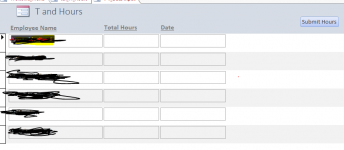
I want 3 fields in a row. Employee Name, Hours, Date. I want there to be 6 rows if there is currently 6 employees. I want employee name fields to autopopulate from list of current employees names. Hours and Date field should be blank for user input. If there are only 5 current employees I want only 5 rows to show up. I want the number of rows to change depending on how many current employees there are.
 

Attachments

  • hours.PNG
    hours.PNG
    18.8 KB · Views: 493
I used to create a set of records for the week for each employee with their default start and end hours for relevant days.
Then all their manager had to do was amend anything outside a default.?
 
I used to create a set of records for the week for each employee with their default start and end hours for relevant days.
Then all their manager had to do was amend anything outside a default.?
I'm trying to make it so everything is automatic. I want to be able to make this database and be done with any editing and then my supervisor doesn't need me to do anything with it. The only thing will be supervisor adding the hours every month. I will make a page where the supervisor can change employees to current or no longer employeed.
 
So how do you expect to create the records? :-( per week, per month, the whole year.?

You make a query to select current employees and append to your EmployeeHours table. What fields you have in that table is up to you.?
How you run that and for what criteria is again up to you, but they are not going to appear without user intervention, even if it is just a button click.
 
I decided just to do an unbound form. I have 6 current employees I will be tracking. I created 8 unbound employees name drop down boxes. I want each dropdown box to default to a different employee name from my current employees query. I want it be dynamic also. If one employee gets taken off of the current employee query I don't want them to be a default selection anymore. I want the first 8 values to be default vales for combo box but without me having to put the specific name. If there are only 6 employees I want 2 of combo boxes to remain blank. Just wondering if this is possible.
 
I decided just to do an unbound form. I have 6 current employees I will be tracking. I created 8 unbound employees name drop down boxes. I want each dropdown box to default to a different employee name from my current employees query. I want it be dynamic also. If one employee gets taken off of the current employee query I don't want them to be a default selection anymore. I want the first 8 values to be default vales for combo box but without me having to put the specific name. If there are only 6 employees I want 2 of combo boxes to remain blank. Just wondering if this is possible.
Hi. Almost anything is possible. But the question is, why try to make it harder on yourself? What was the reason you decided to use an unbound form (if you weren't even sure what you wanted with it was possible)?
 
Hi. Almost anything is possible. But the question is, why try to make it harder on yourself? What was the reason you decided to use an unbound form (if you weren't even sure what you wanted with it was possible)?
If I can't make the selection dynamic I can just let the user select the names. I wanted to make it more automatic and less room for errors from the user. I know I can make it so that each employee name drop down box will be different.
 
If I can't make the selection dynamic I can just let the user select the names. I wanted to make it more automatic and less room for errors from the user. I know I can make it so that each employee name drop down box will be different.
Hi. Not sure that answers my curiosity about how you made the decision to use an unbound form. And as for making it automatic, I believe @Gasman already gave you his process earlier for making it automatic.
 
I was able to get the forms to do what I want with this code. I wanted a way to enter in the total hours at end of the month for all the current employees at the same time on one form, without having to look up the current employees names or select them. I wanted the name selection to be dynamic in the dropdown box, default value of dropdown box to change automatically as new employees were added or employees leave. I created 9 dropdown boxes that pulls all the names for the current employees from Query. Each drop down box automatically has 1 of the employee names. selected, each dropdown box with a different name from the query. I only have currently 6 employees so it just selected the first 6 employees, with one employee in each drop down box and the extra drop down boxes are empty, starting at cboEmployee7. I tried adding new employees and then when I opened up the form it added the new employee names for cboEmployee7 with that new name automatically selected. When I removed different employees it automatically took those names off of the dropdown boxes. Each name selected moved up a dropdown box. I was happy when I found this code. It was exactly what I wanted, I knew there was a way to do what I wanted it to.

I agree I should probably not do unbound forms, but I just wanted to use that because I'm trying to learn more unbound forms. I will probably change it back to bound form just to teach myself how to do it. I am still learning. I'm trying to do different things in access.


[/CODE]
Private Sub Form_Load()
'Sets the default values of the comboboxes to 1-9 rows (EmployeeName field) in the query, value can change automatically as the query values change
Me.cboEmployee1.Value = Me.cboEmployee1.Column(0, 0)
Me.cboEmployee2.Value = Me.cboEmployee1.Column(0, 1)
Me.cboEmployee3.Value = Me.cboEmployee1.Column(0, 2)
Me.cboEmployee4.Value = Me.cboEmployee1.Column(0, 3)
Me.cboEmployee5.Value = Me.cboEmployee1.Column(0, 4)
Me.cboEmployee6.Value = Me.cboEmployee1.Column(0, 5)
Me.cboEmployee7.Value = Me.cboEmployee1.Column(0, 6)
Me.cboEmployee8.Value = Me.cboEmployee1.Column(0, 7)
Me.cboEmployee9.Value = Me.cboEmployee1.Column(0, 8)


End Sub
 

Users who are viewing this thread

Back
Top Bottom