Making backups from within .accde

mcdhappy80

Registered User.
Local time
Today, 19:56
Joined
Jun 22, 2009
Messages
347
I've read that once compiled to .accde format, You cannot change the database. If I compile to .accde how would I then backup the data in tables?
 
I've read that once compiled to .accde format, You cannot change the database. If I compile to .accde how would I then backup the data in tables?

1. The database should be split (Frontend on each user's machine / Backend on server)

2. The Backend remains an ACCDB or MDB file.

3. The Frontend is an ACCDE.

4. You back up the backend.
 
1. The database should be split (Frontend on each user's machine / Backend on server)

2. The Backend remains an ACCDB or MDB file.

3. The Frontend is an ACCDE.

4. You back up the backend.

Thank You for the answer Bob.
My database is not too complex and it will be stored on one computer with only one user accessing it, so I was thinking that there is no need to split it.
If I decide not to split the database is there some other way to do this?

P.S. - I had something like this in mind:
Put some code on the start up form which will be activated on key combination sequence that only I will know. When You press that combination the button appears and when You click on it, Your table backs up on specific location as an excel file containing table with all the fields and entries.
If this is possible can someone help me with the code, because I don't have idea how to do it (especially trapping key combination, creating and exporting an excel files to specific location)?

Thank You.
 
The problem is that backing up can't really be done while the database is open.

Personally, I would split the database anyway so, if your frontend corrupts it doesn't take the data down with it.

You could use a batch file to do the backup. I've done this with my auto updating for frontends. It doesn't do the backup but it basically lets the user click okay, the database kicks off the batch file and then closes itself. The batchfile has a little delay built in so it doesn't try to delete the file before the database is closed. You could modify that batch file code to then copy the file instead of deleting it.

You can find my auto updater on my website (see link in my signature) and if you save the file and open the database (hold shift key) and go to the modules and find basFEUpdate and then the UpdateFrontEnd sub, you can see how I dynamically create the batch file. You wouldn't need to do that as you could just create it on your computer and then call it when needed.
 
The problem is that backing up can't really be done while the database is open.

Personally, I would split the database anyway so, if your frontend corrupts it doesn't take the data down with it.

You could use a batch file to do the backup. I've done this with my auto updating for frontends. It doesn't do the backup but it basically lets the user click okay, the database kicks off the batch file and then closes itself. The batchfile has a little delay built in so it doesn't try to delete the file before the database is closed. You could modify that batch file code to then copy the file instead of deleting it.

You can find my auto updater on my website (see link in my signature) and if you save the file and open the database (hold shift key) and go to the modules and find basFEUpdate and then the UpdateFrontEnd sub, you can see how I dynamically create the batch file. You wouldn't need to do that as you could just create it on your computer and then call it when needed.

Ok, thanks for Your advice, I will definetly try it. For now can someone help me with exporting table in excel format?

Thanks.
 
I tried the code and I have some new questions :)

What code needs to be added in order to do the following:

1) Don't display the excel worksheet to user,
2) After populating, automatically save the worksheet with the given name to specific location (lets say the sub folder "Backup" in the folder where database is)?

Thank You.
 
1) remove the appXL.Visible = True part

2) Add this to the declarations in the function:
Code:
    Dim strSaveAs As String
And add this before the end
Code:
    strSaveAs = CurrentProject.Path & "\Backup\" & YourNameVariableHere & ".xls"
    xlWBk.SaveAs strSaveAs
 
I have some other questions regarding this thing:

When I hide the excel worksheet, it still remains open and can be seen in Windows Task Manager.

1) Can I close the Excel instance from VBA code after saving it?

2) Can I create the folder from VBA where I want to save the excel file, and if I can can someone provide code for this?

Thank You.
 
I have some other questions regarding this thing:

When I hide the excel worksheet, it still remains open and can be seen in Windows Task Manager.

1) Can I close the Excel instance from VBA code after saving it?

Use
Code:
xlWBk.Close
ApXL.Quit
Set ApXL = Nothing

2) Can I create the folder from VBA where I want to save the excel file, and if I can can someone provide code for this?
Just use
Code:
If Dir("YourDirectoryPath") = "" Then
   MkDir("YourDirectoryPath")
End If
that will make the directory if it doesn't exist.
Thank You.[/QUOTE]
 
From the database, and this backup system with exporting to excel which works on the computer I developed the database, I created package installer.
When I install the application on some other machines, two things happen:
Sometimes the Backup folder is created automatically during installation. After that there are two possible scenarios depending on what machine I try it:
1) I delete the folder and backup system works fine;
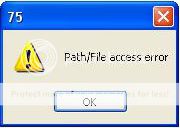
2) I delete the folder, but backup doesn't work and I'm gtting one of these two error messages:

01.jpg


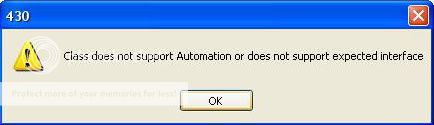
this message stops after I delete the dir, but from there everything works or I get another message:

automation.jpg


can someone explain to me what these messages mean and what causes them?

Also, I'm asking another general question, how can this be that database that works perfect on the machine it was developed, doesn't on other machines?
The strange things like these I also experienced with the parts of the reports that print differently on different machines.
How do I protect myself as a developer from this? Because if I create database program, and charge my client for it, I'm expecting for it to work on the clients machine as it works on mine after I developed it. From what I'm seeing so far that may not be the case always.

Thank You.

 

Users who are viewing this thread

Back
Top Bottom