Months of the year in chronological order

drisconsult

Drisconsult
Local time
Today, 11:18
Joined
Mar 31, 2004
Messages
125
Hello All

Does any know how to index months of the year in chronological order, such as

Jan
Feb
Mar

Etc.

Regards
Terence
Nairobi
 
Create a new fld in the query using datepart() pulling out the month in numerical format then sort on that fld. If Needed, you can also pull out the month in "JAN" format for display use...
 
Pat Hartman said:
Don't format your date before you sort the data. Format the date in the control on the report or form.

Hum...

Don't format your date you wish to display before you sort the data. :)
 
Listing dates in chronological order

Hello KenHigg and Pat Hartman

Many thanks for taking the trouble over my problem.

I am using a combo box to display the months:

January
February
March

etc.

And then highligting the required month, then the day in another combo box, then the the type of over time payment in another combo box. This is then calculated in a text field. All is working nicely

Howerver, I have to display all months worked by each individual in a report. Is it still possible to use the Datepart() or "JAN" format display in a Report using a text field?

Regards
Terence
Mombasa 2.42pm Saturday 10 September

I am including a screenshot of the form that creates all the data.
 
Hello Pat

Many thanks for your help here but I am still having a problem. The field I am trying to sort on is called CMONTH. After allocating a month, date, and type of overtime to a Commander (of an armoured car) I am trying to list all his overtime earned in chronological order in a Report, it isn't necessary but would be nice if I could achieve it.

Are you advocating the SQL code that you have outlined at the query stage or the report stage. Forgive me I am trying to get to a level I haven't been before.

Regards
Terence
Mombasa
Sunday 11 September @ 5pm.
 
Months in chronological order

Hello Pat

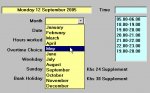
Sorry about the error. The CMONTH is a text field. I use a combo box to list the months of the year. Included is a screenshot of the combo box in question.

Can't thank you enough for taking the trouble to sort me out (no pun intended)

Regards
Terence
Mombasa
 

Attachments

  • FORMS045.JPG
    FORMS045.JPG
    61.4 KB · Views: 422
Terence,

Display what you currently do, but sort on this:

cdate(Mid(CMonth, Instr(1, CMonth, " ") + 1))

Essentially given "Monday 12 September 2005"

Convert the "12 September 2005" to a date field. Access
will sort it just fine.

Wayne
 
Months in chronological order

Hello Wayne

It was very kind of you to take the trouble over my problem. I have tried your line of code and am still having problems.

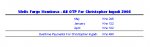
I have included two screenshots, one of the query, the other the result of the query in the report. As you can see my months are not in chronological order.

Regards
Terence
Mombasa
 

Attachments

  • FORMS047.JPG
    FORMS047.JPG
    30.4 KB · Views: 486
  • FORMS048.JPG
    FORMS048.JPG
    32.3 KB · Views: 433
Terence,

Based on your screenshots; you're not sorting by anything!

Try making a new column in a query with the CDATE(Mid...) from the
earlier post. Do you see dates?

You need to ORDER BY the new CDATE column.

Wayne
 
Pat,

He has a "CMonth" field --> "Monday 12 September 2005"

I thought the easiest approach was to make a new column in the
query:

NewField: CDate(Mid([ThatLongDateField] ...

Just using all but the "Monday " stuff.

If he sorts on the converted date he should be fine. BUT I don't
see that in the attached PICs.

Your approach works fine too (Gee that's a surprise!). :p

Where are we anyway? I'm using smileys!

Wayne
 
Months in chronological ordert

Gentleman

I am very impressed with your responses to my problem. Can't thank you both enough. But I have a dilemma. How can I show months of the year in anything but a text format?

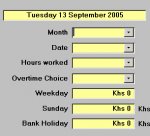
I include a screenshot of the culprit in question. The first combo box allows the user to allocate a month (text field). The second combo box allows the user to allocate a day in the month (numeric field 01 to 31). The third combo box allows the user to allocate the number of overtime hours worked (numeric field 1 to 4 hours).

The bottom three fields are text fields that calculate the hours worked.

Thanking you both for taking the trouble to help a moderate user come to terms with reality.

Terence
Mombasa
Tuesday 13 September.
 

Attachments

  • FORMS050.JPG
    FORMS050.JPG
    31.3 KB · Views: 190
Terence,

Is your current problem in the report or with the combo boxes?
 
Months in chronological order

Hello Pat

Many thanks again for your help, but I feel that I must give up on this one as I am taking up far too much of your time.

I tried looking at the combo box rowsource code that you suggest but cannot find a place to insert your suggestion i.e. 1, January etc.

Included is a screenshot showing the present rowsource code of the combo box. The table is called tblMonths.

Regards
Terence
 

Attachments

  • FORMS051.JPG
    FORMS051.JPG
    48.7 KB · Views: 211
Ok. So you have a table with employee overtime info. In the table, when a person works overtime, you store the month in one fld as text. Say 'January', "February", etc. Then you store the day in a numeric field, say 1, 2, etc. and you also store the amount of overtime in a numeric field.

Now in your report, sayfor a given person, you want to total up the over-time by month. The problem is that the month's don't appear in chronological order. Is all this correct or close enough to correct?
 
Months in chronological order

Hello Ken

Answer to your question is a resounding - YES!!!

Regards
Terence
 
Then at this stage, the best way I can figure out to do this is to create a seprate table that only has two flds; the month, where the spelling is just like the spelling in the main table. Make this the pk. And the second fld would be the associated numerical value for each month.

Now when you do the recordsource for your report, link, on the month flds and bring in the numerical fld from the second table, along with what ever flds you need.

Finally, sort on this fld in the report and you should be set...

But... I suspect all this could have been avoided if you'd set the date flds up using some of Pat's pointers...
 
Months in chronological order

Gentleman

I have decided to get of my arse and do something myself, based I hope on your suggestions. I have changed the following:

I have added a numberic field to my tblMONTHS. There are two fields now:

Number and Month I have enter 1 next to January, 2 next to February etc. I have also indexed the number field (is this OK?)

I have then changed everything related to the combo boxes using the tblMONTHS.

I now get a query that shows the number but still cannot get them in the correct order 1,2,3, etc.

Included are three screen shots, which I have had to zip as they would go over the 100kb limit.

The first screenshot shows the new tblMONTHS
The second screenshot shows the setup for the combo box, which is working fine. I can see only the months of the year, the numbers are hidden.

The third screenshot shows the result of a query. In the report, I have used the IIF function to change 1 January:

=IIF([CMONTH]=1,"January",IIF([CMONTH]=2,"February" etc, and this works fine. But I still cannot get the months to flow from January to December.

Where am I going wrong now?

Regards
Terence

 
Months in chronological order

Gentleman

I have decided to get of my arse and do something myself, based I hope on your suggestions. I have changed the following:

I have added a numberic field to my tblMONTHS. There are two fields now:

Number and Month I have enter 1 next to January, 2 next to February etc. I have also indexed the number field (is this OK?)

I have then changed everything related to the combo boxes using the tblMONTHS.

I now get a query that shows the number but still cannot get them in the correct order 1,2,3, etc.

Included are three screen shots, which I have had to zip as they would go over the 100kb limit.

The first screenshot shows the new tblMONTHS
The second screenshot shows the setup for the combo box, which is working fine. I can see only the months of the year, the numbers are hidden.

The third screenshot shows the result of a query. In the report, I have used the IIF function to change 1 January:

=IIF([CMONTH]=1,"January",IIF([CMONTH]=2,"February" etc, and this works fine. But I still cannot get the months to flow from January to December.

Where am I going wrong now?

Regards
Terence
 
Months in chronological order

Gentleman

I have decided to get of my arse and do something myself, based I hope on your suggestions. I have changed the following:

I have added a numberic field to my tblMONTHS. There are two fields now:

Number and Month I have enter 1 next to January, 2 next to February etc. I have also indexed the number field (is this OK?)

I have then changed everything related to the combo boxes using the tblMONTHS.

I now get a query that shows the number but still cannot get them in the correct order 1,2,3, etc.

Included are three screen shots, which I have had to zip as they would go over the 100kb limit.

The first screenshot shows the new tblMONTHS
The second screenshot shows the setup for the combo box, which is working fine. I can see only the months of the year, the numbers are hidden.

The third screenshot shows the result of a query. In the report, I have used the IIF function to change 1 January:

=IIF([CMONTH]=1,"January",IIF([CMONTH]=2,"February" etc, and this works fine. But I still cannot get the months to flow from January to December.

Where am I going wrong now?

Regards
Terence
 

Attachments

Users who are viewing this thread

Back
Top Bottom