Multi-Select List box via function

Caine

Registered User.
Local time
Today, 06:30
Joined
Sep 1, 2005
Messages
13
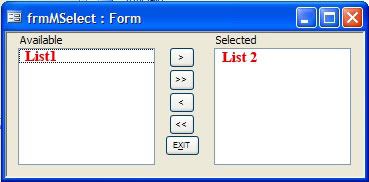
Ok, I have a current project to work through and I've hit a few rough spots. I am trying to create a list box which is called by a function and references the target control to populate the list boxes. I have used the example here to create the list box and it works fine.

This is the code for the module OpenMSelect:
Code:
Function OpenMSelect(ByVal strsubform As String, Optional strcontrol As String)
    On Error Resume Next
    
    'test to see if anything was sent
    If (strsubform & "" = "") Then
        'no subform name sent
        If Not IsMissing(strcontrol) Then
            Forms(Screen.ActiveForm.Name)(strcontrol).SetFocus
        End If
        DoCmd.OpenForm "frmMSelect"
    Else
        'subform name sent
        If Not IsMissing(strcontrol) Then
            Forms(Screen.ActiveForm.Name)(strsubform).SetFocus
            Forms(Screen.ActiveForm.Name)(strsubform).Form(strcontrol).SetFocus
        End If
        DoCmd.OpenForm "frmMSelect", , , , , , strsubform
    End If

This is the modified portion of the form frmMSelect from the MS example above.

Code:
Dim vdr As Variant
Dim sFrm As String, sCtl As String
-------------------------------
Private Sub Form_Open(Cancel As Integer)
   Dim db As DAO.Database
   Dim rs As DAO.Recordset
   Dim strSQL As String, strItem As String

Select Case sCtl
    Case lstZone
        strSQL = "SELECT Distinct tblZone.Zone, tblZone.Description FROM tblZone ORDER BY tblZone.Zone"
           Set db = CurrentDb
           Set rs = db.OpenRecordset(strSQL)
        strItem = rs.Fields("Zone").Value & ";" & rs.Fields("Description").Value
    
    Case lstfare
        strSQL = "SELECT DISTINCT [tblPax_Fare-Types].Passenger_Type FROM [tblPax_Fare-Types]"
           Set db = CurrentDb
           Set rs = db.OpenRecordset(strSQL)
        strItem = rs.Fields("Passenger_Type").Value

End Select

   Do Until rs.EOF
      Me.List1.AddItem strItem      ' Row Source Type must be Value List
      rs.MoveNext
   Loop
   rs.Close
   Set rs = Nothing
   Set db = Nothing

My current issue as I see it is the Select Case does not catch the argument passed on through the control (a button in this case with =OpenMSelect("","lstZone") as the on-click event). The list box opens and there is data related to the first case "lstZone"(also the name of the control on the main form), although it ignores the Distinct clause and displays rows of the same data.

This is probably a very simple fix, but beyond this problem is a larger question. Once the list box populates with the correct data, how will it be returned back to the referenced control on the main form?

Thanks in advance. I have learned a great deal from these forums just as a lurker.
 
Anyone?

I have tried to modify this code with the openargs property of the target form, but I cannot make it work with the select statement, even with a test debug message.

I have bypassed the module and put a direct command button with the argument listed and it doesn't open the form either.

stDocName = "frmMSelect"
DoCmd.OpenForm stDocName, , , , , , "lstFare"
 
First of all, I can't make sense of this, "I am trying to create a list box which is called by a function and references the target control to populate the list boxes," which makees helping out harder.

At first glance there seem to be a number of problems, but what jumps out at me is that your Form_Open() handler runs a Select Case against "sCtl". This variable is is never assigned a value, so your select case only works if your lst's = "". Is this your intention?
Form_Open() should use Me.OpenArgs somewhere, no?
 
"I am trying to create a list box which is called by a function and references the target control to populate the list boxes,"

Sorry if that bit is confusing.

Form with a few list boxes, named "lstfares", "lstzone", etc. A button is assigned which calls the function with an argument. This argument is the control name, ie "lstfares". The form frmMSelect on Form_Open uses the argument to choose and create the recordset, which is then added to list1 through "Me.List1.AddItem strItem"
MSelect.jpg


At first glance there seem to be a number of problems, but what jumps out at me is that your Form_Open() handler runs a Select Case against "sCtl". This variable is is never assigned a value, so your select case only works if your lst's = "". Is this your intention?
Form_Open() should use Me.OpenArgs somewhere, no?

Since I first posted this, I modified the Form_Open() for this reason, but when run, I receive "invalid use of null". Here is the updated code highlighted
Code:
Private Sub Form_Open(cancel As Integer)
   Dim db As DAO.Database
   Dim rs As DAO.Recordset
   Dim strSQL As String, strItem As String, [COLOR="Lime"]strsubform As String

strsubform = Me.OpenArgs[/COLOR]

Select Case [COLOR="Lime"]strsubform[/COLOR]
    Case "lstZone"
    Me.Caption = "Zone Selection"
        strSQL = "SELECT DISTINCT [tblZone].Zone, [tblZone].Description FROM [tblZone] ORDER BY tblZone.Zone"
            Set db = CurrentDb
            Set rs = db.OpenRecordset(strSQL)
            Do Until rs.EOF
                strItem = rs.Fields("Zone").Value & ";" & rs.Fields("Description").Value
                Me.List1.AddItem strItem      ' Row Source Type must be Value List
                rs.MoveNext
            Loop
            rs.Close
            Set rs = Nothing
            Set db = Nothing
        
    Case "lstfare"
        Me.Caption = "Fare Selection"
        strSQL = "SELECT DISTINCT [tblPax_Fare-Types].Passenger_Type FROM [tblPax_Fare-Types]"
            Set db = CurrentDb
            Set rs = db.OpenRecordset(strSQL)
            Do Until rs.EOF
                strItem = rs.Fields("Passenger_Type").Value
                Me.List1.AddItem strItem      
                rs.MoveNext
            Loop
            rs.Close
            Set rs = Nothing
            Set db = Nothing
   
    Case "lstPax"
    Case "lstAirport"

End Select

I also copied the code from "Do Until..." to "Set db = Nothing" into each case, although it should work either way.

The code in the function was modified to reflect the supplied argument.
" DoCmd.OpenForm "frmMSelect", , , , , , strControl"
 
Aha. I have resolved the first issue. I removed the code in the function related to the strsubform variable and removed it from the command button.
Code:
Function OpenMSelect(strControl As String)
    On Error Resume Next
        DoCmd.OpenForm "frmMSelect", , , , , , strControl
and
Code:
=OpenMSelect("lstzone")

When this function is called, the listbox1 gets filled with the items which correspond to the select case, ie, "lstfare" shows fare types, "lstzone" shows zones, etc.

Next step is to fill the listbox on the main form with the items chosen on the subform frmMSelect. I'll need a way to pull any values on the parent form listbox into the list 2 on the sub.

Other concerns I foresee:
1a. Creating the SQL statement containing all of the possible where conditions from multiple multi-select list boxes. This is known, but I haven't been able to test it yet.
1b. If a multi-select list box is blank, having the where condition equal *.
2. Are the multi-select list boxes combo-able? ie, in my example, choosing zones would limit the airports available and the flight numbers available. If not, I could end up with conflicting where conditions.
3. It would be great if after a set of criteria were created, allowing the user to save and load the configured query at will. This is more my goal for the end project and not currently an issue.

Thank you for your help lagbolt.
 
Caine:
Just a thought, but can't you bind these lists to a table or query? Say you populate the lists OK using .AddItem. Then you're going to have to do a whole bunch more work figuring out what happened in MSelect, and propagate the selections the user made back to a table somewhere, I assume. Do-able.
But imagine a table or query that has a "selected" field. Bind that source to both lists with the difference that the left list filters for "Not Selected", and the right list filters for "Selected". Then when the user opts to change the status of an item, you simply find that item, change the value of the "Selected" field, and requery both lists.
Here's a sample db that does what I'm talking about. See if there're ideas here you can use.
See how the moving the item to a new list and changing the data at its source is the same operation?
Cheers,
 

Attachments

Caine:
Just a thought, but can't you bind these lists to a table or query? Say you populate the lists OK using .AddItem. Then you're going to have to do a whole bunch more work figuring out what happened in MSelect, and propagate the selections the user made back to a table somewhere, I assume. Do-able.
But imagine a table or query that has a "selected" field. Bind that source to both lists with the difference that the left list filters for "Not Selected", and the right list filters for "Selected". Then when the user opts to change the status of an item, you simply find that item, change the value of the "Selected" field, and requery both lists.
Here's a sample db that does what I'm talking about. See if there're ideas here you can use.
See how the moving the item to a new list and changing the data at its source is the same operation?
Cheers,

That sounds interesting, but I don't think I'll be able to go this route with my project. The purpose of this whole thing is to allow the users to specify a query's criteria with as much flexibility as they need. In this case, there are 5 sets of criteria which benefit from allowing multiple selections. Zone, Airport, Flight #, and Origin/Destination. Selecting by date range is another, but I have that covered, as is an option for charter or scheduled flights.

The idea of a "selected" field would work for the smaller ranges, but it would probably choke when dealing with the flight numbers. I think this could help in other areas though.

Thanks again.
 
I have a question related to my first follow-up question

"fill the listbox on the main form with the items chosen on the subform frmMSelect. I'll need a way to pull any values on the parent form listbox into the list 2 on the sub."

The original form uses a sub to move items from one list box to another within the form. I would like to use this sub to move from list 2 to the original form and control. I have assigned global variables and assigned them through the module corresponding to the parent form list box.

"strForm" and "strControl" are global strings as called by the openMSelect function. The code errors because it interprets the variable names as literal.


Reference:
Code:
Private Sub Form_Close()
    Call TransferAllItems("List2", strControl)
End Sub

calls this sub

Code:
Sub TransferAllItems(strSourceControl As String, strTargetControl As String)
    Dim strItem As String
    Dim intColumnCount As Integer
    Dim lngRowCount As Long
    
    For lngRowCount = 0 To Me.Controls(strSourceControl).ListCount - 1
        For intColumnCount = 0 To Me.Controls(strSourceControl).ColumnCount - 1
            strItem = strItem & Me.Controls(strSourceControl).Column(intColumnCount, lngRowCount) & ";"
            
        Next
        strItem = Left(strItem, Len(strItem) - 1)
        [COLOR="Lime"]Forms!(strForm)[/COLOR].Controls(strTargetControl).AddItem strItem
        strItem = ""
    Next
        
    Me.Controls(strSourceControl).RowSource = ""
End Sub

The problem is the reference to the variable is read literally instead of the value. This is probably something obvious, but I've been at this for a while. Forest for the trees effect.
 
I don't see anywhere in the code you are showing (in the latest post) that sets strForm to anything.
 
Oops, sorry. Both strForm and strControl are called in the function:

Code:
Option Explicit
Global vdr As Variant
Public strControl As String
Public strForm As String

Function OpenMSelect(Optional strCtl As String)
    On Error Resume Next
    strForm = Screen.ActiveForm.Name
    strControl = Screen.ActiveControl.Name

    If (strCtl & "" = "") Then     'test to see if anything was sent
       'no subcontrol name sent
        DoCmd.OpenForm "frmMSelect", , , , , , strControl
    Else

        DoCmd.OpenForm "frmMSelect", , , , , , strCtl
        strControl = strCtl
    End If
End Function
 
Caine, I have done what you are trying to accomplish using a boolean field in the table(s) and queries. In fact, I have found it helpfull to have "extra" boolean fields (I name them flags.) in several instances.
 
Ok, I have figured out the last part, at least initially. I still need to add/modify the code for the optional variables. It might be better to make them required. The modified portion is highlighted.

Code:
Sub TransferAllItems(strSourceControl As String, strTargetControl As String, [COLOR="Blue"]Optional strSourceForm As String, Optional strTargetForm As String[/COLOR])
    Dim strItem As String
    Dim intColumnCount As Integer
    Dim lngRowCount As Long
    Debug.Print "Source Form" & "=" & strSourceForm
    Debug.Print "Source Ctrl" & "=" & strSourceControl
    Debug.Print "Target Form" & "=" & strTargetForm
    Debug.Print "Target Ctrl" & "=" & strTargetControl
    Debug.Print "End Routine"
    
    For lngRowCount = 0 To Me.Controls(strSourceControl).ListCount - 1
        For intColumnCount = 0 To Me.Controls(strSourceControl).ColumnCount - 1
            strItem = strItem & Me.Controls(strSourceControl).Column(intColumnCount, lngRowCount) & ";"
            
        Next
        strItem = Left(strItem, Len(strItem) - 1)
[COLOR="Blue"]        Forms(strTargetForm).Controls(strTargetControl).AddItem strItem[/COLOR]
        strItem = ""
    Next
        
    Me.Controls(strSourceControl).RowSource = ""
End Sub

I have just noticed that the original code does not seem to work properly when multiple items are selected and you press the single item move buttons. This seems inherent in the original design from MS. Not sure how to resolve this just yet.

Next up is getting already selected items to appear in list2 when that form loads.
 
After a bit of rework, I have a working model which addresses most of my earlier concerns. Using the idea of flags mentioned by billyr and lagbolt and with some modifications to the db linked earlier, I created some index tables which include unique records from the source tables. I have a form with list boxes. When a user dbl-clicks one, it runs the function and passes on the names of the form and calling control to the mselect form. This form uses these variables on_open to select the SQL which is used as the rowsource for the forms' two list boxes. Here lies the base of the linked db from lagbolt.

In the case of the child subcategories, their rowsource sql links the two tables and filters out unselected parent records. After the user makes their selections and exits the sub, the parent form's on_activate requeries the list boxes using SQL similar to that found in the mselect form. The end query/report uses IN statements to filter in the selected records. This was much easier than creating the query at runtime with hard-coded criteria.

I added a more detailed date selector with presets to choose from plus a calendar based date picker. Clear buttons were added for ease and are used in a form reset command.

The only issues with this is how you decide to deal with large recordsets as selection groups. If the set changes often, you'll need to update the index tables.

In any case, I thought to post this if anyone else finds it useful.
 

Users who are viewing this thread

Back
Top Bottom