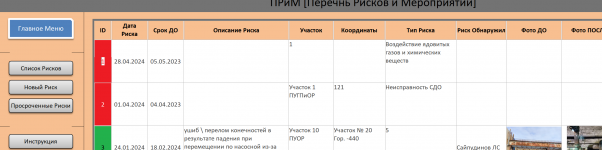
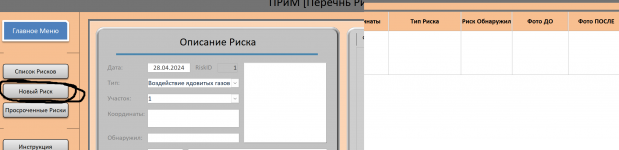
Solved nagivation control. where clause = new record

TipsyWolf

Member
Local time
Today, 22:38
Joined
Mar 20, 2024
Messages
302
hello everyone.
i can't figure it out how to set formula so it opens up a form with new record.

this doesn't work
1712171254826.png


i have done it so far via on click event
1712171130326.png


but i dont like it as it opens it up in a seperate window where as navigation form opens it in build in window, but ID=1 set by default.

any suggestions ?
 
Hardly anyone here uses macros that I know of at least?
Might want to start learning VBA. Much easier and more flexible in my opinion.
Aren't you actually asking it to open a particular form?
 
Hardly anyone here uses macros that I know of at least?
Might want to start learning VBA. Much easier and more flexible in my opinion.
Aren't you actually asking it to open a particular form?
yeap. it already works fine. navigation control opens a form i already built. but it does it with ID=1.
so is there any way to type something in "navigation where clause" so it does it with new record ?

or i misunderstood the purpose of "navigation where clause" and it meant for something else
 
2007 does not have navigation forms, so I cannot help there. Sorry.
 
Have you tried entering ID=0 in the Navigation Where Clause? Just curious...
 
Have you tried entering ID=0 in the Navigation Where Clause? Just curious...
yas, i tried many variaties like :

Forms!FRiskPage!RiskID is 0
Forms!FRiskPage!RiskID is Null
Forms!FRiskPage!RiskID = 0
Forms!FRiskPage!RiskID = Null
Forms!FRiskPage!RiskID is new()
Forms!FRiskPage!RiskID = new()

and it doesnt want to loat the form with NewRecord
 
yas, i tried many variaties like :

Forms!FRiskPage!RiskID is 0
Forms!FRiskPage!RiskID is Null
Forms!FRiskPage!RiskID = 0
Forms!FRiskPage!RiskID = Null
Forms!FRiskPage!RiskID is new()
Forms!FRiskPage!RiskID = new()

and it doesnt want to loat the form with NewRecord
But have you tried with simply? RiskID=0
 
Although long winded and possibly unnecessary if the other suggestions work, you could use OpenArgs in the form open options, to Pass in a string "New" when opening the form, and use that in the forms load event to go to a New Record
 
See if the attached works for you.

I put the following in The On Click Event of the Button

Code:
Private Sub NavigationButton186_Click()

10        On Error GoTo NavigationButton186_Click_Error
20    DoCmd.OpenForm "FRiskPage"
30    DoCmd.GoToRecord , , acNewRec
          
40        On Error GoTo 0
50        Exit Sub

NavigationButton186_Click_Error:

60        MsgBox "Error " & Err.Number & " (" & Err.Description & ") in procedure NavigationButton186_Click, line " & Erl & "."

End Sub
 

Attachments

See if the attached works for you.

I put the following in The On Click Event of the Button

Code:
Private Sub NavigationButton186_Click()

10        On Error GoTo NavigationButton186_Click_Error
20    DoCmd.OpenForm "FRiskPage"
30    DoCmd.GoToRecord , , acNewRec
         
40        On Error GoTo 0
50        Exit Sub

NavigationButton186_Click_Error:

60        MsgBox "Error " & Err.Number & " (" & Err.Description & ") in procedure NavigationButton186_Click, line " & Erl & "."

End Sub
it does work !
it opens as a seperate window, but i think its not possbile to make it in built it nav. control window
thanks a lot @mike60smart ! u save my day !
 
Hi. I entered RiskID=0, and it worked for me. I'll send an image or reupload your db later.

Sent from phone...
very wierd ) db would be perfect. i haven't done any changes yet, so i would just continiue working on it
 
Here you go...
before
1712314129846.png

after
1712314192310.png


yeah, it starts with new, but its a master list - i mean its wrong botton :)

i was asking about 2nd botton. 2nd botton means (New Risk) new records where user input data.
1712314296844.png


1st botton is MasterList - it should just open all risks in the list :)

but thank your anyway for your time :)
 

Attachments

  • 1712314121849.png
    1712314121849.png
    172.9 KB · Views: 93
  • 1712314266331.png
    1712314266331.png
    70.1 KB · Views: 97
yeah, it starts with new, but its a master list - i mean its wrong botton :)

i was asking about 2nd botton. 2nd botton means (New Risk) new records where user input data.
Oops, sorry. When you said "2nd button," I counted them like this:

1712328529196.png


In that case, you don't even need to use the Where Clause at all. Try the attached now and let us know if it's what you want.
 

Attachments

Users who are viewing this thread

Back
Top Bottom