I have built a very simple Clock In/Clock Out application for hourly employees which records the date and time (General Date format) that they arrive and leave. However, for a report of their time, I need to develop a parameter query that asks for just the beginning date and ending date for the two week period (a fortnight, I believe you fellows call it) that the employees worked, such as "12/5/2010" to "12/18/2010." The results must still report in the General Date format. I appreciate your insights with this.

You are using an out of date browser. It may not display this or other websites correctly.
You should upgrade or use an alternative browser.
You should upgrade or use an alternative browser.
Need parameter query assistance here!
- Thread starter fhs
- Start date

DCrake
Remembered
- Local time
- Today, 23:16
- Joined
- Jun 8, 2005
- Messages
- 8,620
Small date (dd/mm/yyyy) = 01/01/2010 00:00:00
So if you did between x and y you would loose the last day in the range. So add 1 day to the end date so that it picks everything up until 23:59:59
Otherwise in your underlying query add 1 new column
ClockDate:Format(ClockStart,"dd/mm/yyyy")
And place you filter condition on this column.
So if you did between x and y you would loose the last day in the range. So add 1 day to the end date so that it picks everything up until 23:59:59
Otherwise in your underlying query add 1 new column
ClockDate:Format(ClockStart,"dd/mm/yyyy")
And place you filter condition on this column.

boblarson
Smeghead
- Local time
- Today, 15:16
- Joined
- Jan 12, 2001
- Messages
- 32,040
Personally I would avoid using parameter prompts in queries that pop up asking for input. Use a FORM instead for input. Here's a FAQ which explains some reasons why.
I appreciate your insights thus far, however here's what I'm dealing with. I've had good fortune working with query parameters so I've enclosed a couple of views to illustrate. The first view shows a simple query where I would like to design the parameters for the "start date" and "end date" based on the ClockInTime and ClockOutTime respectively. However, as I mentioned before the data is in a General Date format and I would just like to show "12/5/2010" to "12/18/2010" in the query. The second view shows the recordset of what I'm working with. Will what I'm asking for work in this context or do I need to use the ClockDate format?

Bob,
I understand the Between [Enter Start Date] And [Enter End Date] parameter,but I'm also getting a parameter for: MyNewField: DateValue([FieldWithDateTimeInIt]). Can you tell me what needs to be entered there or should this even appear? Thanks.
I understand the Between [Enter Start Date] And [Enter End Date] parameter,but I'm also getting a parameter for: MyNewField: DateValue([FieldWithDateTimeInIt]). Can you tell me what needs to be entered there or should this even appear? Thanks.
boblarson
Smeghead
- Local time
- Today, 15:16
- Joined
- Jan 12, 2001
- Messages
- 32,040
Bob,
I understand the Between [Enter Start Date] And [Enter End Date] parameter,but I'm also getting a parameter for: MyNewField: DateValue([FieldWithDateTimeInIt]). Can you tell me what needs to be entered there or should this even appear? Thanks.
Okay, read closely as it is a message to you - FieldWithDateTimeInIt
In other words, replace that reference to your actual field with your date and time in it. Get it?
MyNewField is just a name that is chosen for the new column because you can't use the same name as the field you are trying to work with.
Bob,
Please be patient with me now. I understand that the MyNewField is an additional column in the query (surely not in the table), but I get a parameter pop-up for the column (first jpg), then followed by the Start Date and End Date parameters. Then I get this error message (2nd jpg). What am I not understanding here? Thanks.
I think I just discovered that I had not been attaching my jpgs properly. Here are the others I previously referred to.
Please be patient with me now. I understand that the MyNewField is an additional column in the query (surely not in the table), but I get a parameter pop-up for the column (first jpg), then followed by the Start Date and End Date parameters. Then I get this error message (2nd jpg). What am I not understanding here? Thanks.
I think I just discovered that I had not been attaching my jpgs properly. Here are the others I previously referred to.
boblarson
Smeghead
- Local time
- Today, 15:16
- Joined
- Jan 12, 2001
- Messages
- 32,040
Still not showing up. Are you sure when you select the image from the browse that you are also clicking the UPLOAD button? Then it should show you a link under the text box when it is successful.I think I just discovered that I had not been attaching my jpgs properly. Here are the others I previously referred to.
Attachments

boblarson
Smeghead
- Local time
- Today, 15:16
- Joined
- Jan 12, 2001
- Messages
- 32,040
By the way, you can upload up to 5 (I believe it is 5) at a time in a single post. You don't have to do them one at a time. Just click the upload button for the first one, then do the browse for file again and then click upload again and you can keep doing that.Another...
boblarson
Smeghead
- Local time
- Today, 15:16
- Joined
- Jan 12, 2001
- Messages
- 32,040
Okay, if this doesn't get it for you I don't know what will. I built a table with your fields and table name and then put this into it. You will use it EXACTLY as shown.
(by the way you shouldn't be storing the employee name in the table but an ID for them and the name should be in an employees table).
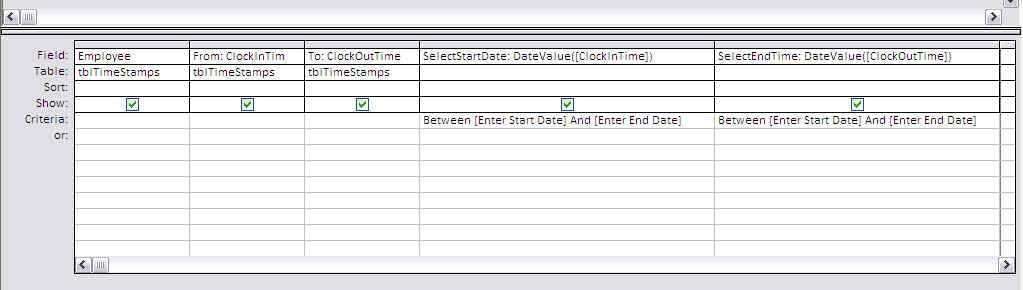
(by the way you shouldn't be storing the employee name in the table but an ID for them and the name should be in an employees table).
Attachments

Bob-
I agree with you about the employee name and ID, but this application is for three hourly guys and that's what it's relatively not complicated. However, I'm still getting the same error message after I input the parameters. Incidentally, your second parameter included "SelectEndTime." I changed it to Date, but still got the error. Any ideas? Would you like for me to zip this thing up and send it? Thanks.
I agree with you about the employee name and ID, but this application is for three hourly guys and that's what it's relatively not complicated. However, I'm still getting the same error message after I input the parameters. Incidentally, your second parameter included "SelectEndTime." I changed it to Date, but still got the error. Any ideas? Would you like for me to zip this thing up and send it? Thanks.
boblarson
Smeghead
- Local time
- Today, 15:16
- Joined
- Jan 12, 2001
- Messages
- 32,040
Okay this is getting too much to bear. I built it exactly as shown and it works exactly as shown. So you can change the name to SelectEndDate (I had it off there for sure) but it should not give you any parameter prompts other than the first two - the start date and end date.
So, post a screenshot like I did there so I can see what you have exactly there.
Also, you may be experiencing some issues with a missing reference potentially. If the screenshot fails to help we'll go visit that.
So, post a screenshot like I did there so I can see what you have exactly there.
Also, you may be experiencing some issues with a missing reference potentially. If the screenshot fails to help we'll go visit that.
boblarson
Smeghead
- Local time
- Today, 15:16
- Joined
- Jan 12, 2001
- Messages
- 32,040
Would you like for me to zip this thing up and send it? Thanks.
Do a Compact and repair and then zip it and then upload it here just like you did the screenshots.
Similar threads


- Replies
- 24
- Views
- 787


Users who are viewing this thread
Total: 1 (members: 0, guests: 1)