

Seph
Member
- Local time
- Today, 16:51
- Joined
- Jul 12, 2022
- Messages
- 72
Good day internet geniuses.
Please can you assist.
I have a form InvoiceSalesF, with a continuous subform that displays records in the cost table CostT.
(Forms are linked via InvoiceID)
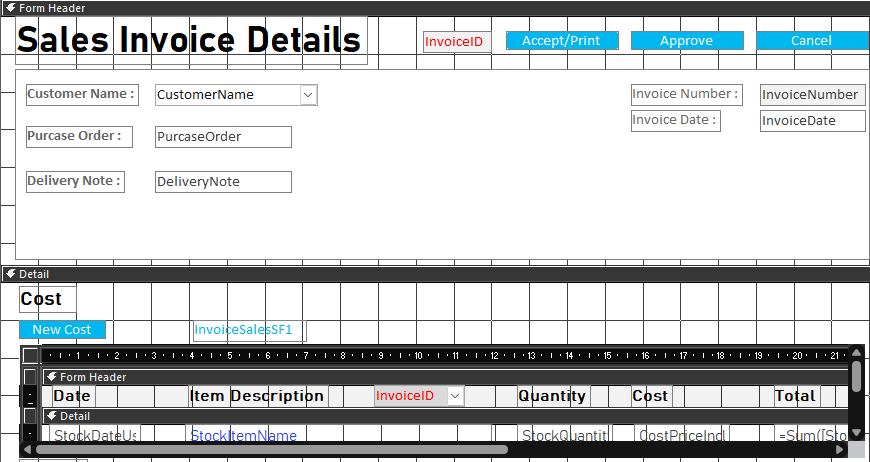
I have a button that opens up a pop up form that's control source is the Cost table CostT.
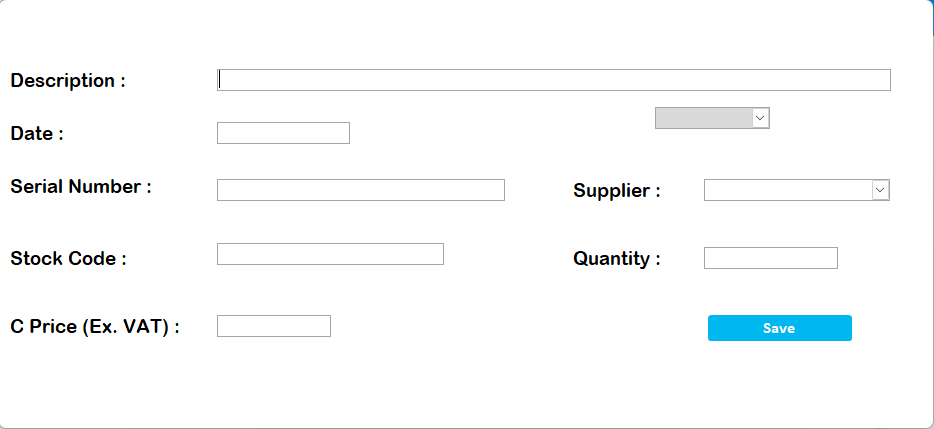
The greyed out field is a usually hidden field called InvoiceID.
(Tables are linked via a one-to-many relationship)
I'm trying to open the pop up form and have it insert the main form's InvoiceID automatically so I can add records that are linked to the Invoice.
The current VBA code I'm using is:
Private Sub NewCostB_Click()
DoCmd.OpenForm "InvoiceSalesCostSF", , , "InvoiceID=" & InvoiceID
End Sub
However nothing reflects as there isn't a record captured yet in the CostT.
Any idea's would be appreciated.
P.s. I wasn't sure how to title this questions, so I will gladly change the title after some guidance.
Please can you assist.
I have a form InvoiceSalesF, with a continuous subform that displays records in the cost table CostT.
(Forms are linked via InvoiceID)
I have a button that opens up a pop up form that's control source is the Cost table CostT.
The greyed out field is a usually hidden field called InvoiceID.
(Tables are linked via a one-to-many relationship)
I'm trying to open the pop up form and have it insert the main form's InvoiceID automatically so I can add records that are linked to the Invoice.
The current VBA code I'm using is:
Private Sub NewCostB_Click()
DoCmd.OpenForm "InvoiceSalesCostSF", , , "InvoiceID=" & InvoiceID
End Sub
However nothing reflects as there isn't a record captured yet in the CostT.
Any idea's would be appreciated.
P.s. I wasn't sure how to title this questions, so I will gladly change the title after some guidance.


