
You are using an out of date browser. It may not display this or other websites correctly.
You should upgrade or use an alternative browser.
You should upgrade or use an alternative browser.
Paste Limit
- Thread starter kitty77
- Start date

- Local time
- Today, 05:24
- Joined
- Feb 28, 2001
- Messages
- 31,045
Here is an article on that subject.

 stackoverflow.com
The limit may be Windows-based rather than Access-based. It could also be a per-process memory quota.
 www.howtogeek.com
This article uses the virtual memory size, so that may be a limit to consider.
stackoverflow.com
For a 32-bit system, you MIGHT run into issues of memory mapping limits, which would be hardware-related. On a 64-bit system, that is less likely to be a culprit.
Clipboard size limit
Is there any limit of the size of data that can be copied to clipboard? I am using VB6 and need to copy blocks of data to the clipboard.
stackoverflow.com
The limit may be Windows-based rather than Access-based. It could also be a per-process memory quota.
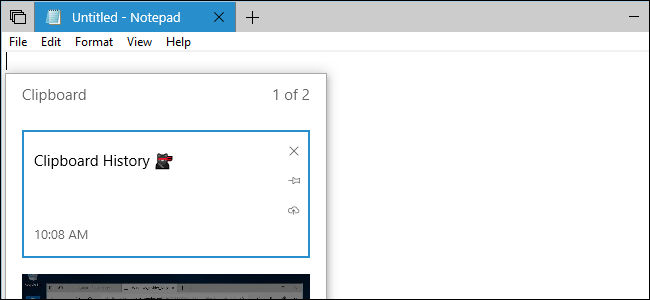
Using Windows 10's New Clipboard: History and Cloud Sync
Windows 10's October 2018 Update has a new Clipboard experience.
www.howtogeek.com
This article uses the virtual memory size, so that may be a limit to consider.
How can I increase the size of the clipboard in Windows 7?
How can I increase the size of the clipboard in Windows 7? While copying large amounts of data, I get the following error: Item to large for Clipboard.
stackoverflow.com
For a 32-bit system, you MIGHT run into issues of memory mapping limits, which would be hardware-related. On a 64-bit system, that is less likely to be a culprit.

oleronesoftwares
Passionate Learner
- Local time
- Today, 03:24
- Joined
- Sep 22, 2014
- Messages
- 1,160
this can be set in the table end,field size property of each fieldIs that the same for copying one column to another? It has a limit?
- Local time
- Today, 05:24
- Joined
- Feb 28, 2001
- Messages
- 31,045
Is that the same for copying one column to another? It has a limit?
ALL clipboard actions, from copying a single character to copying a whole file, will have limits. The limits are primarily in the clipboard. Access uses Windows API calls to do things like this. (They don't ALWAYS re-invent the wheel...)
- Local time
- Today, 11:24
- Joined
- Feb 19, 2013
- Messages
- 17,817
as we are trying to explain, if you are copying a column of text with an average length of say 20 chars and 20,000 rows, then that is something over 400,000 chars or 800,000 bytes which goes against the clipboard limit of (I believe) 4mb i.e. around 4,000,000 bytes. Richtext will be even more because of all the hidden charactersNot field size... I'm talking about copying an entire column to another column.
But Pat is right - use a query

GPGeorge
George Hepworth
- Local time
- Today, 03:24
- Joined
- Nov 25, 2004
- Messages
- 3,307
If this were a one-time cleanup process, to correct something, I'd say it's worth pursuing (perhaps). However, if you intend to do this as a regular part of a workflow, NOW is the time to stop and think carefully about the wisdom of such an approach. Frankly, duplicating columns is almost never a good plan. I'd say "never", but well, one should never say never.Not field size... I'm talking about copying an entire column to another column.
 Ah, heck, it's never a good approach as part of an on-going process.
Copy/paste is a MANUAL process, and as such relies on the care and precision of the user to accurately select, properly copy and accurately paste the data.
Append queries are the proper tool for a relational database application in any event.

moke123
AWF VIP
- Local time
- Today, 06:24
- Joined
- Jan 11, 2013
- Messages
- 4,828
Agree with Pat, Hyperlink DataType is a P.I.T.A. to work with (IMO)
You haven't stated what your linking to , whether its web urls or files and folders.
Here's a link to a procedure which opens any url or file with the default application for the type of link.
http://access.mvps.org/access/api/api0018.htm
You haven't stated what your linking to , whether its web urls or files and folders.
Here's a link to a procedure which opens any url or file with the default application for the type of link.
http://access.mvps.org/access/api/api0018.htm
moke123
AWF VIP
- Local time
- Today, 06:24
- Joined
- Jan 11, 2013
- Messages
- 4,828
Less letters in fHandleFile() than in FollowHyperlink(). 
Only difference is that Followhyperlink is native and fHandlefile requires you copy and paste the already written code to a module.
IIRC, followhyperlink used to occasionally throw up a warning message that fHandleFile does not.
Only difference is that Followhyperlink is native and fHandlefile requires you copy and paste the already written code to a module.
IIRC, followhyperlink used to occasionally throw up a warning message that fHandleFile does not.
- Local time
- Today, 11:24
- Joined
- Feb 19, 2013
- Messages
- 17,817
is this the same question being asked here?
How to Copy over 2MM records?
Hi I have a database with 2.1 million records. The file came from an XML file and it split the data into multiple tables instead of 1. I would like to copy one of the tables to another but can't due to the 65k limit. Basically, I need to merge those two tables in the exact order their in but...
www.accessforums.net
moke123
AWF VIP
- Local time
- Today, 06:24
- Joined
- Jan 11, 2013
- Messages
- 4,828
https://docs.microsoft.com/en-us/of...ministration/enable-disable-hyperlink-warningThat's interesting. One of my users gets security warnings but no one else at the same company does. I haven't tracked down the setting that is causing the problem yet. But it is a setting since only one person has the problem.
Similar threads


- Replies
- 29
- Views
- 983
- Replies
- 13
- Views
- 1,638
Users who are viewing this thread
Total: 1 (members: 0, guests: 1)